
Working with Web Forms Controls and C# covers Introduction to Web Forms Controls, Simple Input Controls, HyperLinks and Button Controls and List Controls
Introduction:
In this tutorial we will introduce some of the most commonly used controls used in Asp.net web programming. We will see all the different types of controls and their behavior. I will not talk about complex, data bound or template controls in this tutorial since we are going to look at that in later tutorials.
Web Form Controls:
As in the previous tutorial I explained that there are three types of controls in Asp.net namely, HTML Controls, HTML Server Controls and Web Server Controls. Among these controls Web Server Controls are the most advanced controls and provides tons of features.
Input Controls:
Input controls are those controls which lets the user to interact with the underlying logic by providing input and than waiting for a response from the application. The most commonly used input control is TextBox control. Below you can see a small image of the TextBox control.
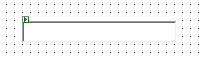
As you can see its just a blank box where you are write your desired input. TextBox control exposes many properties which you can use. In order to see the properties window just right click on the control and select properties. You will see the properties as seen in the image below.
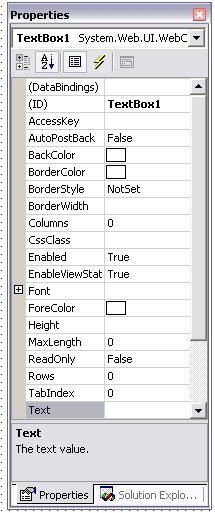
You still must be wondering what other features TextBox control offers. Sometimes you need to write a lot of Text and need more place in the TextBox you can get more space by specifying the property of the TextBox TextMode to multiline which, allows you to enter unlimited text. You can also hide your input by specifying password in the TextMode property.
Now comes the cool part how can you access the text that you wrote in the TextBox. This is also as simple as “2+2”. TextBox exposes a property which is “Text”. You can use this property to either set or get the Text written in the TextBox. Here is the correct syntax of using the Text property.
string myString = TextBox1.Text;
// this returns whatever was written in the TextBox.
This is the most commonly used property of the TextBox control and is used most frequently.
You can also set the background color of the TextBox using the background color property in the property window. One important property I need to point out is the MaxLength property. The Maxlength property defines how many characters the Asp.net will take from the Textbox. But it does not limit the input while entering the Text. Meaning you can keep on writing on and Asp.net will not let you know that you have achieved the maximum characters in the TextBox. In order to stop the Text input behavior you will need to use the javascript to limit the number of characters input.
The id property of the TextBox specifies the unique id of a control on a page. Usually when dealing with TextBoxes the id starts with txt(YourSubject).
TextBox control also exposes some events. Now the events are generated when ever user interacts with the TextBox. Here are the events available for the TextBox control. Events are taken from www.msdn.microsoft.com
 DataBinding (inherited from Control) DataBinding (inherited from Control) |
Occurs when the server control binds to a data source. |
|
Disposed (inherited from Control) |
Occurs when a server control is released from memory, which is the last stage of the server control lifecycle when an ASP.NET page is requested. |
|
Init (inherited from Control) |
Occurs when the server control is initialized, which is the first step in the its lifecycle. |
|
Load (inherited from Control) |
Occurs when the server control is loaded into thePage object. |
|
PreRender (inherited from Control) |
Occurs when the server control is about to render to its containing Page object. |
|
TextChanged |
Occurs when the content of the text box changes between posts to the server. |
|
Unload (inherited from Control) |
Occurs when the server control is unloaded from memory. |
}
Hyperlink Controls:
Hyperlinks controls are those controls that drink a lot of coffee and that’s why they always remain Hyper. Hyperlink controls are used to link one page to the other page. If you drag and drop the hyperlink control from the toolbox to the webform your Hyperlink control will look something like this:

Hyperlink exposes many important properties. One of them is NavigateUrl. NavigateUrl is used to give the path to the next linking page. The hyperlink also exposes the property of ImageUrl which can be used to assign the image to the hyperlink. Each control also comes with a tooltip property. The tooltip property can be used to make a message appear when a user hover his mouse pointer over the hyperlink.
The available events for the hyperlink controls are given below:
|
DataBinding (inherited from Control) |
Occurs when the server control binds to a data source. |
|
Disposed (inherited from Control) |
Occurs when a server control is released from memory, which is the last stage of the server control lifecycle when an ASP.NET page is requested. |
|
Init (inherited from Control) |
Occurs when the server control is initialized, which is the first step in the its lifecycle. |
|
Load (inherited from Control) |
Occurs when the server control is loaded into thePage object. |
|
PreRender (inherited from Control) |
Occurs when the server control is about to render to its containing Page object. |
|
Unload (inherited from Control) |
Occurs when the server control is unloaded from memory. |
{mospagebreak title=ASP.NET Button Controls}
Button Controls:
Button control is also one of the most important control available for developing Asp.net forms. When ever you submit a form you need a button to tell Asp.net parser that you have completed the form that’s the basic purpose of the button control. Apart from the display properties and appearance of the button control the most important event raised is button click event.
Here is what the button click event looks like:
private void Button2_Click(object sender, System.EventArgs e) {
}
Here the name of the button is Button2, which is the id of the button. The button event takes two parameters which are object sender and System.EventArgs.
the object sender specifies that which button on the form has been clicked. And the next parameter System.EventArgs tells the asp.net that what is being send to the button method.
Below is the list of all the events supported by button control.
Public Events
|
Click |
Occurs when the Button control is clicked. |
|
Command |
Occurs when the Button control is clicked. |
|
DataBinding (inherited from Control) |
Occurs when the server control binds to a data source. |
|
Disposed (inherited from Control) |
Occurs when a server control is released from memory, which is the last stage of the server control lifecycle when an ASP.NET page is requested. |
|
Init (inherited from Control) |
Occurs when the server control is initialized, which is the first step in the its lifecycle. |
|
Load (inherited from Control) |
Occurs when the server control is loaded into thePage object. |
|
PreRender (inherited from Control) |
Occurs when the server control is about to render to its containing Page object. |
|
Unload (inherited from Control) |
Occurs when the server control is unloaded from memory. |
Lets make a small application that will change the text in the TextBox when the button is clicked.
private void Button2_Click(object sender, System.EventArgs e) {
TextBox1.Text = "This is my new Text";
}
As you see its very simple to raise and capture, capture and take action on the event.
{mospagebreak title=ASP.NET List Controls}
List Controls:
List controls provide the user with a number of options to choose from. A user has a choice to select a single option or list of options. The ListBox control provided by Asp.net controls collection. The listbox control has a collection property which is known as items. You can click on the property and populate the ListBox with the data and the value you desire. While populating the ListBox remember that the Text property of the ListBox is the text which will appear inside the it and the value is simple value. Usually we set the value to an integer which maps to some column in the database. Lets see how we can select a simple item in the ListBox control.
private void ListBox2_SelectedIndexChanged(object sender, System.EventArgs e) {
string selectedItemTextFromListBox = ListBox1.SelectedItem;
// Returns the textstring selectedItemValueFromListBox = ListBox1.SelectedValue;
// returns the value}
The listbox exposes the property of SelectedItem and SelectedValue which can be used to find the selected item or selected value. You can also set the SelectionMode of the ListBox to multiple which allows the user to select multiple items with the ctrl key being pressed while selecting. Here is a small piece of code you can use to find out all the selected items in the listbox.
private void ListBox2_SelectedIndexChanged(object sender, System.EventArgs e) {
foreach(ListItem l in ListBox1.Items) {
if(l.Selected) {
selectedItems += l.Text;
selectedValue += l.Value;
}}}
The foreach loop will iterate the collection and if it finds the selected item it will assign to the string.
In the next tutorial we will see more advanced controls.
References:
www.msdn.microsoft.com
www.asp.net


