Types of Functions
You may have noticed the discussion about the <data type> portion of the function declaration missing from the last section. The <data type> refers to the type of data that would be returned by the function when it finishes executing. Data types are the same as any variable data types plus another one called void. Void type functions do not return any values.
Function with no arguments and no return value:
void function_name();
Think of this as a self-contained block of reusable code that does not need any data from the outside or have to return any data back to its caller. Functions that print values are good candidates for this type of function.
Sometimes you have a list of data you want to print to the console and you keep copy and pasting it or retyping it over and over again in different places. This practice is error prone and unprofessional. Consider the following example.
void main() {
int x = 10;
int y = 5;
printf("value of x: %d", x); printf("value of y: %d", y); printf("n");
x += y;
printf("value of x: %d", x); printf("value of y: %d", y);
y++;printf("value of x: %d", x); printf("value of y: %d", y);
}
The quality of this program would greatly be improved by moving the print statements into a function. printxy1.c:
#include <stdio.h></stdio.h>//global variables. int x, y;//Function for printing variable's values.void printxy();
void main() {
x = 10;
y = 5;
printxy();
x += y;
printxy();
y++;printxy();
}void printxy() { printf("value of x: %d, ", x); printf("value of y: %d", y); printf("n");
}
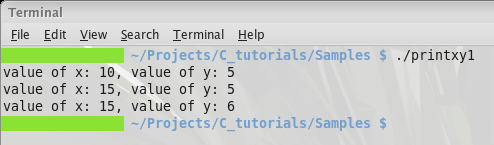
Now instead of retyping the same three lines over and over, you simply make a call to the function to perform the exact same task in a more readable and maintainable manner.
Here is the output.
Function with arguments and no return value:
void function_name(int var);
Did you notice in the last example that we had to move the x and y variables to the global scope in order to use this function type. This should be avoided whenever possible. Global variables are considered bad practice, but in reality there are times (especially in embedded systems development) where you just have to give in.
In our case we can fix it by using a function that takes arguments and does not have to return a value to its caller.
Let us change our function declaration from the last example to this:
void printxy(int val1, int val2);
This function declaration has a parameter list which is just a comma-separated list of variables that will be used within the function that the caller can assign values when the function is called.
Here is a good place to introduce the idea of function signatures. A signature is just a function declaration or prototype, but it is called as such because no two functions may have the same signature or the compiler will not be able to resolve the call to a function. The signature is made up of the data type, function name, and the parameter list.
Let us fix our program so that it does not need to rely on global variables. Changes are in bold.
printxy2.c:
#include <stdio.h></stdio.h>//Function for printing variable's values. 2 arguments, no return value.void printxy(int x, int y);
void main() {
int x, y;
x = 10;
y = 5;
printxy(x, y);
x += y;
printxy(x, y);
y++;printxy(x, y);
}void printxy(int x, int y) { printf("value of x: %d, ", x); printf("value of y: %d", y); printf("n");
}
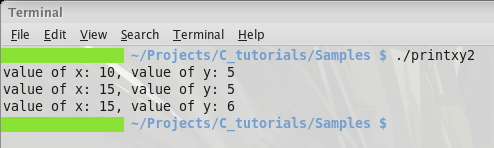
All we did was change the signature of our printxy function so it now takes two arguments and prints those values. Main is the caller, and passes the new function the values it currently has for x and y when it makes the call. Now we do not need to use global variables to access x and y, we can just pass local variables as arguments.
Here is the output.
Functions with no arguments and a return value:
<data type></data> function_name();
A function of this form takes no arguments, but does return a value of some variable local to the function back to its caller. The data type refers to what kind of data is returned by the function on exiting.
Sometimes global flags are used in a program to indicate the current state of something, this is very common in embedded systems applications or system level programming. That is one thing you might use this type of function for.
Instead of inventing some useless function, let us use the standard C function from the stdio.h library as an example. This is the prototype for the getchar function:
int getchar();
This function returns a character input from standard input as an integer. Although you would most likely set a char variable with this function.
char character = getchar();
That would set character to the value returned by getchar once it finished executing.
Function with arguments and a return value:
<data type></data> function_name(<data type></data> arg1,
<data type></data> arg2, ...);
This type allows you to use a variable from an external source within the scope of the function, and you can return data back to the caller.
Main is actually a function of this type, we just have not been passing it arguments or using it is return values for anything. It is not necessary to use or catch a function’s return value but you can if you want to.
Usually main takes the following form:
int main(int argc, char *argv[]);
For now, ignore the odd looking second parameter, its explanation is reserved for the pointers topic. This form of main is very useful because it allows your program to receive command-line arguments and return data. Unix, DOS, and Linux programmers know about this if they ever use terminal commands or write bash scripts that rely on the output of a command.
Let us modify our printxy example to show the name of the program before it runs and a message telling when it is finished. Ignore the fact that the argv argument is a pointer to an array of chars for now and focus on the fact that we are able to use the values passed through these function arguments.
Below is the latest source code for our printxy example. Changes are in bold.
printxy3.c:
#include <stdio.h></stdio.h>#include <stdlib.h></stdlib.h>//Function for printing variable's values. 2 arguments, no return value.void printxy(int x, int y);
int main(int argc, char *argv[]) {
int x, y;
x = 10;
y = 5;
printf("%s is runningn", argv[0]); printxy(x, y);
x += y; printxy(x, y);
y++; printxy(x, y);
printf("%s is finishedn", argv[0]);
return 0;
}void printxy(int x, int y) { printf("value of x: %d, ", x); printf("value of y: %d", y); printf("n");
}
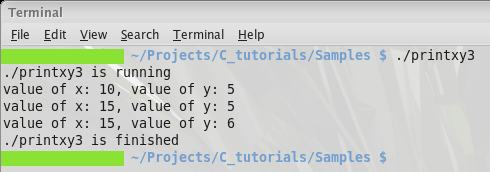
The function main takes two arguments, argc and argv, we use the value in argv to print the name of the program and a message about the state of the program. Main returns 0 to indicate that it completed successfully.
You may be wondering where the program name was passed to main from. It is passed automatically by the command line as the first element in the argv array. In case you were wondering, argc is the number of arguments passed by the command-line when the program is launched from the terminal.
Here is what the output of printxy3 should look like.