Record size and Data types should be kept as short as possible in the Fact tables and should only include fields for measures and indexed key columns. The Measure fields should use the smallest data type consistent with the measure data but the data type should be large enough to contain summarized values and prevent overflow when aggregations are calculated. Even saving two bytes per row can result in smaller fact tables in the database and this will go a long way in enhancing performance.
|
Feature
|
Description
|
|
Data Type sizes
|
Size limitation of data types were increased dramatically.
|
|
Databases and files
|
Database creation is simple as the databases reside on the operating system files instead of on logical devices. The databases are mapped to their own set of files and pages.
|
|
Dynamic memory
|
Memory allocation and usage is optimal and the simplified design minimized contention with other resource managers
|
|
Dynamic row level locking
|
Both data rows and index entries have full row level locking. The Dynamic locking chooses the optimal level of lock for all database operations automatically. The improved concurrency feature requires no tuning and the database supports hints for forcing a particular level of locking
|
|
Dynamic space management
|
Automatic grow and shrink is allowed within configurable limits. This minimizes the need for the data base administrator intervention. There is no need to pre-allocate space and manage data structures.
|
|
Evolution
|
This is an architecture designed for extensibility with a foundation for object relational featues.
|
|
Large memory support
|
Memory addressing is supported for greater than 4 gigabytes in conjunction with Windows NT Server 5.0, alpha processor based systems and other techniques.
|
|
Log manager
|
The design of the log manager helps improver performance for truncation, online backup and recovery operations.
|
|
Read Ahead
|
The read ahead logic improves performance and removes manual tuning
|
|
Text and image
|
Text and image data are stored separately and optimally
|
|
Unicode
|
Native Unicode is implemented, with Open Database Connectivity (ODBC) and OLE DB Unicode application programming interfaces are improved with multilingual support.
|
Apart from the above, SQL Server 2000 Analysis services also comes with inbuilt Server Error Logs which logs in all the errors that occur. It is important to frequently review these logs and fine tune the server performance by identifying frequent and troublesome errors.
Optimizing the Data Warehouse Database:
Analysis services creates multidimensional presentations of the Data warehouse data. It reads and organizes the data into multidimensional objects such as dimensions and cubes. It uses the relational database to access the data warehouse database when creating and processing dimensions and cubes. Therefore the schema design and the relational database performance have a significant impact on the performance of the cubes and objects in the data warehouse database.
Record size and Data types should be kept as short as possible in the Fact tables and should only include fields for measures and indexed key columns. The Measure fields should use the smallest data type consistent with the measure data but the data type should be large enough to contain summarized values and prevent overflow when aggregations are calculated. Even saving two bytes per row can result in smaller fact tables in the database and this will go a long way in enhancing performance.
Data warehouse update strategy should be designed to take care of changes and reduce the need for frequent reprocessing of cubes.
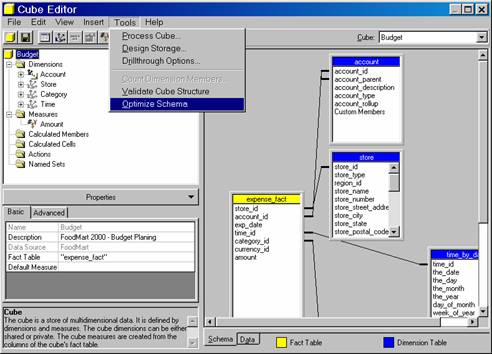
Optimizing Cube schemas is extremely useful in cube processing. This can be done by selecting the Optimize schema command on the tools menu of the Cube Editor. Analysis services then modifies the schema to eliminate joins between the fact table and dimension tables wherever possible. The conditions appurtenant thereto are that the dimensions must be shared dimensions and must have been processed. The member key column for the lowest level of the dimension must contain keys that relate to the fact table and the dimension table. The keys in the member key column for the lowest level of the dimension must be unique and the lowest level of the dimension must be represented in the cube—the levels disabled property must be set to NO and the level must be hidden.
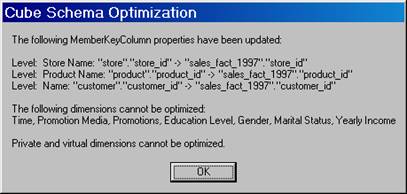
The cube schemas are optimized ignoring the dimension tables in the database and it reads only the fact table. Processing time is reduced if cubes are optimized and optimization is applied to all partitions of a cube. Cube schemas should not be optimized if the cube depends on inner joins between the fact table and the dimension tables for excluding fact rows for cube content. Since schema optimization removes joins, all dimension tables will not be displayed while specifying drill through options. The tables will have to be joined to the schema by using SQL statements.
During Cube schema optimization the member key column is treated as the lowest level of a dimension. If the dimension meets the required conditions, the member key column property for the lowest level of the dimension is changed to refer to the foreign key in the fact table instead of a key in the dimension table.
The cube schema optimization can be modified by the user. One or more dimensions can be removed from the optimization by changing the lowest level member key column property to refer to the original column in the dimension table.
Calculated measures are stored in cubes. When cubes have multiple calculated measures setting the right solve order will improve performance and accuracy.
Partitions are very valuable when used in large cubes. Each partition can be separately processed. It should be noted however that partitions may make the cube very complex and become a liability in certain implementations. They may also set artificial limitations to data design and queries.
Linked cubes that run across multiple servers are useful, but the processing complexity and difficulties in implementation almost preclude their usage.
Cube storage Modes influence the degree to which cube query is impacted for the end user. Since in MOLAP storage, the data is copied onto the server and not stored in the relational database, the latter has no impact on the performance of the cube query. The query is faster as it draws its data from the multidimensional structures created and stored in the server independent of the relational database. In ROLAP and HOLAP storage the impact of the relational database performance is felt because, the data is drawn from the relational database itself. Therefore, the relational database performance tuning becomes important if ROLAP or HOLAP storage modes have been selected. Cold caches do not impact on MOLAP stored cubes but definitely impact upon ROLAP and HOLAP cubes. The latter exploit warm caches better even though their performance even with heavy caching is poor.
Dimensional Modeling impacts on performance of queries. It is essential to incorporate the principles of dimensional modeling so that dimensions and fact tables so that the data becomes meaningful to the end user. The star and snowflake schemas generally used, improve cube design and reduce the need for multiple table joins. Design of fact tables should be optimized by deleting duplicate data and by reducing the length of rows.
Any optimization technique that improves the speed of reading data, improves the speed of processing cubes. One important technique that is frequently used is Indexing. Indexes are built on the fact and the dimension tables to facilitate performance of the joins and queries. Every dimension table is indexed on the primary key. Indexes on other columns for identifying levels in the hierarchical structure are also useful while performing specialized queries. The Fact table is indexed on the composite primary key made up of the foreign keys of the dimension tables. Clustered tables are tables which have clustered indexes. The data pages are doubly linked lists and the index is implemented as a B-tree index structure that enables fast retrieval of rows based on the clustered index keys. Heaps are tables with non clustered indexes.
The Index Tuning Wizard allows the user create an optimal set of indexes for a Microsoft SQL Server 2000 database without requiring extraordinary expertise and understanding of the structure of indexes. The primary requirement of the Index Tuning Wizard is the existence of a workload. The workload is a SQL script or a SQL profiler saved to a file or table containing SQL Batch or remote procedure call(RPC) even classes along with the Event Class and Text data columns.
1. The Index tuning wizard recommends the best mix of indexes for a database, given a particular workload. For this purpose it uses the Query optimizer to analyze the queries in the workload.
2. The Wizard analyzes the effects of the proposed changes on the performance of queries.
3. It recommends ways to tune the database for a set of problems
4. It allows the user customize the recommendations by specifying advanced options such as disk space constraints.
The recommendations are SQL statements that can be executed to create new and more effective indexes or drop existing indexes.
However the Index Tuning Wizard does not give any recommendations on tables referenced by cross database queries that are not present in the current database; system tables and primary key constrains and unique indexes. The maximum number of tunable queries in a work load that are considered is only 32,767 queries. Any additional queries will be ignored. Any additional queries with quoted identifiers are also ignored. Since the Wizard gathers data by sampling method, successive executions of the same workload may result in variations in the indexes recommended and also improvements on previous recommendations. When saving the SQL script if the Index Tuning Wizard encounters an error such as lack of disk space, it does not give a message. The index tuning wizard consumes a lot of CPU and memory resources during analysis. Finally if the data in the tables being sampled are insufficient or there is no improvement that can be made to the index, the Wizard does not return any report.
Working with the Index Tuning Wizard
1. On the Enterprise Manager console window expand a server group,
2. Expand the server in which to create the index.
3. On the Tools menu, click Wizards.
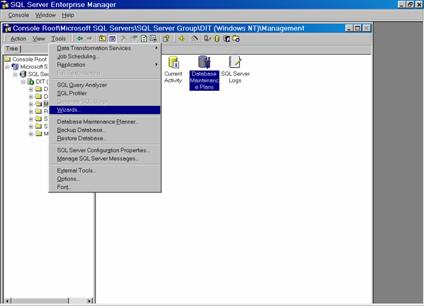

4. Double-click Index Tuning Wizard.

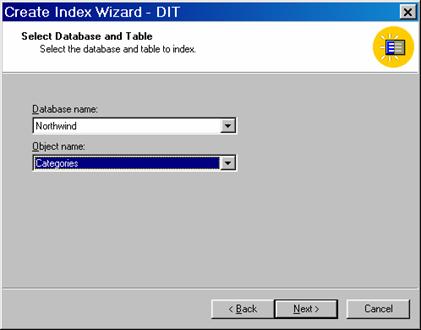
5. Select the database and table on which the index has to be created.
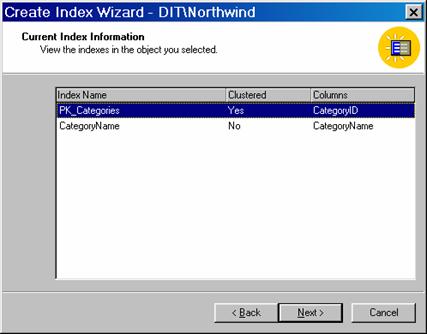
6. View the indexes currently existing in the table selected.
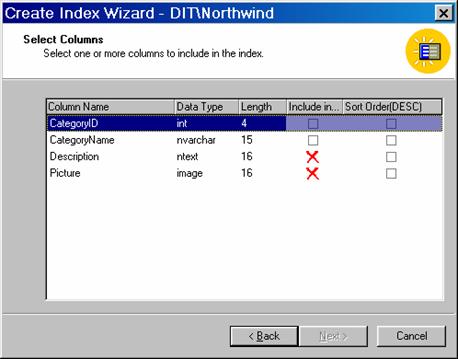
7. Select the columns to be included in the index
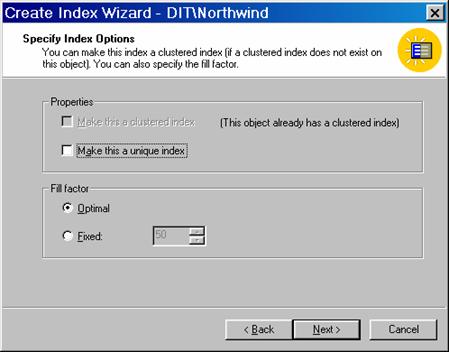
8. Specify the Index options
9. On the completion screen click Finish
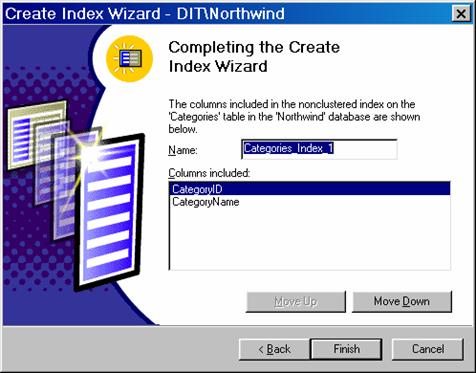
10. The user is given a message that the index has been successfully completed