The next 6 tutorials explains Building Dimensions using Dimensions Editor. Dimensional modeling is the conceptualization and visualization of numerical data models as a set of measures that are derived from the common parameters used in a business. It summarizes and rearranges data and presents views of data to support data analysis. Dimensional modeling focuses on data such as counts, weights, balances and occurrences.
Understanding Dimensions Basics
Dimensional modeling is the conceptualization and visualization of numerical data models as a set of measures that are derived from the common parameters used in a business. It summarizes and rearranges data and presents views of data to support data analysis. Dimensional modeling focuses on data such as counts, weights, balances and occurrences.
Dimensional modeling revolves around facts and dimensions. These are the basic components of cube structures in Analysis services. Facts are collections of data that are related and consists of measures and context data. Each fact table represents a business item, a business transaction or an event that can be used in the analysis of a business. For instance the revenue of a store relates to total revenue and total profits. These would be facts. Facts are core tables in OLAP database. The data in these tables are usually raw data.
Analysis of facts is conducted across a collection of properties. These properties are known as dimensions. Using these dimensions we can view facts in different contexts and perspectives. For instance the sales fact can be examined with reference to State, city or region. These would be members of the geographical dimension. Every point in the fact table is associated with only one member of the multiple dimension in the dimensional model. In the example below the value in a cell is associated with unique dimensions. A time dimension, a product dimension and a place dimension.

Types of Dimensions
A shared dimension is a dimension stored in the library and can be accessed by multiple cubes in the database.
A private dimension is a dimension that can be used only in cubes in which they are defined. A virtual dimension is created from a member property. It can be browsed like a regular dimension but has no aggregations calculated for it. A member property associates additional information with the members in one of the levels of the dimension.
A time dimension is a specialized dimension used to represent standard time. All other dimensions are called standard dimensions
Dimension members: Dimension members are values of the elements in the dimensions. The members are organized in levels within a dimension. For instance the time dimension consists of several levels. Day, week, months, year are levels in the time dimension. The members of the day would be Monday, Tuesday, Wednesday…and so on. When these concepts are combined with fact table records, it is clear that the dimension member determines the position in the dimension with which the record in the fact table is associated.
Dimension Hierarchies: The members of a dimension can be arranged in one or more hierarchies. Each hierarchy can have multiple levels. A member of a dimension may be located on more than one hierarchy structure. In the time dimension the year member may be linked to quarters represented by three months each or to two halves of a year and so on.

Time dimension is a good example of multiple hierarchies in a dimension
The Dimension Editor Interface
In the second tutorial of the series “Introducing Analysis Manager Wizards” we used dimension wizards to build our dimensions. The dimension editor however, appeared as soon as the dimension was created. This is because the Dimension editor is the interface that helps the user manipulate and edit a dimension. In the Analysis Manager, the main console, the Dimension Editor, and the Cube Editor are the only three windows. All others are wizards or dialog boxes.
While the wizard pre-populates the default property value, the dimension editor provides the user with an interface with which to set properties for a dimension and to manipulate the various dimensions and dimension level properties that are attributed to a dimension.
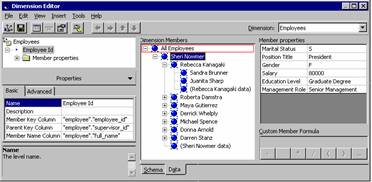
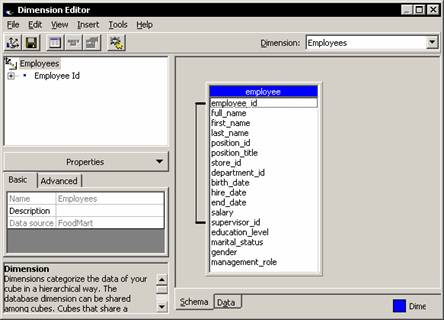
Before proceeding to actually building dimensions let us examine the Dimension Editor interface we will be using. It consists of two panes—the left pane with the dimension tree and the properties pane and the right pane displaying the dimension tables with two tabs called schema tab and data tab.
 |
The Dimension Tree Pane
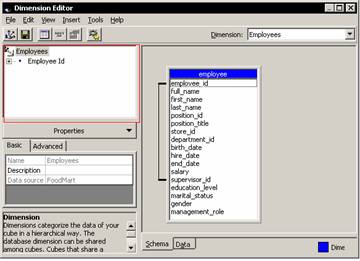
The dimension, its levels and member properties are contained in the Dimension tree pane that appears on the left pane of the Dimension editor interface. Clicking on the dimension name in the tree will activate the dimension level properties. For instance clicking on Store in the dimension tree will activate the properties of the store dimensions and the members will be displayed on the right pane. To delete a member level the user has to right click on the member and select delete. To rename a level, the user will have to click on the dimension level and click Rename. The name can then be altered. Using “Altering the name property” for that dimension level will also change the name of the property.
 |
The schema of the dimension is displayed in the schema tab of the Dimension editor. This interface displays the tables, views and joins of the relational database that has been used to create the dimension. This schema is extremely useful where snowflake schema or parent child dimensions have to be created.
 |
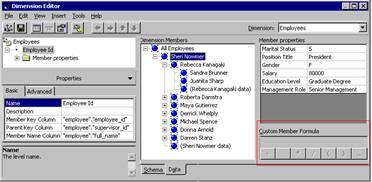
The Data tab of the interface enables the user browse the hierarchy of the dimension. Custom member formulas are displayed in a small window in the right pane and the type of member properties used and the values of the member properties within the dimension member.
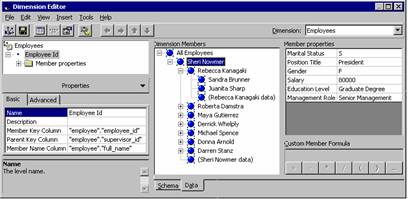 |
The Custom member formula window in the bottom right corner of the data tab allows the user to create a calculation at the member level. These calculations are useful in instances where the members created are based on other dimension members. For instance in a financial budget for current year’s expenses a 20% increase can be made by creating a custom calculation at the member level so that Current year’s Budget member is 1.2 times the Current year’s actual member. Calculation at member level requires that the SQL Server Enterprise edition is in use and the write back to the dimension option is enabled.
 |
Grouping levels is used when a dimension contains more than 64,000 members. In MOLAP storage mode Analysis services can handle up to 10 million members but the number of child members to a parent can be only 64,000. Artificial hierarchies are created to circumvent this problem. Analysis services has an inbuilt option of automatically creating the artificial hierarchies. For instance in the Employee dimension “all employees” would be a artificial hierarchy.
|