
Encapsulation and modularity are the few of the generic and recommended language features, which enhance efficiency and scalability of the language in the application. Oracle database language implements these features through stored subprograms. These subprograms (or subroutines) are the program units which hold a business or computational component and can be invoked at any junction in the application. This promotes code re-usability and logical sampling of code.
In Oracle, subprograms can be of two types; namely, Procedures and Functions. These are named PL/SQL blocks, which physically occupy disk space. They can be called from other program units, packages and anonymous PL/SQL blocks in database. These subprograms can also be declared locally to a PL/SQL block. In such cases, the subprogram carries the scope of its parent block only.
In this tutorial, we shall study the architecture, usage and benefits of Oracle subprograms in schema and real time applications.
Subprograms
As discussed above, subprograms are the named PL/SQL blocks, whose definition consists of Specification and body. The ‘specification’ or header is the mandatory part which contains subprogram info like name, prototype and parameter list. And the ‘body’ is optional part that contains the variable declarations and programmable logic.
Subprograms can accept list of parameters, which can be used within its body. Parameters can be passed in two modes i.e. Pass by Value and Pass by Reference.
Oracle identifies two types of subprograms in a schema, Procedures and Functions.
Procedures and functions have the same structure and physical architecture. But they both achieve different motives. While procedures are meant for the outlining a process or functional logic in the application, functions are meant for computational tasks. Besides this, they have few usage differences, which we shall discuss later in this tutorial.
Properties of subprograms
Before going in details of each subprogram, we shall study the similar properties of schema subprograms. Both procedures and functions follow the below listed features.
Subprogram Namespace
Namespace is a category of the schema objects, which uniquely identifies their name. The schema objects which fall in a category must have a unique name. Procedures and functions share their namespace with tables, views, materialized views, sequences, packages, and object types. This implies that a procedure and a table cannot have same name.
Example [1]: A function F_GET_ID is available as standalone function in the schema. User attempts to create a table with the same name. Oracle identifies the violation and prevents such action by raising ORA-0955 error.
SQL> CREATE TABLE F_GET_ID( a NUMBER);
CREATE TABLE F_GET_ID( a NUMBER)
             *
ERROR at line 1:
ORA-00955: name IS already used BY an existing object
Other namespace available is the one which can hold unique names for Indexes, triggers, constraints, db links, and clusters.
Storing subprogram metadata
Oracle schema contains multiple dictionary views to hold the metadata of all the objects created within the schema. The metadata of the Oracle subprograms is contained with two views i.e. USER_OBJECTS and USER_PROCEDURES
USER_OBJECTS holds metadata of all the existing schema objects, while USER_PROCEDURES holds the metadata for subprograms i.e. procedures and functions. Refer the screen dumps.
A procedure P_UPD_SALARY is queried in USER_PROCEDURES and USER_OBJECTS respectively. Note the columns in the views; schema level columns in USER_OBJECTS and object level columns in USER_PROCEDURES.


Removal of subprograms
Obsolete functions and procedures can be removed from the database using DROP command. Note that DROP is a DDL command and carries the feature of ‘Auto Commit’.
Syntax [1]
DROP [PROCDURE | FUNCTION] [SUBPROGRAM NAME]
Example [2]
SQL> DROP PROCEDURE P_GET_PART;

PROCEDURE dropped.

SQL> DROP FUNCTION F_GET_ID;

FUNCTION dropped.
Passing parameters in a subprogram
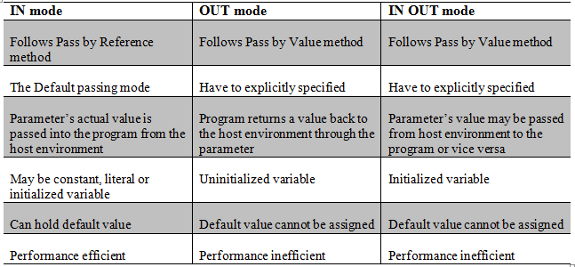
Parameters can be passed to a subprogram in three distinct modes. These modes can be ‘pass by value’ and ‘pass by reference’. Oracle implements the passage of parameters in the form of IN, OUT and IN OUT modes. While IN mode is way to pass parameters as ‘Pass by Reference’, OUT and IN OUT modes follow ‘Pass by Value’ method.
Syntax [2]
CREATE [OR REPLACE] PROCEDURE [NAME]
(PARAMETER1 [IN | OUT | IN OUT] [DATA TYPE] [DEFAULT],
 PARAMETER2 [IN | OUT | IN OUT] [DATA TYPE] [DEFAULT],
…
PARAMETER N)
I shall list the key differences between the two passage methods.
Calling subprograms
Before the release of Oracle 11g version, there used to be two methods of subprogram call i.e. Positional or Named. Oracle 11g has introduced hybrid method of calling subprograms, which is known as Mixed notation. Mixed notation allows making use of both positional and named methods of subroutine call. This enhances the feature flexibility and proves quite useful when a subprogram has mandatory placed at the start and optional parameters at the end.
However, we shall have look at all the three notations of subprogram call as below.
Positional Notation – Every parameter appears at the same position as that in the prototype.
Example [3a]
SELECT FUN_TEST(1,2) FROM DUAL
Named Notation – Parameters can be passed in jumbled order by explicitly specifying the actual parameter along with its value.
Example [3b]
SELECT FUN_TEST(b=>2, a=>1) FROM DUAL
Mixed Notation – Oracle 11g opened the gates for the mixed usage of positional and named notation.
Example [3c]
SELECT FUN_TEST(1,b=>2) FROM DUAL
Oracle Procedures: The Business Managers
A procedure is a named PL/SQL block which is used to implement business logic within the application. As its name suggests, it is used to embed an active process or business logic in the application. For this reason, it would be worth referring them as ‘Business Development Manager’ in Oracle.
It can optionally accept list of parameters and amazingly, it can even return values to the host environment through the same parameter list. Though it is not really meant for returning values, but at times, their primary objective can be extended to return values also.
Syntax [3]: The user must possess CREATE ANY PROCEDURE privilege to create a new procedure.
CREATE [OR REPLACE] PROCEDURE [NAME][(parameter list)]
[IS | AS]
[Declarative SECTION]
BEGIN
[Executable SECTION]
END [PROCEDURE name];
In the syntax, REPLACE keyword preserves the privileges associated with the procedure, if the procedure is dropped and recreated.
Example [4] – Every employee’s salary has to be incremented based on his job cadre
CREATE OR REPLACE PROCEDURE P_UPD_SALARY (P_EMPID NUMBER)
IS
CURSOR C IS
   SELECT JOB_ID
   FROM EMPLOYEES
   WHERE EMPLOYEE_ID = P_EMPID;
L_JOBID VARCHAR2(10);
L_INC_SAL NUMBER := 0;
BEGIN
OPEN C;
FETCH C INTO L_JOBID;
CLOSE C;
IF L_JOBID = 'MGR' THEN
   L_INC_SAL := 1000;
ELSIF L_JOBID = 'DEV' THEN
   L_INC_SAL := 800;
ELSIF L_JOBID = 'ANL' THEN
   L_INC_SAL := 500;
ELSE L_INC_SAL := 200;
END IF;
UPDATE EMPLOYEES
SET SALARY = SALARY + L_INC_SAL
WHERE EMPLOYEE_ID = P_EMPID;
END;
/

PROCEDURE created.
Execution of procedures
Procedures can be executed in two ways
Call within a PL/SQL block as a PL/SQL construct
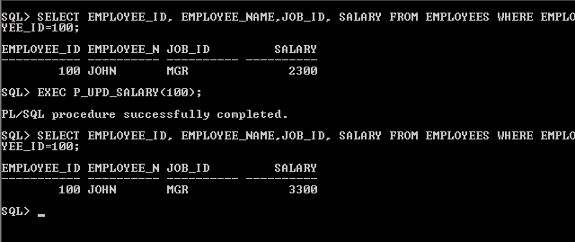
The screen dump below executes the above procedure P_UPD_SALARY to recalculate the salary of employee id 100. Note that it calls the procedure within a BEGIN…END block.
The ‘Pass by Reference’ parameters can be passed as actual or as local variables. Any ‘Pass by Value’ mode parameter can be declared in DECLARE section and captured after the procedure call.

In SQL* Plus, using EXECUTE command
EXECUTE command in SQL*plus is used to invoke a subprogram. It is analogous to the previous execution.
Parameters can be declared as bind variables in the session and used during the procedure call.
Functions: The real workers
Functions are the schema objects, which are used for the implementation of computational tasks and functions. They optionally accept parameters and mandatorily return a definite value.
Usage Notes:
- Function must have one logical RETURN statement
- Similar to procedure, functions can be invoked from other subprograms or anonymous PL/SQL blocks
- Functions are callable from SELECT statements, provided they should not modify the database purity state
Syntax [5]
CREATE OR REPLACE FUNCTION [FUNCTION NAME] [PARAMETERS]
RETURN [RETURN TYPE]
IS
[DECLARATIVE SECTION]
BEGIN
[EXECUTABLE SECTION]
END;
Example [5] – The function below calculates number of employees which match the input criteria. The criterion is based on their Job function and salary.
CREATE OR REPLACE FUNCTION F_SEARCH_EMP (P_SAL NUMBER,
						     P_JOBID VARCHAR2)
RETURN NUMBER
IS
   L_COUNT NUMBER := 0;
BEGIN
   SELECT COUNT(*)
   INTO L_COUNT
   FROM EMPLOYEES
   WHERE SALARY = P_SAL
   AND JOB_ID = P_JOBID;

   RETURN NVL(L_COUNT,0);
END F_SEARCH_EMP;
/

FUNCTION created.
Execution of Functions
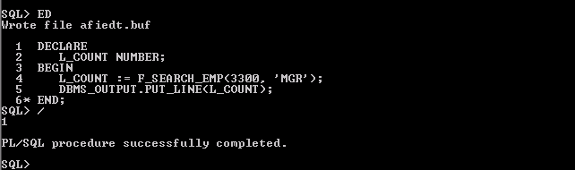
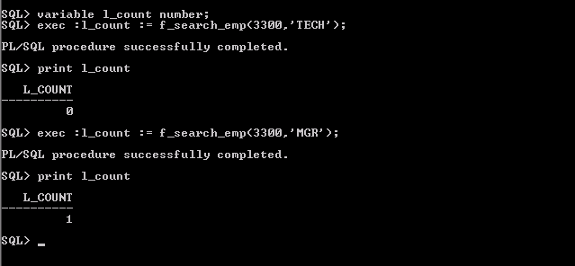
Functions can be executed in similar way as that of a procedure. They can be invoked from any other subprogram, or anonymous block.
Calling function within a PL/SQL block
Execution in SQL* Plus. Note the use of bind variables
Using functions in SQL expressions
Functions can be invoked from the SQL statement expressions. A valid stated function can be called in WHERE clause condition. In such situations, certain conditions must be satisfied, as listed below.
- All the parameters must be IN mode. Parameters should be of SQL supported type (no BOOLEAN or COLLECTION type)
- Parameters and return output must be of SQL supported data type
- User must have EXECUTE privilege on the function
Example [6]: The function F_COUNT_STR counts the appearance of a string (search string) in another string (parent string). Note its call in the SELECT query.
CREATE OR REPLACE FUNCTION F_COUNT_STR (P_STR VARCHAR2,
						     P_SRCH_STR VARCHAR2)
RETURN NUMBER
IS
   L_COUNT NUMBER;
BEGIN
   SELECT REGEXP_COUNT(P_STR,P_SRCH_STR)
   INTO L_COUNT
   FROM DUAL;

RETURN L_COUNT;
END;
/

FUNCTION created.

SQL> SELECT EMPLOYEE_ID, EMPLOYEE_NAME
  2  FROM EMPLOYEES
  3  WHERE F_COUNT_STR(EMPLOYEE_NAME,'A') > 0
  4  /

EMPLOYEE_ID EMPLOYEE_N
----------- ----------
        110 KATE
        140 LARRY
Calling functions from SELECT statement
Functions can also be selected from the SELECT statements, but with utter alert and care. Functions must ensure the database purity level. Below are the purity rules which must be obeyed at any instant, when calling a function from SELECT statement.
- When a function is called from a SELECT statement or a parallel UPDATE or DELETE statement, the function cannot update database tables.
- When a function is called from an UPDATE or DELETE statement, the function cannot query or modify database tables modified by that statement.
- When a function is called from a SELECT, INSERT, UPDATE, or DELETE statement, the function cannot execute directly or indirectly through another subprogram or SQL transaction control statements
Example [7]: The function F_UPD_SALARY updates the salary of a given employee by some amount.
CREATE OR REPLACE FUNCTION F_UPD_SALARY( P_EMPID NUMBER,
						      P_INC_SAL NUMBER)
RETURN NUMBER
IS
BEGIN
   UPDATE EMPLOYEES
   SET SALARY = SALARY + P_INC_SAL
   WHERE EMPLOYEE_ID=P_EMPID;
   RETURN 1;
END;
Now, the below screen dump shows the testing the above function by calling it in a SELECT statement.
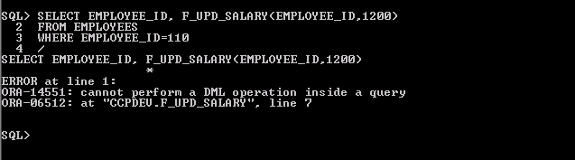
Thus, these rules must be recapitulated and followed to ensure the purity level of the database.


