
Data Manipulation Language (DML) in SQL Server 2005
In this tutorial you will learn about Data Manipulation Language (DML) – New Data Types, New Operators, The APPLY Operator, Ranking Functions, The OUTPUT Statement, Common Table Expressions(CTE), OTHER DML and T-SQL functions, TABLESAMPLE, Exception Handling, and Procedure for using Structured Exception handling.
Data manipulation Language (DML) is a set of statements that help manipulate data in the database. The heart of the DML is T-SQL. A number of enhancements have been made to T-SQL in the Yukon version. In this section we shall examine some of the new statements that have been introduced to ease the life of the developer.
New Data Types
New data types have been introduced in SQL server 2005 to assist developers in innumerable ways. Existing datatypes have been extended and true user defined types have been implemented using .NET code. The most significant introduction is the XML data type.
The new data types introduced include varchar(max), nvarchar(max) and varbinary(max). All these datatypes support up to 2 gigabytes of data and the information does not have to be moved in and out in blocks.
New Operators:
A number of new relational and set operators have been introduced in the Yukon version. These operators make query simpler to implement. Some of them add new functionalities to the DML.
The first of these are the Some and Any operators. These are semantically equivalent and can be used interchangeably. When used in a WHERE clause along with a comparison operator they enable the comparison of a scalar value to a single value from the result set of a sub query.
The All operator is a logical operator often used in conjunction with a comparison operator. It compares a single scalar value to all results of the value from a subquery result.
The EXCEPT and INTERSECT set operators allows users to locate records that are common in two sets of data or not common to the two sets of data. The rules followed are the same as that of the UNION set operator. The INTERSECT operator is similar to INNERJOIN in that the data returned is joined on all columns as in a SELECT clause.
PIVOT and UNPIVOT Operators
Powerful cross tab queries and reports can be created using these new relational operators. The values of the queries are converted into columns and averages, sums or other aggregations can be performed and results can be grouped into row headings/column headings in the grid. This operator recalls to the mind the TRANSFORM statement of Microsoft Access. The syntax of the PIVOT operator would read like this.
SELECT * FROM table_source
PIVOT(aggregate_function(value_column)
FOR pivot_column
IN(
) table_alias
The UNPIVOT converts columns to values reversing the PIVOT operator output. The syntax is the same, except that the UNPIVOT keyword replaces the PIVOT keyword.
The APPLY Operator
It is now possible to apply a table valued function to each row of a JOIN table using a user defined function. APPLY operator can be used in conjunction with the FROM clause. The result set is a table for each row in the JOIN table. The developer can use CROSS APPLY or OUTER APPLY and the difference between the two are minute. If an user defined function returns no results for a given row of the outer query, CROSS APPLY causes the outer query row not to be returned whereas OUTER APPLY will return the row irrespective of the User defined function results.
Ranking Functions
‘Paging data’ has long required the use of multiple methodologies and long pages of complex T-SQL queries that either cached several pages of data or pulled it page by page. The Row_Number ranking function is the developers dream data paging function!
This function is a sequential row number for each row data returned from a SELECT statement. It uses the OVER clause to determine the basis for the numbering of the rows of data. Since the Row_ Number does not exist till the WHERE clause has operated upon the data, the WHERE clause cannot be used to page the data. The solution would be to set the criteria on the data derived from the results and select from it. The function would look like this:
Create PROC pageddata @nStartRowNum int, @nRowCount int
AS
SELECT * FROM
(SELECT Row_Number() OVER(ORDER BY OrderDate Desc) AS RowNum,
CourseOrderID, StudentID, OrderDate
FROM CourseSales.SalesOrderHeader)0
WHERE RowNum BETWEEN @nStartRowNum and @nStartRowNum +@nRowCount -1
ORDER By OrderDate DESC
The Rank function performs an ordering similar to the Row_number function but ties get the same number. Therefore if there is a tie for the fourth place the order would be 1,2,3,4,4,6. The Dense_Rank function is similar to the Rank function while outputting rows with equal values from the OVER clause. However the gaps in the sequence are removed during the output. For instance the above ranks would read as 1,2,3,4,4,5. The NTile function assigns weights to rows. Earlier rows receive more weights than the later ones. All rows are broken into equal parts during this process based on the parameter given. For instance if the parameter given to NTile is 4, and the number of rows to be output is 100, then the rows are broken into 4 equal parts. The output would be for rows 1-25-à1; for rows 26-50à1 and so on. The rows with lower numbered results are given preference over the rows with higher number results.
The OUTPUT Statement
The frequently used statements are INSERT, UPDATE and DELETE. SQL Server 2005 has introduced a new OUTPUT statement to provide the developer with all the functionalities of the insert, update and delete statements. This is a great time saver and performance booster.
The OUTPUT keyword can be used to return information about the results of a Transact SQL statement in a table valued variable. This statement can be included in insert statements targeting views or DML operations with remote tables or views or DML operations on local or distributed partitioned views. For instance the OUTPUT statement when used with the insert statement reads as under:
–Create a table variable to hold the OUTPUT results:
Declare@InsertDetails Table
{StudentID int,
InsertedBy sysname}
–Perform an INSERT statement with an OUTPUT clause
INSERT INTO ExforsysStudentMaster.Student{Name, Age}
OUTPUT inserted.StudentID, suser_name() INTO@InsertDetails
VALUES
(‘Samantha’, getdate())
–View the OUTPUT results
SELECT * FROM@ InsertDetails
Common Table Expressions(CTE)
CTE allows developers to define a virtual view that can be used in another DML statement. This new feature supports recursive queries and reduces the implementation problems of complex T-SQL queries. The WITH clause in SQL Server has been enhanced to define a CTE.
The WITH statement contains a SELECT statement which allows the creation of a temporary view. This view has all the restrictions its type. Developers cannot use COMPUTE or COMPUTE BY; ORDER BY; INTO; OPTION clause with query hints in a CTE. When CTEs do not perform any recursion, they perform in the same way as derived tables and are often interchangeable.
An example of a CTE statement would read something like this:
–CTE example
With C(StudentID, CoursePrice)
As (SELECT StudentID, Avg(ListPrice)As CoursePrice
FROM StudentMaster.Student Group By StudentID)
SELECT *
FROM StudentMaster.Student As S
INNER JOIN C
ON S.StudentID= C.StudentID AND S.ListPrice> C.CoursePrice
Recursive CTEs are similar to normal CTEs except in that they have additional considerations inbuilt into the SELECT statement. The definition consists of two queries—a non recursive starting point known as anchor member query and a recursive member query. The anchor member query must be created first. The anchor query is located at the top of the tree and defines the column names. The only exception occurs when the column names are specified in the optional column_list parameter to the WITH statement. The UNION ALL operator then links the two result sets together and is the only set operator that is allowed in a recursive query. The recursive query then references the CTE as one of the tables in the SELECT query. The only precondition to this is –the number of columns must match the number in the anchor member. The recursion then continues till the member query ceases to produce result sets. The recursions can be limited by setting the MAXRECURSSION option. An exception is thrown if the set limit is exceeded.
.
.
OTHER DML and T-SQL functions
Often developers have the need to have a command that will enable them to insert data while updating a table. The Merge command can now be used to do this. The command specifies the table to which the data will be updated while USING will specify the table from which the data is being input. An ON clause is used to determine which fields will be used for matching and execution of the WHEN MATCHED THEN or WHEN NOT MATCHED THEN. The whole process is still very cumbersome and slows down performance considerably.
The TOP clause has been transformed to be used with other SQL statements such as INSERT, DELETE and UPDATE.
TABLESAMPLE
This is a new feature of the FROM clause that allows users select samples of data rows. It takes the number of rows to be sampled as a parameter. The syntax is as under:
SELECT * FROM Student.CourseSales TABLESAMPLE(10 ROWS)
Exception Handling
The lack of exception handling in SQL Server has been bemoaned by developers for years. SQL Server 2005 alleviates many of the problems. Now data errors can be managed and some of the issues can be resolved by the server before the results are displayed on the client machine. Structure exception handling integrated into SQL Server through the .NET Framework enables exception handling in transactional situations—such as in a stored procedure. The TRY…CATCH blocks implement structured exception handling. While the TRY block contains the transactional code that could potentially fail the CATCH block contains code that executes if an error occurs. This reduces the amount of code required to be written and the @@error check can be dispensed with.
A precondition to the structured exception handling is that the Automatic roll back of transactions must be enabled with SET XACT_ABORT ON. All errors, are then raised within the TRY block to the level of transaction abort errors and the CATCH block then handles the errors. At this point, the transaction become doomed and is in a limbo till the developer uses the ROLLBACK TRANSACTION statement in the CATCH block to release the transaction resources. To create an exception in the TRY block the RAISERROR statement has to be used and the severity level (11-20) must be specified in order to invoke the CATCH block.
The syntax would be as under:
BEGIN TRY
—BEGIN TRAN
——-–Perform INSERT,UPDATE, or DELETE statements
—COMMIT TRAN
END TRY
The syntax for the CATCH statement would be as under:
BEGIN CATCH
—DECLARE @err int
SET@err=@@error
ROLLBACK TRAN
–log the @err variable in an error log table
END CATCH
Procedure for using Structured Exception handling
1. Start SQL Server Management Studio. When prompted to connect to a server, click Cancel.

2. On the standard menu, click New Query, and then click New SQL Server Query.
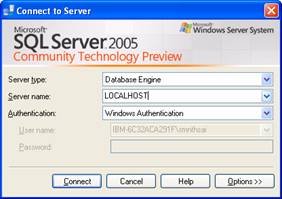
3. In the Connect to SQL Server dialog box, connect to localhost by using Windows authentication.
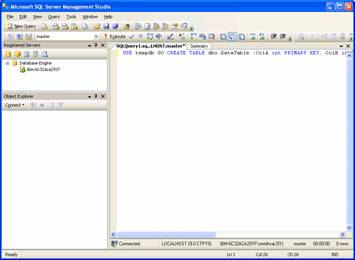
4. In the new query page, type the following Transact-SQL code: USE tempdb GO CREATE TABLE dbo.DataTable (ColA int PRIMARY KEY, ColB int) CREATE TABLE dbo.ErrorLog (ColA int, ColB int, error int, date datetime) GO
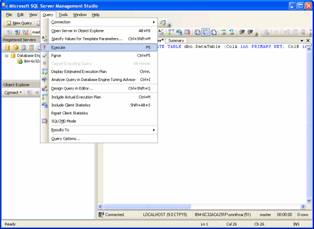
5. On the Query menu, click Execute.
6. Type the following Transact-SQL code: CREATE PROCEDURE dbo.AddData @a int, @b int AS SET XACT_ABORT ON BEGIN TRY BEGIN TRAN INSERT INTO dbo.DataTable VALUES (@a, @b) COMMIT TRAN END TRY
7. Add the following Transact-SQL code: BEGIN CATCH DECLARE @err int SET @err = @@error ROLLBACK TRAN INSERT INTO dbo.ErrorLog VALUES(@a, @b, @err, GETDATE()) END CATCH GO
8. On the Query menu, click Execute.
9. Create a new query with the following code: USE tempdb EXEC dbo.AddData 1, 1 EXEC dbo.AddData 2, 2 EXEC dbo.AddData 1, 3 GO SELECT * FROM dbo.DataTable SELECT * FROM dbo.ErrorLog GO
10. On the Query menu, click Execute.
While a number of new features have been added to SQL Server 2005 T-SQL, several features have been marked for deprecation. The SET ROWCOUNT is being deprecated in favor of TOP statement. The original JOIN syntax is also on its way out. It may be better to use the ANSI join syntax in its place till a final decision is taken. The next one for the axe is the COMPUTE statement. The ROLLUP or CUBE statements will have to be used instead.
In the next section of this tutorial we will briefly examine the Developer tools that are being made available to the developer.

