
Exforsys

SQL Server 2005 Training

  1. SQL Server 2005 - Configuring Replication
  2. SQL Server 2005 Replication Enhancements
  3. SQL Server 2005 - Mirror Server
  4. SQL Server 2005 - Introduction to Data Availability
  5. SQL Server 2005 - Backing up a Database
  6. SQL Server 2005 - Using Database Snapshots
  7. SQL Server 2005 - Disaster Recovery
  8. SQL Server 2005 - Managing Certificates
  9. SQL Server 2005 - Managing Permissions
  10. Managing SQL Server 2005 Security
  11. SQL Server 2005 - Using the Database Tuning Advisor
  12. SQL Server 2005 - Tuning a Database
  13. Maintain indexes in a SQL Server 2005 database
  14. SQL Server 2005 - Defining Indexes
  15. SQL Server 2005 - Database Backup
  16. SQL Server 2005 - Populating the Database
  17. SQL Server 2005 Configuration Manager
  18. SQL Server 2005 - Using the Sqlcmd Utility
  19. Using the SQL Management Objects
  20. Using SQL Sever Management Studio - Part 2
  21. Using SQL Sever Management Studio - Part 1
  22. SQL Server 2005 - Using Event Notifications
  23. SQL Server 2005 - Using DDL Triggers
  24. SQL Server Monitoring Tools - Server Profiler
  25. SQL Server 2005 - Testing Troubleshooting
  26. SQL Server 2005 - Upgrading from earlier versions of SQL Server
  27. SQL Server 2005 Installation - Maintenance Plan Without Using Wizard
  28. SQL Server 2005 - Unattended Installations
  29. SQL Server 2005 Installation - Maintenance Plan Using Wizard
  30. Installing a Second Copy of SQL Server 2005
  31. Planning to Install SQL Server 2005
  32. SQL Server 2005 Installation
  33. SQL server 2005 Editions
  34. SQL Server 2005 Architecture Overview
  35. SQL Server 2005 - Management studio interface Summary Page
  36. SQL Server 2005 - Server Groups
  37. SQL Server 2005 - Registered Servers
  38. SQL Server 2005 Administrative Tools
  39. Developing Client applications in SQL Server 2005
  40. SQL Server Management Objects
  41. NET CLR in SQL Server 2005
  42. Native HTTP Support in SQL Server 2005
  43. XML Data Types in SQL Server 2005
  44. Using XML in SQL Server 2005
  45. Using Notification Services in SQL Server 2005
  46. SQL Server 2005 - Service Broker
  47. Data Manipulation Language (DML) in SQL Server 2005
  48. T-SQL Enhancements in SQL Server 2005
  49. Security Features in SQL Server 2005 for the Developer
  50. SQL Server Architecture and Components
  51. SQL Server 2005 Management Studio
  52. Overview of SQL Server 2005 for the Database Developer
  53. Getting started with SQL Server 2005

Ads


Home arrow Technical Training arrow SQL Server 2005 Training

SQL Server Architecture and Components

Author : Exforsys Inc.     Published on: 13th Sep 2005

Business Intelligence Development Studio

This solution oriented interface is intended for creating Business intelligence services, integrating projects involving Analysis Services, Reporting services and Data Transformation Services. It is similar to SQL Server Management Studio and provides integration with Visual SourceSafe.

Ads

SQL Server Integration Services

This is a revamped version of the SQL Server 2000 based Data Transformation Services. The improvements have been made in the performance, usability and manageability aspects of the tool. It contains a Business Intelligence Workbench and SQL server Workbench which enables extracting data for the data warehouse simpler.

Analysis Services has been enhanced to give better performance.

Relational and XML data support

Both relational and XML structured data are supported. The XML data becomes available through the addition of the XML data type and allows storing of XML fragments and documents in SQL Server databases. It has new data types such as VARCHAR(MAX), NVARCHAR(MAX) and VARBINARY(MAX) which has an ability to store up to 2 GB of data supplementing TEXT, NTEXT and IMAGE data types.

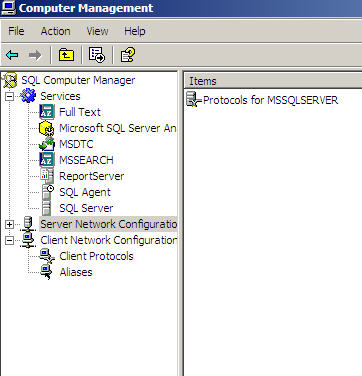
SQL Computer Manager

This utility is accessible from the Programs menu and is implemented as a Microsoft Management console snap in. It has a functionality that is based on Windows Management Instrumentation. It combines the features of SQL Server Manager, Server Network Configuration and Client Network configuration. It is backward compatible.
SQL Profiler

Ads

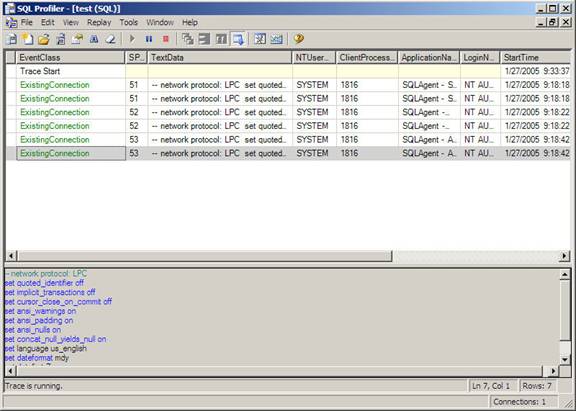
The SQL Profiler has been enhanced with a few new features. The ability to analyze MDX Analysis Services statements and monitoring the operation of the Data Transformation services are significant changes to the tool. Access to the utility is no longer limited to the SysAdmin fixed server role. It can be granted to designated logins in the Analysis server role.

Aggregated views allow grouping of recorded events on the basis of arbitrarily selected criteria. Special file types can be used to extract and store events for ease of troubleshooting. The Create Trace Wizard enables the creation of traces. Deadlocks can be displayed in a graphical view and integration with the Windows System monitor helps troubleshoot problems of performance.
Database Tuning Advisor

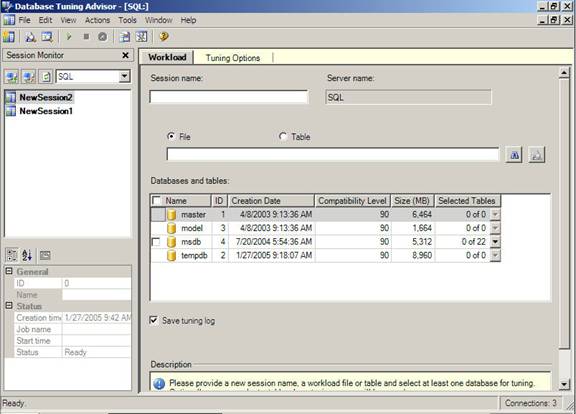
This is an enhanced version of the Index tuning Wizard. In SQL Server 2005 it integrates with the SQL Profiler and reduces the time spent on tuning. It also helps determine whether aligned or non-aligned layout should be used to benefit performance in dealing with partitioning related tables. It analyzes workload and physical implementation of one or more databases. It uses trace files, trace tables or Transact-SQL scripts as workload input when tuning databases. It can recommend the optimum physical design structure for the database and statistics that should be collected to backup physical design structures.
Command Line Utilities

The SQLWB.EXE launches the SQL Server Management Studio from the command prompt. The server type can be specified by using the various switches of this command. Databases can also be specified or queries, projects and solutions can be specified. The default values of this command is stored in Tools>options menu. Profiler90.Exe is used as a command line utility that launches the SQL Profiler and provides an ability to connect to a server or Analysis Services or database, table, template or file etc.

DTA.EXE is a command line version of the Database Tuning Advisor. It analyzes performance and provides recommendations regarding improvements. It can run on the same server or on a different server. Connection settings will have to be specified using the switches. Other functions such as table tuning, workload in the form of SQL Profiler Trace, SQL file or SQL Server Trace file etc can also be performed using this utility along with the switches.

SQLCMD.EXE

This is a new and improved version of the OSQL and ISQL programs of the earlier versions of this server. It helps connect to any version of SQL Server via OLE DB. It runs batches of T-SQL statements. It can also connect to a server via the Dedicated Administrative connection when invoked with an –A switch from the Command prompt.

A number of functional enhancements have also been made to SQLCMD.EXE. Creation of elaborate scripts, provision for setting the SQLCMDPASSWORD environment variable, assignment of custom and predefined scripting variable for use within scripts and execution of SQLCMD scripts from within the query editor are some of the new features added in SQL Server 2005.

The above details were only intended to give the reader a flavor of the new SQL Server 2005. We will study the features in greater detail later in this tutorial and also learn how to use them to an advantage.


This tutorial is part of a SQL Server 2005 Training tutorial series. Read it from the beginning and learn yourself.

SQL Server 2005 Training

  1. SQL Server 2005 - Configuring Replication
  2. SQL Server 2005 Replication Enhancements
  3. SQL Server 2005 - Mirror Server
  4. SQL Server 2005 - Introduction to Data Availability
  5. SQL Server 2005 - Backing up a Database
  6. SQL Server 2005 - Using Database Snapshots
  7. SQL Server 2005 - Disaster Recovery
  8. SQL Server 2005 - Managing Certificates
  9. SQL Server 2005 - Managing Permissions
  10. Managing SQL Server 2005 Security
  11. SQL Server 2005 - Using the Database Tuning Advisor
  12. SQL Server 2005 - Tuning a Database
  13. Maintain indexes in a SQL Server 2005 database
  14. SQL Server 2005 - Defining Indexes
  15. SQL Server 2005 - Database Backup
  16. SQL Server 2005 - Populating the Database
  17. SQL Server 2005 Configuration Manager
  18. SQL Server 2005 - Using the Sqlcmd Utility
  19. Using the SQL Management Objects
  20. Using SQL Sever Management Studio - Part 2
  21. Using SQL Sever Management Studio - Part 1
  22. SQL Server 2005 - Using Event Notifications
  23. SQL Server 2005 - Using DDL Triggers
  24. SQL Server Monitoring Tools - Server Profiler
  25. SQL Server 2005 - Testing Troubleshooting
  26. SQL Server 2005 - Upgrading from earlier versions of SQL Server
  27. SQL Server 2005 Installation - Maintenance Plan Without Using Wizard
  28. SQL Server 2005 - Unattended Installations
  29. SQL Server 2005 Installation - Maintenance Plan Using Wizard
  30. Installing a Second Copy of SQL Server 2005
  31. Planning to Install SQL Server 2005
  32. SQL Server 2005 Installation
  33. SQL server 2005 Editions
  34. SQL Server 2005 Architecture Overview
  35. SQL Server 2005 - Management studio interface Summary Page
  36. SQL Server 2005 - Server Groups
  37. SQL Server 2005 - Registered Servers
  38. SQL Server 2005 Administrative Tools
  39. Developing Client applications in SQL Server 2005
  40. SQL Server Management Objects
  41. NET CLR in SQL Server 2005
  42. Native HTTP Support in SQL Server 2005
  43. XML Data Types in SQL Server 2005
  44. Using XML in SQL Server 2005
  45. Using Notification Services in SQL Server 2005
  46. SQL Server 2005 - Service Broker
  47. Data Manipulation Language (DML) in SQL Server 2005
  48. T-SQL Enhancements in SQL Server 2005
  49. Security Features in SQL Server 2005 for the Developer
  50. SQL Server Architecture and Components
  51. SQL Server 2005 Management Studio
  52. Overview of SQL Server 2005 for the Database Developer
  53. Getting started with SQL Server 2005
 

Comments