
ASP.NET Code Directory
In this tutorial you will having a deeper look at the Code Directory, the Code Beside Model and the evolution of the Code Behind model, learn about Partial Classes, Sharing Source components, Creating a Component, you will learn how to create a Application_Code folder, to create a component in the Application_Code folder and use a component.
Having a deeper look at the Code Directory
As mentioned in the earlier section of this tutorial the Code directory is one of the significant folders of the ASP.NET application. It contains the reusable components that are automatically compiled and linked to the page code by the runtime engine. Visual Studio 2005 gives a lot of importance to the monitoring of this directory. The components are compiled by default into a single assembly and referenced in the project. The assembly is then made available to all the pages in the site.
The Code Beside Model and the evolution of the Code Behind model
The Code Behind class model has been evolved to get round the problems of using inline code in Visual Studio 2003. Using inline code automatically deprived the user of the benefits of the IntelliSense. The Visual Studio 2003 model is based on the idea that each Web form page is bound to a separate class file and this file is the basis of the dynamically generated page class that the ASP.NET runtime creates for each .aspx resource. All server code is channelled to the code behind class and everything compiles down to an assembly in which all the constituent classes are packed together. This becomes a handicap. An explicit step by step compilation is demanded. Every page must reference the code behind class through a src, else it will not be compiled. The AppDomain has to be restarted with every change and the timestamp of the directory is modified. If the project is large, the whole process is expensive.
ASP.NET 2.0 offers the compile on demand feature to the users. All resources are compiled only on demand with an exception of a few file types which are dynamically compiled. ASP.NET pages, Web Services, user controls, HTTP handlers and global.asax are dynamically compiled on demand. Any changes to the compiled copy is automatically detected and the copy is invalidated and a fresh compilation takes into account the changes. This reduces the process overhead for developers and helps in rapid application development.
The compile on demand feature has been extended to a number of file types in ASP.NET 2.0. Class files, resource files, Web service discovery files, and typed DataSet schema files have all acquired this capability. All changes to files are promptly and automatically detected and no development tool is required to force the compile step. It becomes possible to refine the whole code behind mechanism. Since ASP.NET is backward compatible it works with the code beside schema of older applications with ease.
The code beside model provides for a modular approach by separating support code and layout. It comes with a page/class association and uses a different set of keywords and behaviours. By default the code is stored inline. To take advantage of the code separation the user has to select a template by selecting Add New Item form the Website menu. The pages can be edited with page separation and the code is stored in a class file specified through the CompileWeb attribute. ASP.NET then compiles the page when requested.
Partial Classes
The page separation feature enables developers take advantage of partial classes. The CompileWeb attribute in the @Page directive is used to find the file containing the code. The .aspx page and the code page are then dynamically merged into a single class that inherits the base page class. This is then compiled into an assembly and executed. By default the code in the code beside file is located in the ASP namespace and contains only the class definition which is partial. It however contains the event handlers and other custom code that the user writes. The ASP.NET 2.0 runtime parses the .aspx layout file and combines the information of the partial class in the code beside file. The class then inherits from the Page and is compiled and served on request. The code beside version of our ‘Hello world’ application would look like this:
using System;
namespace ASP
………………{
……………….public partial class Helloworld
……………………..{
………………………void Send_Greeting(object sender, EventArgs e)
…………………………….{
………………………………MsgSent.Text=Greet.Text;
……………………………..}
……………………….}
……………….}
Sharing Source components
The compile on demand feature has been extended to the classes bound to the Web page in the code beside model. The helper components or other class files of the application can now be stored in the Code subdirectory. Visual Studio 2005 monitors the directory and compiles all class files that are added there. This enables the assembly to be referenced automatically after compilation. This assembly is named code.dll and has application scope. It is created in the Temporary ASP.NET files folder outside the Web application space.
To illustrate this concept let us create a simple project. To recall the steps for creating a new web site:
1. Open Visual Web Developer.
2. On the File menu, click NewWeb Site.
3. The New Web Site dialog box appears.
4. Under Visual Studio installed templates, click ASP.NET Web Site.
5. In the Location box, enter the name of the folder where you want to keep the pages of your Web site.
6. For example, type the folder name C:WebSites.
7. In the Language list, select C#.
8. Click OK.
Visual Web Developer creates the folder and a new page named Default.aspx.
Creating a Component
Reusable components can be created by keeping them in a sub directory. Let us call this directory App_code. This directory is monitored by ASP.NET 2.0 and all components added to this directory are compiled automatically into a single assembly.
To create a Application_Code folder
1. In Solution Explorer, right-click the name of the Web site, and select Add
2. Select the folder Application_Code.
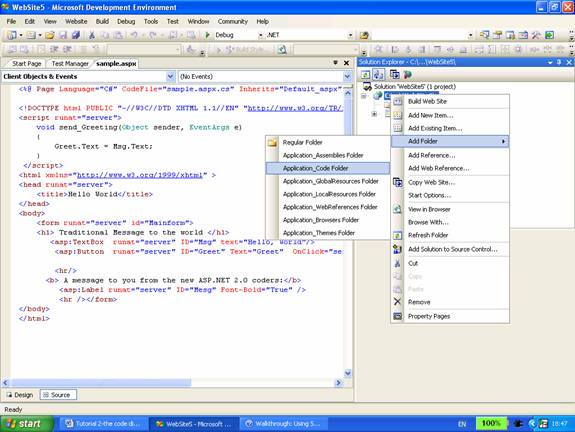
3. A component can now be added to the site.
{mospagebreak}
.
.
To create a component in the Application_Code folder
1. In Solution Explorer, right-click the Application_Code folder, and then click Add New Item.
2. Under Visual Studio installed templates, choose Class.
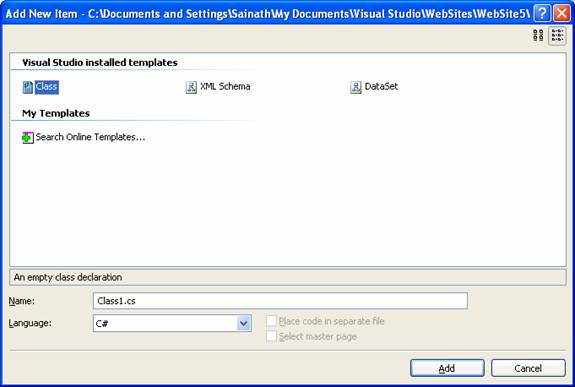
3. Name the class ExForSysClass1.
4. From the Language list, select C#.
5. Click Add.
Visual Web Developer opens the new class file in the editor.
1. Create a class that has a single property named testString.
public class ExForSysClass1
{
……….public ExForSysClass1() {}
……….private string testStringValue;
……….public string testString
……….{
………………..get
………………..{
…………………………return testStringValue;
………………..}
………………..set
………………..{
…………………………testStringValue = value;
………………..}
……….}
}
2. Save the file and close it.
Using the Component
1. Create a file called ExForSys.aspx
2. From the Standard folder of the toolbox, drag a TextBox control, Label control, and Button control onto the page.
3. Double-click the button to create a Click handler it.
4. In the handler, type in the code just below the page directive.
< script runat="server" language=C# >
……….void Button1_Click(object sender, EventArgs e)
……….{
………………..ExForSysClass1 Test = new ExForSysClass1();
…………………………Test.testString=TextBox1.Text;
………………………………….Label1.Text=Test.testString;
……….}
< / script >
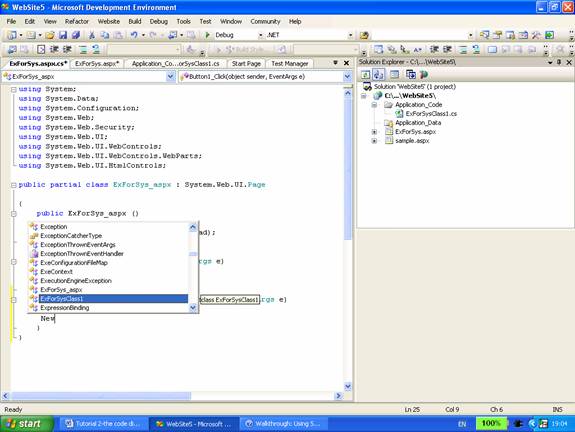
5. When you enter a space after New or new, Visual Web Developer displays a list of available classes. The class you created earlier, ExForSysClass1, appears in the drop-down list.
Testing the Page and Component
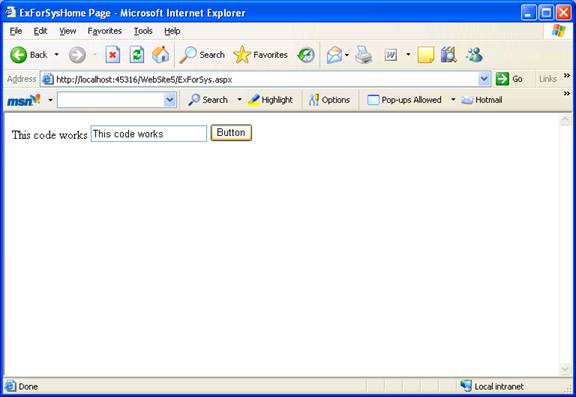
1. Press CTRL+F5 to run the page.
2. When the page appears in the browser, enter something into the text box and click the button. Doing so sets a property in your simple class, which is then displayed in the Label control.
Navigate to Windows Explorer and examine the directory in which the Website is located. Note that the page App_code directory and the .aspx files appear in the website folder. Also note that the .dll file is not present in the directory. ASP.NET has compiled the page and the component dynamically.
[catlist id=179].