Exforsys

ASP.NET 2.0

  1. Getting started with ASP.NET 2.0
  2. .NET Framework Fundamentals
  3. Microsoft.NET Framework Tools
  4. Application Development in .NET
  5. What's New in the .NET Framework 2.0 ?
  6. Introduction to Visual Studio.NET
  7. Installing Visual Studio.NET 2005
  8. Working with Visual Studio.NET Web Applications
  9. Whats New in ASP.NET 2.0
  10. Creating an ASP.NET Application
  11. ASP.NET Code Directory
  12. ASP.NET Page Object Model
  13. ASP.NET Server Controls
  14. ASP.NET Working With Master Pages
  15. ASP.NET Creating Content for Master Page
  16. ASP.NET Referencing Master Page Members
  17. ASP.NET Changing Master Pages Dynamically
  18. ASP.NET Creating Nested Master Pages
  19. ASP.NET Working with Web Parts
  20. ASP.NET Using Web Parts and Controls in Web Pages
  21. ASP.NET Web Pages and Layout
  22. ASP.NET - Adding Web Parts at Run Time
  23. ASP.NET Personalization: User Profiles and Themes
  24. ASP.NET Data Access features
  25. ASP.NET State Management
  26. ASP.NET Customizing the Session State Mechanism
  27. ASP.NET State Management And Caching
  28. ASP.NET Security
  29. Forms Authentication in ASP.NET
  30. ASP.NET Managing Membership and Roles
  31. ASP.NET Configuring Page-Level Caching
  32. ASP.NET Setting Application-Level Caching
  33. ASP.NET Data Source Object Model
  34. ASP.NET SqlDataSource Control
  35. ASP.NET Data Bound Controls
  36. ASP.NET GridView Control
  37. ASP.NET GridView Filtering
  38. ASP.NET Adding Sorting and Paging in GridView
  39. ASP.NET DataBound Controls - Details View
  40. ASP.NET Using a Grid to Display Detail Information
  41. ASP.NET Displaying Master-Detail Data on the Same Page
  42. Displaying Master-Detail Data on Separate Pages in ASP.NET
  43. ASP.NET Creating Web Wizards
  44. ASP.NET : Dynamic Image control
  45. ASP.NET Advanced Site Functionality

Ads


Home arrow Technical Training arrow ASP.NET 2.0

ASP.NET Configuring Page-Level Caching

Author : Exforsys Inc.     Published on: 30th Aug 2005

ASP.NET Configuring Page-Level Caching

In this tutorial you will learn how to configure Page-Level Caching. Page directive and Duration attribute.

Ads

Configuring Page-Level Caching

1. In Visual Web Developer, switch to Design view.

2. Drag a Label control to your page, leaving the default name of Label1.

3. Switch to Design view.

4. Double-click the surface.

5. A stubbed out method will be created for you named Page_Load.

6. Add the following highlighted code to the method:

..................void Page_Load(Object sender, System.EventArgs e)
..................{
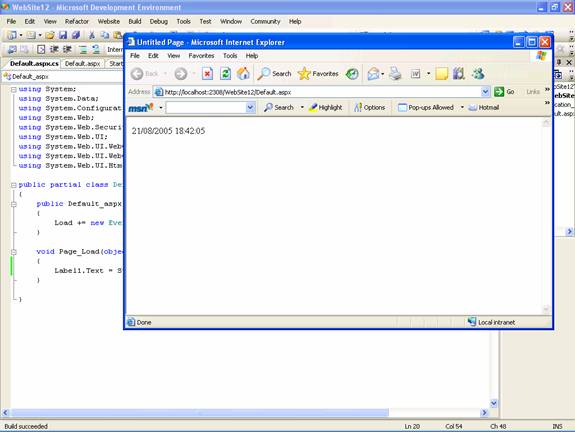
............................Label1.Text = System.DateTime.Now.ToString();
..................}

7. Press CTRL+F5 to run the page.

8. Close the browser.

Close the browser.

9. Switch to Source view and add the following page directive beneath the @ Page directive:

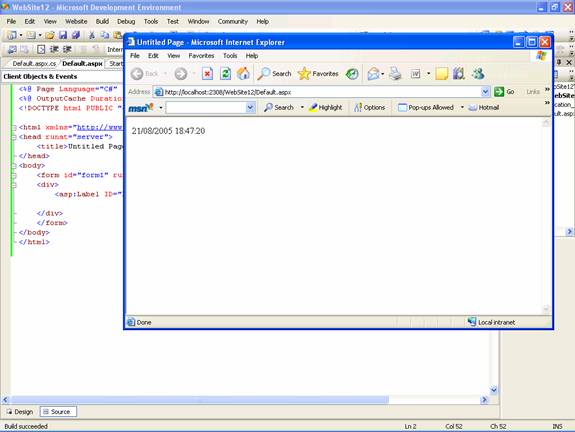
< % @ OutputCache Duration="15" VaryByParam="none" % >

10. You are setting the page to be cached. The Duration attribute specifies that the page will remain in the cache for 15 seconds.

11. Press CTRL+F5 to run the page again.
Ads

12. Refresh the page several times.

13. Since the duration has been set to 15 seconds, the page is only refreshed after the lapse of that time.


This tutorial is part of a ASP.NET 2.0 tutorial series. Read it from the beginning and learn yourself.

ASP.NET 2.0

  1. Getting started with ASP.NET 2.0
  2. .NET Framework Fundamentals
  3. Microsoft.NET Framework Tools
  4. Application Development in .NET
  5. What's New in the .NET Framework 2.0 ?
  6. Introduction to Visual Studio.NET
  7. Installing Visual Studio.NET 2005
  8. Working with Visual Studio.NET Web Applications
  9. Whats New in ASP.NET 2.0
  10. Creating an ASP.NET Application
  11. ASP.NET Code Directory
  12. ASP.NET Page Object Model
  13. ASP.NET Server Controls
  14. ASP.NET Working With Master Pages
  15. ASP.NET Creating Content for Master Page
  16. ASP.NET Referencing Master Page Members
  17. ASP.NET Changing Master Pages Dynamically
  18. ASP.NET Creating Nested Master Pages
  19. ASP.NET Working with Web Parts
  20. ASP.NET Using Web Parts and Controls in Web Pages
  21. ASP.NET Web Pages and Layout
  22. ASP.NET - Adding Web Parts at Run Time
  23. ASP.NET Personalization: User Profiles and Themes
  24. ASP.NET Data Access features
  25. ASP.NET State Management
  26. ASP.NET Customizing the Session State Mechanism
  27. ASP.NET State Management And Caching
  28. ASP.NET Security
  29. Forms Authentication in ASP.NET
  30. ASP.NET Managing Membership and Roles
  31. ASP.NET Configuring Page-Level Caching
  32. ASP.NET Setting Application-Level Caching
  33. ASP.NET Data Source Object Model
  34. ASP.NET SqlDataSource Control
  35. ASP.NET Data Bound Controls
  36. ASP.NET GridView Control
  37. ASP.NET GridView Filtering
  38. ASP.NET Adding Sorting and Paging in GridView
  39. ASP.NET DataBound Controls - Details View
  40. ASP.NET Using a Grid to Display Detail Information
  41. ASP.NET Displaying Master-Detail Data on the Same Page
  42. Displaying Master-Detail Data on Separate Pages in ASP.NET
  43. ASP.NET Creating Web Wizards
  44. ASP.NET : Dynamic Image control
  45. ASP.NET Advanced Site Functionality
 

Comments