
Exforsys

ASP.NET 2.0

  1. Getting started with ASP.NET 2.0
  2. .NET Framework Fundamentals
  3. Microsoft.NET Framework Tools
  4. Application Development in .NET
  5. What's New in the .NET Framework 2.0 ?
  6. Introduction to Visual Studio.NET
  7. Installing Visual Studio.NET 2005
  8. Working with Visual Studio.NET Web Applications
  9. Whats New in ASP.NET 2.0
  10. Creating an ASP.NET Application
  11. ASP.NET Code Directory
  12. ASP.NET Page Object Model
  13. ASP.NET Server Controls
  14. ASP.NET Working With Master Pages
  15. ASP.NET Creating Content for Master Page
  16. ASP.NET Referencing Master Page Members
  17. ASP.NET Changing Master Pages Dynamically
  18. ASP.NET Creating Nested Master Pages
  19. ASP.NET Working with Web Parts
  20. ASP.NET Using Web Parts and Controls in Web Pages
  21. ASP.NET Web Pages and Layout
  22. ASP.NET - Adding Web Parts at Run Time
  23. ASP.NET Personalization: User Profiles and Themes
  24. ASP.NET Data Access features
  25. ASP.NET State Management
  26. ASP.NET Customizing the Session State Mechanism
  27. ASP.NET State Management And Caching
  28. ASP.NET Security
  29. Forms Authentication in ASP.NET
  30. ASP.NET Managing Membership and Roles
  31. ASP.NET Configuring Page-Level Caching
  32. ASP.NET Setting Application-Level Caching
  33. ASP.NET Data Source Object Model
  34. ASP.NET SqlDataSource Control
  35. ASP.NET Data Bound Controls
  36. ASP.NET GridView Control
  37. ASP.NET GridView Filtering
  38. ASP.NET Adding Sorting and Paging in GridView
  39. ASP.NET DataBound Controls - Details View
  40. ASP.NET Using a Grid to Display Detail Information
  41. ASP.NET Displaying Master-Detail Data on the Same Page
  42. Displaying Master-Detail Data on Separate Pages in ASP.NET
  43. ASP.NET Creating Web Wizards
  44. ASP.NET : Dynamic Image control
  45. ASP.NET Advanced Site Functionality

Ads


Home arrow Technical Training arrow ASP.NET 2.0

ASP.NET Creating Nested Master Pages

Author : Exforsys Inc.     Published on: 18th Aug 2005    |   Last Updated on: 19th May 2006

ASP.NET Creating Nested Master Pages

In this tutorial you will learn how master pages can be nested within one main master page, build and example nested master page with the help of sample code.

Ads

In the preceding sections we had seen how to create simple master and content pages. We also examined how we can reference members of a master page from content pages and how to use different masters with a single content page. In this section we shall see how master pages can be nested within one main master page.

When one master page references another as its master, it is said to be a nested master page. A number of nested masters can be componentized into a single master. The advantage of this kind of structuring is that a number of child masters can be created to be subordinated to the overall look and feel of the site defined by the Parent master, while the child master give the child pages some uniqueness. While a parent master defines the overall layout of the pages—header, body and footer, the child master expands the body for a group of pages.

Child masters have the extension .master too. It contains all the controls that are mapped to content place holders on the parent master page. The layout is similar to that of a content page in this respect. However, child masters also have content place holders of their own to display content of its child pages.

There is no architectural limitation to the number of child masters that can be created. The depth of nesting also does not impact on performance significantly.

The design support view does not support the creation of nested masters. Developers will have to use source view or note pad to create nested masters.

Building an example:

We shall now do an exercise of creating a master called sampletutorial, a nested master called ExForSystut master and a content file called About.aspx. Follow the steps detailed in the earlier sections and create the two masters and the content page. Name the first master sampletutorial.master and in code view enter the following code.

Click here to view sample code

Now name the second master ExForSystut.master and enter the following code

Click here to view sample code

Now create an aspx file called About.aspx and enter the following code.

Click here to view sample code

Now build the web application and see the output. The output will appear like the one displayed below.
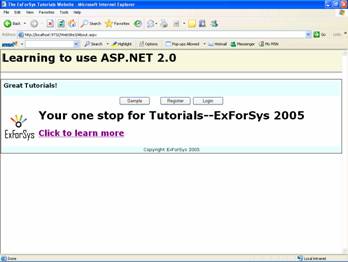
Note that the About.aspx content has been loaded into ExForSystut.Master and that in turn has been loaded into the sampletutorial.master. Note that different contentplaceholders on the main master can be used to load groups of content files loaded into the child masters which are inturn loaded into the main master. This implies that multiple child masters can load multiple content files into different contentplaceholders on the main master file.

Ads

ASP.NET 2.0 is not the first in support of templating. However, the functionality provided by this software goes beyond the frontiers of templating to make master pages components that can be reused. The mechanism is not based on class inheritance. The binding of the master and the content pages is defined statically and cannot be changed or set programmatically.

In the next tutorial we shall be looking at another component provided by ASP.NET that promotes reusability—Web Parts. Web Parts content rich, modular and customizable components that help the developer make cutting edge web sites.


This tutorial is part of a ASP.NET 2.0 tutorial series. Read it from the beginning and learn yourself.

ASP.NET 2.0

  1. Getting started with ASP.NET 2.0
  2. .NET Framework Fundamentals
  3. Microsoft.NET Framework Tools
  4. Application Development in .NET
  5. What's New in the .NET Framework 2.0 ?
  6. Introduction to Visual Studio.NET
  7. Installing Visual Studio.NET 2005
  8. Working with Visual Studio.NET Web Applications
  9. Whats New in ASP.NET 2.0
  10. Creating an ASP.NET Application
  11. ASP.NET Code Directory
  12. ASP.NET Page Object Model
  13. ASP.NET Server Controls
  14. ASP.NET Working With Master Pages
  15. ASP.NET Creating Content for Master Page
  16. ASP.NET Referencing Master Page Members
  17. ASP.NET Changing Master Pages Dynamically
  18. ASP.NET Creating Nested Master Pages
  19. ASP.NET Working with Web Parts
  20. ASP.NET Using Web Parts and Controls in Web Pages
  21. ASP.NET Web Pages and Layout
  22. ASP.NET - Adding Web Parts at Run Time
  23. ASP.NET Personalization: User Profiles and Themes
  24. ASP.NET Data Access features
  25. ASP.NET State Management
  26. ASP.NET Customizing the Session State Mechanism
  27. ASP.NET State Management And Caching
  28. ASP.NET Security
  29. Forms Authentication in ASP.NET
  30. ASP.NET Managing Membership and Roles
  31. ASP.NET Configuring Page-Level Caching
  32. ASP.NET Setting Application-Level Caching
  33. ASP.NET Data Source Object Model
  34. ASP.NET SqlDataSource Control
  35. ASP.NET Data Bound Controls
  36. ASP.NET GridView Control
  37. ASP.NET GridView Filtering
  38. ASP.NET Adding Sorting and Paging in GridView
  39. ASP.NET DataBound Controls - Details View
  40. ASP.NET Using a Grid to Display Detail Information
  41. ASP.NET Displaying Master-Detail Data on the Same Page
  42. Displaying Master-Detail Data on Separate Pages in ASP.NET
  43. ASP.NET Creating Web Wizards
  44. ASP.NET : Dynamic Image control
  45. ASP.NET Advanced Site Functionality
 

Comments