
ASP.NET Personalization: User Profiles and Themes
In this tutorial you will learn about Personalization – User Profiles and Themes, Inbuilt providers in ASP.NET 2.0 and also Create and execute a Shopping cart application with Personalization features.
Surfers would love to see on the website the content which is customized to their needs. ASP.NET offers a personalization feature which enables users to do just that. Personalization is a storage system that manages all the data related to users of the application. It integrates seamlessly with SQL server or Microsoft Access or any other database that developer’s wishes to use. A little code enables the creation of modular pages where personalization can manage the session’s services and the user can return to the screen at a later time to find the controls in the position he had left them. He can add controls from the catalog or remove a control and store it in the catalog for later use. This is called the persistent storage of structured data using a friendly and type safe API.
In ASP.NET personalization is implemented as user profiles and themes. These are complementary to each other. The model of personalized data is defined by the application and it is parsed at runtime by compiling that model into a class. The data in the personalized class corresponds to information specific to the current user. The internal working of the software is masked from both the user and the developer but the loading and saving of personalized data is completely transparent to the user.
Personalization:
In ASP.NET 2.0 Personalization is activated by default and is available to all authenticated users. However, before actually using personalization it is important to specify the data that needs to the be saved for each user. The profile of the user has to be defined in the < personalization > section of the web.config file. Individual properties may be placed and the profile properties can be defined by using the < property > tags.
< ?xml version= “1.0”
< configuration >
………….
< system.web >
………….
< profile >
< properties >
………….< add name="Nickname" / >
< / properties >
< / profile >
………….
< / system.web >
< / configuration >
In the source code file now the IntelliSense kicks in and you can call this.Profile. and the property is displayed in the drop down box. This is because a corresponding typed class is generated the moment the profile was defined. It was then compiled and integrated into the website’s assembly.
The current profile can be caught either by using the object model of the current page or through the HttpContext class. The personal data store is returned through the ‘Profile’ property.
Personalization is based on the provider model. Two providers are inbuilt into the ASP.NET 2.0—one for Microsoft Access and another for SQL Server. By default the profile is stored in the Microsoft Access database aspnetdb.mdb. The profile information is stored in direct relationship to the membership data. The GetProfile() method enables access to other profiles in the database. The user name has to be passed as a parameter to the method and the HttpPersonalization instance is returned with the data stored in the profile.
HttpPersonalization profile=this.Profile.GetProfile(“xxx”);
String name= Profile.Nickname;
It is possible to write into the data and the same can be saved if it is done explicitly by calling the CommitSettings() method to commit the data to the data source.
All properties of the profile are saved as strings by default. However other objects can be placed in the profile if they are serializable. DateTime, for instance can be stored by specifying a class name of the desired data type via the attribute type while defining the profile properties. It will read as
< Property name=”birthdate” type=”System.DateTime” / >
In the above example the complete class name of the data type including the corresponding namespace such as System.DateTime has been specified. However if a static value has to be used, it can be added with the attribute defaultValue.
The profile created can now be edited using a new page editprofile.aspx by each user in a type safe manner. We can see how this is done a little later in this tutorial.
Complex data types can also be stored in the profile from the base class library. The only precondition is that these data types should be serializable. To define the type the class’s full name and its namespace have to be specified. Though all values are serialized as string by default, property values are stored next to each other and the values are distinguished by their start and end positions.
PropertyNames: Username: X:0:1: Theme:X:7:22:
PropertyValuesString:XXX
However, string serialization is not considered advisable for reference types. The XML or binary format is more acceptable. The desired string can be assigned with the desired setting to the SerializeAs attribute. For instance a StringCollection can be serialized in the database as XML and will be available through the property name “xxx” that is serialized. Look at the example below to understand the concept better.
< personalization >
< profile >
< add name=”MyName” / >
< add name= “Birthdate” type= “System.DateTime” / >
< add name = “mycollections”
type= “System.Collections.Specialized.StringCollection” serializeAs=”Xml” / >
< / profile >
< / personalization >
This new profile property of the page and the HttpContext classes can now store ‘mycollections’. The URL of the current page can be dropped into the collection through a LinkButton located on the master page. The code for this button would look like this:
Void LinkButton_Click(object sender, System.EventArgs e)
{
HttpPersonalization profile = (HttpPersonalization) this.Context.Profile;
Profile.mycollections.Add(this.Request.Url.ToString());
It must be noted in this context that the master page does not allow type safe access to custom profiles. The HttpContext class is used to redeliver the profile through the HttpPersonalizationBaseClass and give access to the custom properties. Individual data also can be stored in a profile. The condition, again being serialization. We will see how this is done when we come to the practical half of the tutorial.
Anonymous users are supported in ASP.NET 2.0. This feature will have to be activated and custom properties of such users can be saved even if they are anonymous. How is this done? The profile property features have to be activated in the Web.config file. Enter the following code in the Web.config file
< configuration >
< system.Web >
< anonymousIdentification enabled= “ture” / >
< / system.web >
< / configuration >
Each property in the profile can be defined using the allowAnonymous attribute. If this property is not set, the properties will not be stored. We will see how the anonymous user’s profiles are stored when we look at the shopping cart example a little later in this tutorial.
Anonymous user profiles can be migrated to Authenticated user profiles by using the MigrateAnonymous event of the class PersonalizationModule. This is done in the global.asax file which is usually added to the website to fulfill this function.
Using the personalization features of ASP.NET 2.0 it is easy to store custom information belonging to the individual users. Simple strings or complex data structures can be added. Anonymous users can be identified during their visit to the site and later pinpointed if they repeat their visit.
{mospagebreak}
.
.
Creating a Shopping cart application with Personalization features:
A shopping cart application has to have two classes—Cart and Product. The Cart derives from System.Collections.Generic.List class and Product is a business object prototype with some attributes. Both classes must be marked as Serializable.
1. Create a Website project and add an Application_code directory to the Web site.
2. Right click on this directory and select “Add New Item…” and select class.
3. Name the class file Cart.cs and click Add.
4. Note that a new class file has been created for your project.
5. Enter the following code in the Cart.class file.
Click here to view sample code
6. Now create another class file called Product.cs and enter the following code in it.
Click here to view sample code
7. Now create a web.config file and enter the following code.
< personalization >
< profile >
< add name="Cart" type="Cart" SerializeAs="Xml" / >
< / profile >
< / personalization >
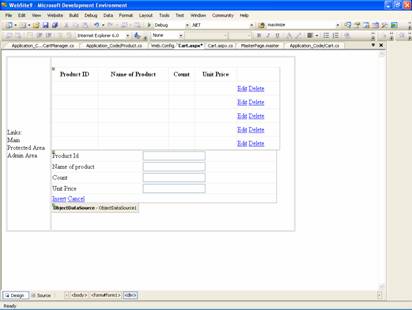
8. An objectDataSource control will now have to be used to access the basket. Open a .aspx file and enter the following code to use the shopping cart. The page will contain a GridViewControl and a DetailsView control. The former will help users show, edit and delete the contents of the cart and the latter will help adding of new items.
Click here to view sample code
9. The design view of the Shopping cart application would look as under:
10. Now create a CartManager class and type in the following code
Click here to view sample code
11. Save all and click F5 to execute.
In this section of the tutorial we have seen how to use personalization to store the profile of the user and also to save the features personalized by users. Complex features and data structures can also be stored by users with personalization as we have seen in the shopping cart application above. In the next section we shall look at Themes and skins which are closely associated with personalization and is often used with it.
[catlist id=179].