
ASP.NET Working with Web Parts
In this tutorial you will learn about Understanding Web Parts, Building pages with Web Parts, Web Part Display Modes, Advantages of using WebParts, To create a new Web site using WebParts, The Web.config File and Adding the WebPartManager Control.
Understanding Web Parts
Websites and portals show a large amount of content and content personalization has assumed importance over the years. Users accessing content rich websites experience a desire to see only such content as is of immediate relevance to them. Successful websites capitalize on this need and allow the user personalize his experience. The crux of the problem is harnessing a capacity to handle rich content effectively and pragmatically.
ASP.NET 2.0 provides developers with a set of controls called web parts for creating websites that enable end users modify the content, appearance and behavior of the website from a browser. With these tools users can select and receive only those content which interest them. The modifications can be applied to all users of a site or restricted to individual users. The settings made by the user can be saved and recalled to the browser when the user starts a session with the application. This implies that developer can empower his user with capabilities that do not require the intervention of the developer or the administrator. This feature is referred to as personalization.
A web part can be defined as a window of information available to a user within a web page. It is basically a component that is derived from the panel class. The support it receives from the Web part manager makes it more powerful than a panel. The layout of the web part mimics a window and has a caption bar and has the links to maximize, minimize and close actions. The users can open, close, minimize or restore the window. It can contain static text, images, other controls including user controls and custom controls. Users can personalize page content; they can add new Web parts, controls to a page, remove them, hide them or minimize them. Users can drag web parts control to another part of the page or change its appearance, properties and behavior. Users can export or import control settings of web parts for use in other pages. While performing all these operations, users can retain the data in the controls and reduce data entry and configuration demands on end users. Connections can be established between controls. The connection itself could be personalized or the appearance and details of the control displaying the data can be personalized. Authorized users can even configure site level settings, determine access rights or set role based access to controls.
A web part is different from a frame in so far as it is not filled with content by accessing an URL. It is a server side control that is served to the browser as plain HTML and is populated with content grabbed from external sites using HTML scarping or web services.
Building pages with Web Parts:
The web part control provides the required infrastructure for creating web applications and portals. A page may employ several components from the web parts framework for performing specific functions.
1. The WebPartManager manages all the web parts on a page and is invisible at runtime.
2. The WebPart is the content container that the user sees. This is an abstract class and the developer has to create his own webpart through inheritance or through other user controls.
3. The WebPartZone controls and provides an overall layout for the webpart controls it contains. A page can have one or more zones.
4. The CatalogPart is the base class for catalog WebPart controls that present a list of available web parts to users. The classes that are derived are ImportCatalogPart, DeclarativeCatalogPart and PageCatalogPart.
5. CatalogZone is a container for CatalogPart controls.
6. The ConnectionsZone is a container for the connections defined between pairs of webparts found on a page.
7. The ImportPart provides the base class for editing controls that allow modifications to webparts. It has its own interface and allows users set properties.
8. EditorZone is a container for the EditorPart control.
Web Part Display Modes
There are four display modes—the view mode, the catalog mode, the Edit mode and the Design mode. The View mode is the mode that is normally displayed to the end users. In this mode a web part can be maximized, minimized or closed. It can also be removed from the page but does not get deleted. It gets stored in the catalog for future retrieval.
The Design mode enables the developer, place his controls in specific locations and design the look and feel of the page visually. Often the web parts are placed within zones. The zones are placed within table cells and take over the display of content to be shown. Each zone has a ZoneTemplate assigned to it. These templates can be edited within VS.NET. A number of server controls can be added including user controls as contents to the Zone. These controls can now be treated as web parts and the user can switch them off and on at will. If more than one control is added to a zone the ContentWebPart control is recommended for use. This contains one ContentTemplate, which can be edited visually in the IDE.
The Catalog mode is used to store web parts that are to be added or are removed from a page. The developer will have to define a zone called the CatalogZone and add a ZoneTemplate. A PageCatalogPart control template will have to be added to the zone to enable users to add and remove web parts from the zone. If new or user defined controls have to be added to a Zone, one or more TemplateCatalogParts will have to be implemented. Each instance of this control type represents a control group. Controls pertaining to that group can be added to the control by using the template.
The Edit Zone is displayed the instant the WebPartManager kicks into action. The zone contains a ZoneTemplate to store the content. The AppearanceEditorPart users can define the appearance of the web part. The LayouteditorPart provides settings for status of the Web Part—minimized, maximized or closed. The BehaviourEditorPart is used to update the behavior of a Web Part. The PropertyGridEditorPart control offers flexibility and can handle custom properties of a Web Part control. The developer needs to set the changeable property to true so that these controls can modified through the Web using this attribute.
Advantages of using WebParts
A significant advantage that accrues to the developer is the functionality available for page development. The Visual Studio.NET drag and drop creation and configuration of web parts in the visual designer, is a great boon. It improves speed of development.
Any existing ASP.NET control can be used as a Web Part control. Customized WebParts can also be created by deriving them form the WebPart class. If the visual designer is packaged with the control, any user can just drag and drop the control and configure it at design time without writing a single line of additional code.
Web Application development is made rapid as you can use web parts to create fully integrated, personalizable web applications.
The standalone application could be packaged with a complete set of WebPart controls that the user can configure and personalize.
{mospagebreak}
To create a new Web site using WebParts
1. In Visual Studio, create a new ASP.NET Web site.
2. If additional settings have to be configured on the website, select the Website menu and choose ASP.NET Configuration. This opens the ASP.NET Web Site Administration Tool, and provides access to various administration settings.

Let us create a simple page using web parts to better understand the concepts.
The Web.config File
When working with Web Parts it is important to have an authenticated user system. The Web.config file can be modified to ensure that the login of the user is required to access the home page of the portal. However, personalization features can work with anonymous users as well if the personalization features are activated.
Open the Web.config file and enter this code.
Click here to view sample code
Adding the WebPartManager Control
The WebPartManager Control has no visibility at runtime and hence can be placed anywhere on the page.
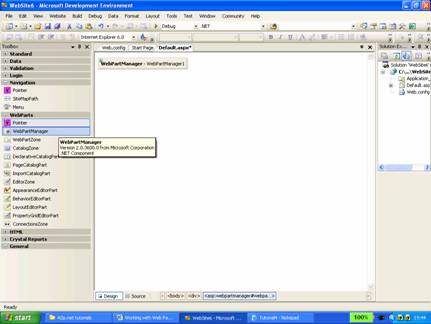
However, for sake of convinience it can be place in the head of the page between the head tags. This will ensure that it is available but does not disturb the layout of the page. In combination with master pages this becomes a great advantage, as it can be placed once and used on several pages. The following code is displayed when the WebPartManager Control is placed on a page. It must be noted that only one WebPartManager control can be placed per page.
< html xmlns="http://www.w3.org/1999/xhtml" >
< head runat="server" >
< title > Untitled Page < /title >
< asp:WebPartManager ID="WebPartManager1" runat="server" >
< /asp:WebPartManager >
< /head >
This section is a conceptual introduction on Web Parts and its uses. In the next section we shall see how these concepts can be applied to a Web page to create dynamic, user friendly pages.
[catlist id=179].