
ASP.NET Security
In this tutorial you will learn about ASP.NET 2.0 Security, The Security Architecture of ASP.NET 2.0, The security infrastructure and subsystem relationships of the ASP.NET and the sequence of events that occur when a authentication is sought.
When we talk of ‘security’ we are basically acknowledging that there is a possibility of ‘vulnerability’. The developer and the Administrator need to focus on various threats and mitigation techniques and security concepts including principals, authorities, services, security identifiers, tokens, logon sessions, window stations, access control and so on…
Security of websites is a very critical and complex issue that needs to be handled by the developer and the administrator. It requires an understanding of possible threats and a thorough knowledge of access points and vulnerabilities of the application being developed. It presupposes that the developer and the administrator will build in sufficient safeguards in the application being deployed over the network.
ASP.NET 2.0 comes up membership services that manage a database of user accounts, hashed passwords, a role manager for managing role membership for users, and five new server-side controls that make implementing forms authentication much easier. ASP.NET 2.0 also offers a provider model that gives the developer and the administrator complete control over the implementation of the Membership and Role services and cookie-less forms authentication. The Web-based administration enables simple local and remote administration of user accounts and roles, as well as enhanced control of other non-security related settings.
The Security Architecture of ASP.NET 2.0
The security infrastructure and subsystem relationships of the ASP.NET are illustrated in the following diagram.
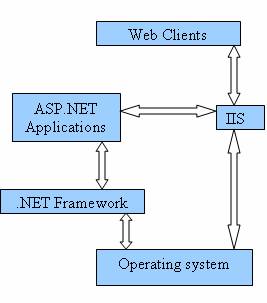
Web clients communicate with the Internet Information Services (IIS). The IIS deciphers and authenticates the user request. It examines whether the ‘Allow Anonymous’ property has been set to true authentication processes are bypassed, else they are set in motion. The IIS also searches for the requested resource and if the client is authorized it returns the resource else denies the resource. The IIS also assumes that a set of credentials is mapped to the Operating System account and uses them to authenticate the user. Different kinds of authentication is available in IIS.5.0 and 6.0—the basic, the digest and the Integrated Windows Authentication. However, a detailed study on IIS authentication modes is beyond the purview of this tutorial and, therefore, only receives a mention here.
ASP.NET has its own security features and the application built on ASP.NET can have its own low level security features. When the IIS hands over the request to the ASP.NET application, the latter provides three kinds of authentication-forms authentication, Passport authentication and Windows authentication. The type of authentication required is declared in the configuration file of the application. If windows authentication is used the information about users and groups is stored in the Security Accounts Manager(SAM) database or in the Active Directory services. For Passport authentication, user information is stored in the internal passport database. Forms authentication allows the developer specify where to store the information.
Forms authentication is a system whereby unauthenticated requests are redirected to an HTML form using HTTP client-side redirection. The user provides his credentials and submits a form. If the data is authenticated by the application the system issues a ticket in a cookie that contains the credentials or key for reacquiring the identity. All subsequent requests are issued with the cookie in the request headers and they are authenticated and authorized by an ASP.NET handler using the validation method specified by the developer.
Passport authentication is a centralized authentication service provider that is made available by Microsoft. It offers a single logon and core profile services for member sites.
Windows Authentication is used in conjunction with Microsoft IIS authentication. This type of authentication is commonly used in Intranet scenarios. It provides a user interface and backend code needed to collect user inputs. The developer can be unaware of the data storage and validation of user roles. The identity of the application user is passed in from the IIS.
However, Passport or Windows authentication are not practical for real life scenarios where websites are extremely vulnerable to attacks of hackers and unauthorized entrants. The forms based authentication is considered the best protection for ASP.NET applications and as such has received much focus in ASP.NET 2.0.
On completion of the authentication by IIS, ASP.NET uses the authenticated identity to authorize access.
The sequence of events that occur when a authentication is sought is as under:
…………….1. A client generates a request for a protected resource on the web.
…………….2. The request is received by the IIS. The IIS checks whether the resource is authenticated
…………….by IIS or if Anonymous Access has been enabled for the resource. If yes, the request is
…………….passed on to ASP.NET application. If the ASP.NET application is set to forms authentication,
…………….IIS authentication is bypassed.
…………….3. If the request does not have a cookie attached to it, ASP.NET redirects it to the Logon
…………….page. The configuration file of the application rests in this path. The client then, enters his
…………….credentials on the Logon page.
…………….4. The credentials are checked by the application code using an event handler which checks
…………….the credentials. If authenticated a ticket is attached(a cookie) containing the username. If
…………….authentication fails the access denied message is sent to the user and the logon form is
…………….again presented to the user.
…………….5. Once the ticket has been issued by the application, ASP.NET checks the ticket for validity
…………….using a message authentication check.
…………….6. If the user has been authenticated, ASP.NET proceeds to check for authorization. It either
…………….provides access to the original resource requested or if the user does not have
…………….authorization for the resource, the application will redirect the user to another page which
…………….can be a custom authorization module where the credentials are again tested for
…………….authorization access. If authorization fails the user is redirected to the logon page.
…………….7. If the user is authorized, access is granted.
[catlist id=179].