
ASP.NET Changing Master Pages Dynamically
In this tutorial you will learn how to make a copy of the master page, To add buttons for selecting an alternate master page, To write code to dynamically select the master page and test the dynamic master pages.
Changing Master Pages Dynamically
Dynamically changing master pages is possible. The code can be used to set the master for the content. This may especially be useful when users want to select from several different layouts to set their preferences. To see how this is done let us add another Master page to our website and allow the user to select the template he wants.
The first step is to make a copy of the Master as we want the second page to approximate to the first Master.
To make a copy of the master page
1. In Solution Explorer, right-click MasterPag.master, and then click Copy.
2. Right-click the name of the Web site, and then click Paste.
3. A master page is added to the Web site with the name Copy of masterPage.master.
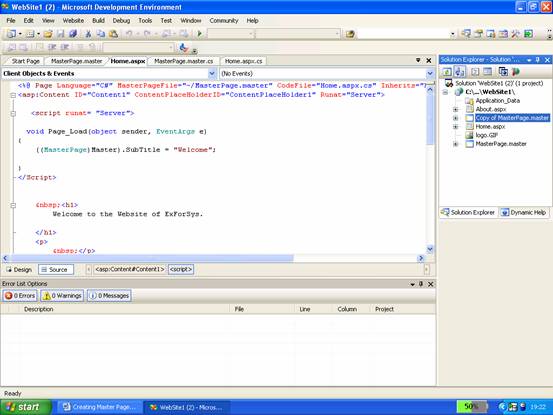
4. Right-click Copy of masterPage.master, click Rename, and then name the new master page MasterPage2.master.
5. Open Master2.master and in the @ Master directive, change MasterPage to MasterPage2.
6. Switch to Design view.
7. In the Properties window, in the drop-down list at the top, click DOCUMENT.
8. Set the BgColor property to the color of your choice.
9. The new master page will look and function like MasterPage.master, but will have a different background color
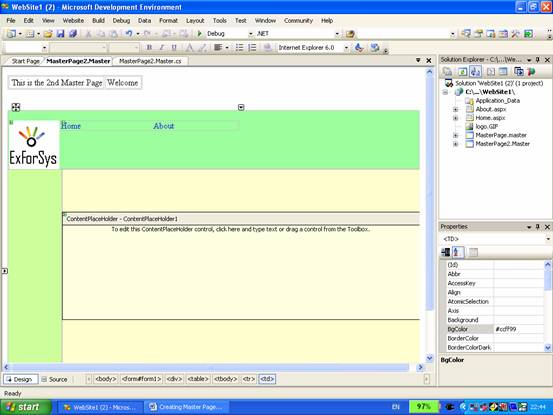
10. Open the master page’s code file, and then change the class name from MasterPage_master to MasterPage2_master.
The next step is to add a button to each master page that allows the user to select the alternate master page.
{mospagebreak}
.
.
To add buttons for selecting an alternate master page
1. Open the MasterPage2.master page.
2. In the Toolbox, from the Standard node, drag a LinkButton control onto the page and place it below the layout table.
3. Set the button’s Text property to Colorful.
4. Double-click the button to create a handler for its Click event, and then add the following highlighted code:
public partial class MasterPage2_master
5. The code loads the file name of the alternate master page into a persistent session variable, and then reloads the current page. (The Request.URL property returns a URL object that references the current page.) Shortly, you will create code in the content page that will use the name of the master page.
6. Open the MasterPage.master page.
7. Add a LinkButton control as you did in Steps 1 and 2 and set its Text property to Master 1.
8. Double-click the Master 1 button to create a handler for its Click event, and then add the following highlighted code:
9. This code is the same as that for the button in the MasterPage2.master page, except that it loads an alternate master page.
The content page will now dynamically load the master page selected by the user.
To write code to dynamically select the master page
1. Open the About.aspx page.
2. Note that the home page created earlier contains a MasterType directive that binds this content page to the MasterPage.Master and no other master pages can be assigned dynamically to the home page. The developer will have to work with other pages that have been created.
3. In Solution Explorer, right-click About.aspx, and then click View Code to open the code editor.
4. Add the following code:
void Page_PreInit(Object sender, EventArgs e)
{
…..if(Session["masterpage"] != null)
…..{
…..this.MasterPageFile = (String) Session["masterpage"];
…..}
}
5. The code sets the value of the current page’s MasterPageFile property to the value in the session variable, if any. This code must run in the Page_PreInit handler; it cannot run in a handler that occurs any later than the Page_PreInit handler (for example, in the Page_Init handler), because the master page must be established so that the page can create an instance of it before any further initialization can occur.
6. The process can now be tested.
To test the dynamic master pages
1. Open the About.aspx page, and then press CTRL+F5 to run it.
2. The page is displayed in the browser merged with its default master page, Master1.master.
3. Click the Master 1 link at the bottom of the page.
4. The page is redisplayed, this time merged with Master2.master, which has a different color schema.
5. Click the Colorful link.
6. The page is displayed using MasterPage.master again.
In this section we have examined how to create multiple master pages and also swtich between the different master pages. In the section that follows we shall briefly look at how to create nested Master pages.
[catlist id=179].