
ASP.NET Forms Authentication
In this tutorial you will learn about Forms Authentication in ASP.NET 2.0 – Forms Authentication class, Cookie Domain, Forms Cookies, The Login Control, Signin, Signout, Authenticate, Redirect, Login Status, Login Name and Login View Controls.
Forms authentication has been made easier with a supply of readymade tools for repetitive tasks. ASP.NET 2.0 encapsulates all the best practices and provides built in solutions to virtually all the tasks relating to user databases, roles cached in cookies, controls for capturing user name and passwords, and administration tools for managing users and roles. Additionally ASP.NET 2.0 supports cookie-less semantics.
Cookie-less authentication can be implemented in several ways but ASP.NET prefers to pack the authentication ticket into the URL. It requires the ISAPI filter to intercept the request, extract the ticket and rewrite the correct path to the application. The filter, then exposes the authentication ticket as another request header. In this section of the tutorial we shall see how this can be implemented.
Forms authentication is driven by the contents of
Click here to view sample code
The boxed in section of the code are the new features introduced by ASP.NET 2.0.
The FormsAuthentication class exposes some helper methods which are useful when adding authentication methods to an ASP.NET application. The static methods can be used to manipulate authentication tickets. For instance the user can call the RedirectformLoginPage method to redirect and authenticated user back to the original URL and SignOut can be used to remove the authentication ticket for the current user. There are a number of other methods that can be used to manipulate and renew the ticket and the associated cookie. Most of these deal with cookie naming and usage issues and are initialized with the values read from the applications configuration file when the application starts up.
CookieDomain is a property that returns the domain set for the authentication ticket. This property equals the domain attribute in the < forms > section.
The CookieMode returns one of the four FormsCookieMode enumeration values.
CookieSupported returns true if the current request supports cookies. When the AutoDetect mode is set, it checks for the browser’s cookie capability and verifies that cookies have not been disabled on the client.
DefaultUrl returns the configured or default URL for the page to return after the request has been successfully authenticated.
The EnableCrossAppRedirects as the name suggests, indicates whether redirects can span over different Web applications.
FormsCookieName returns the configured cookie name used for the current application. By default this name is .ASPXAUTH.
FormsCookiePath returns the configured cookie path used for the current application. The default path is the root path /.
LoginUrl returns the configured or default URL for the Login page. This matches the loginUrl configuration attribute.
RequireSSL gets the value that indicated whether a cookie must be transmitted using only HTTPS.
SlidingExpiration gets the value indicating whether sliding expiration is enabled.
A number of methods are supported by the FormsAuthentication class.
The Authenticate method is called to validate the credentials input by the user against those configured.
Decrypt returns a decrypted authentication ticket, when given a valid encrypted ticket obtained from a HTTP cookie.
Encrypt as the name suggests encrypts the authentication ticket in a form suitable for use in the HTTP cookie.
GetAuthCode creates an authentication code for a given username.
HashPasswordForStoringInConfigFile does what the name implies—hashes the password for storage in the web.config file.
Initialize is called when the application is first started and it initializes all the properties set. The method gets the cookie value and encryption keys to be used in the application.
RedirectToLoginPage is a new method that has been introduced to plug the holes in the programming interface. This method is used when the user signs out and he has to be redirected to the login page. The method identifies the login page and calls Response.Redirect.
RedirectFromLoginPage redirects the authenticated user back to the originally requested URL.
RenewticketIfOld conditionally updates the sliding expiration on an authentication ticket.
SetAuthCookie creates the authentication ticket and attaches it to the cookies collection of the outgoing response.
SignOut as stated earlier removes the authentication ticket.
The Form authentication layer is set up on top of a Web application. The web.config file is configured as under:
< authentication mode="Forms" >
…………< forms loginUrl="login.aspx"
……………………name=".ASPXFORMSAUTH" >
…………< / forms >
< / authentication >
…………
< authorization >
…………< deny users="?" / >
< / authorization >
Note that the anonymous user is denied access in the authorization section of the code. All users must enter their credentials and be authenticated. A ticket must be obtained and encrypted in default and packed into a cookie with a default name.
ASP.NET 2.0 provides the developer with many security controls. The Login Control has only one task. It takes input from the user and validates the user name and password entered, confirms authentication or denies it. Let us see how this control works:
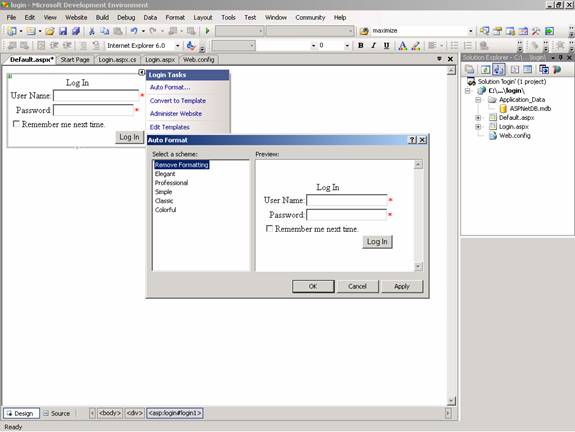
Create a web page with one page called login.aspx. Insert a table with two rows. In the First row insert a Label with the text “ExforSys Home Page–Login”. Now drag a Login control onto the page and examine the code that is formed on the page. Note that the task list of the control offers the user the option of Auto formatting the control choosing standard formats.
{mospagebreak}
This is a kind of plug and play offer. Click on convert to Template in the tasklist and see the code generated.
Click here to view sample code
Note that using the numerous properties built into this control it can be customized. See the sample of a custom control below. Note that the entire control has been created using the properties available for the control. By setting the
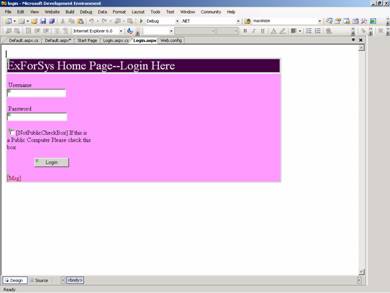
Click here to view sample code
Developers must note that there are four events with which they can interact while customizing the control. BeforeLogin is raised before the authentication process begins. The syntax can be checked and the login can be stopped if required. AfterLogin is raised after authentication is completed successfully. The developer can pass additional routines. Authenticate can be used to provide customized authentication and LoginError can be used to give error messages whenever login fails or user data is incorrect.
The Password Recovery Control helps users determine their forgotten passwords. Users will be prompted to enter their login name, answer the question for validation and the existing password will be mailed to them. If the password has been stored with a hash value in the database this becomes necessary. See the screenshot of the control as it appears when it is placed on the page.
The control must be enabled to send emails and the following code must be placed in the machine.config file. If a local SMTP service has been activated the setting can be left untouched. < stmpMail The data of the password message to be sent will have to be edited. The ‘from’ property of the MailDefinition will have to be set. Using the other definitions of the mailDefinition class other properties can also be defined. The highlight is the option to create a message based completely upon a template. This is a text file that resides in the root directory of the application. The < %UserName% > and < %Password% > can be used as placeholders. The control offers three templates that can be built from the scratch or used with customization. UserName is the initial view of the control and it asks for the user name to be typed in. Question is used if the user is required to give an answer. Answer is shown if the password has been detected successfully or has been set back and the email has been sent. A few methods also come in handy while customizing the control. BeforeUserLookup is used before the control tries to look for the user. UserLookupError is returned if the user is not found or cannot be validated. BeforeAnswerLookup is used before the answer is checked. AnswerLookupError is used if the answer is found to be incorrect. BeforeSendEmail is raised before the email is sent to the user. The LoginStatus and LoginName Controls are useful controls. The latter shows the name of the Logged in user while the former shows the status of the user. The LoginLink of the LoginStatus control automatically refers to the page in which it is placed. The LoginView Control gives two different views depending on the authentication process. It helps in conditional display of pages for anonymous and authenticated users. In other words it is possible to create role based templates using this control.
This section of the tutorial was devoted to Authentication. However, ASP.NET 2.0 comes with a lot of features that help developers create roles and membership definitions. We shall be dealing with the Membership Management API in the next section of this tutorial.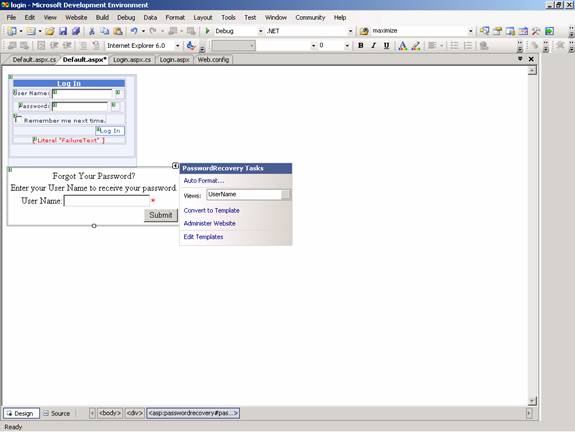
serverName=”localHost”
serverPort=”25”>
/ >
[catlist id=179].