
ASP.NET : Using Web Parts and Controls in Web Pages
In this tutorial you will learn how To create a page for containing Web Parts controls, To create content for the main zone and To create a user control.
In the preceding section we examined the concepts of Web Parts and the features of the controls that have been provided by ASP.NET 2.0 for rapidly creating web portals that are elegant and well laid out. We also theoretically appreciated the immense potential of allowing users to customize the content they wish to see. In this section we shall create a simple web page and use web parts and controls to demonstrate how all this can be done. click
To create a page for containing Web Parts controls
1. Close the default page and add a new page to the site named Start.aspx.
2. Switch to Design view.
3. Add a heading to the page with the text Web Parts Demonstration Page.
4. From the WebParts tab of the Toolbox, drag a WebPartManager control onto the page.
5. The WebPartManager control does not render any output, so it appears as a grey box on the designer surface.
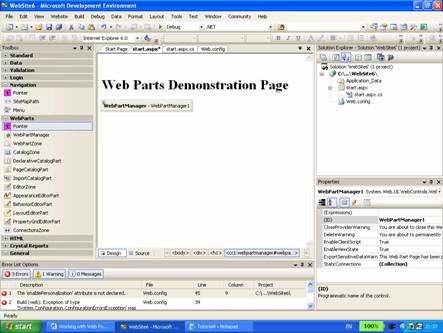
6. Position the insertion point after the WebPartManager control, and press ENTER to add a line break.
7. In the Layout menu, click Insert Table, and create a new table that has one row and three columns. Click the Cell Properties button, select Top from the Vertical align drop-down list, click OK, and click OK again to create the table.

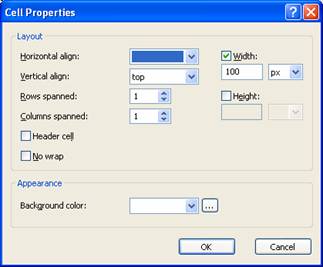
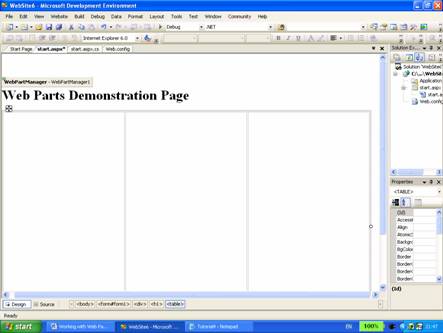
8. Drag a WebPartZone control into the left table column. Right-click the WebPartZone control, choose Properties, and set the following properties:
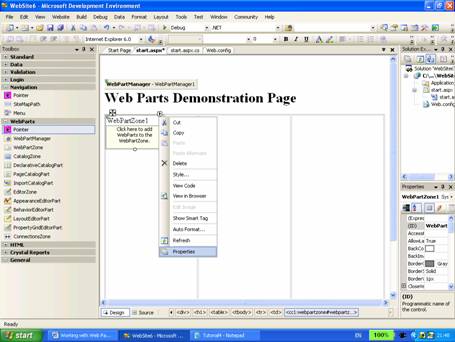
9. ID: SidebarZone
10. HeaderText: Sidebar
11. Drag a second WebPartZone control into the middle table column and set the following properties:
12. ID: MainZone
13. HeaderText: Main
14. Save the file.
Now the Web page has two distinct zones that can be controlled separately. The next step in the process is to create content. We shall create static content in this exercise to appreciate the concept.
The layout of the Web Parts zone is defined by the element ZoneTemplate as stated earlier in this tutorial. Inside this template any ASP.NET control can be added. For instance using a Label control static text can be added. When a regular server control such as a WebPartZone is added, ASP.NET views the control as a Web part control at runtime.
{mospagebreak}
.
.
To create content for the main zone
1. In Design view, drag a Label control from the Standard tab of the Toolbox into the contents area of the zone whose ID property is set to MainZone.
2. Switch to Source view. Notice that a < zonetemplate > element was added to wrap the Label control in the MainZone.
3. Add an attribute named title to the < asp:label > element, and set its value to Content. Remove the Text="Label" attribute from the < asp:label > element. Between the opening and closing tags of the < asp:label > element, add some text such as Welcome to my Home Page within a pair of < h2 > element tags. Your code should look as follows.
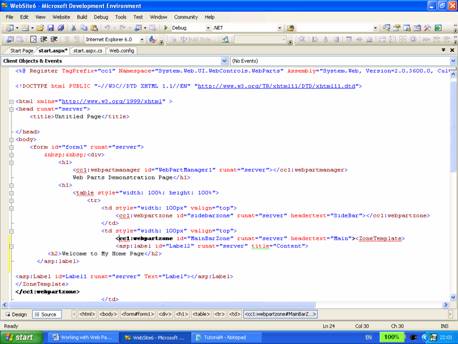
Click here to veiw sample code
4. Save the file.
Now let us create a user control that can also be added to the page as a web parts control.
To create a user control
1. Add a new Web user control to your site. Let us add a calendar control to the “Main” section below the label control.
2. Switch to Design view. From the Standard tab of the Toolbox, drag a Tree view control to the SideBar Zone. Right click on the control and select Edit nodes.
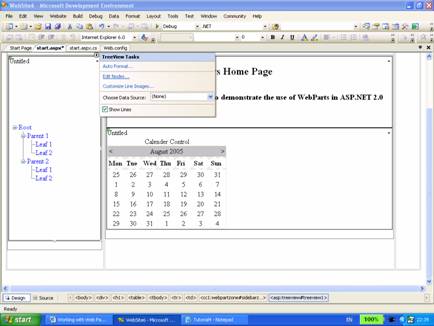
The treeeview nodes editor window opens

3. Now create a Root node, child nodes and click ok.
4. If you wish to make your site colorful, you may set different background, foreground and title properties to your controls.
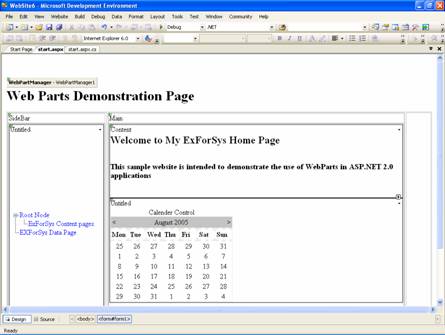
5. Save and close the file.
6. Click F5 to execute the application.
Note that in the title bar of each control there is a downward arrow that provides access to verbs menu. Click on the down arrow and see the actions that can be performed.
The code for Start.aspx should now look like this:
Click here to veiw sample code
The final page as displayed in the browser may look like this.

[catlist id=179].