
Loops are group of instructions executed repeatedly while certain condition remains true. There are two types of loops, counter controlled and sentinel controlled loops (repetition).
Counter controlled repetitions are the loops which the number of repetitions needed for the loop is known before the loop begins; these loops have control variables to count repetitions. Counter controlled repetitions need initialized control variable (loop counter), an increment (or decrement) statement and a condition used to terminate the loop (continuation condition).
Sentinel controlled repetitions are the loops with an indefinite repetitions; this type of loops use “sentinel value” to indicate “end of iteration”.
Loops are mostly used to output the data stored in arrays, however they are also used for sorting and searching of data.
‘For’ Loop
“For” loops is a counter controlled repetition; therefore the number iterations must be known before the loop starts.
for(control-variable; continuation-condition;increment/decrement-control) {
code to iterate
}
Hint: if the code to iterate is only a single line then the braces ({ }) can be ignored.
Diagram 1 illustrates ‘for statement’ operation.
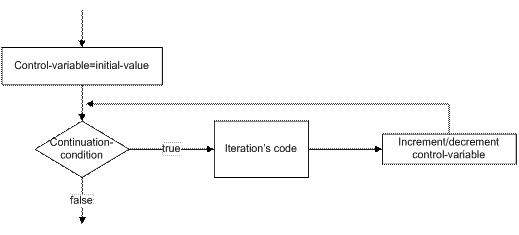
Diagram SEQ Diagram * ARABIC 1 for statement
Example: consider the case of repeating the same line of code for 10 times. We write the code below.
int counter;
for(counter=1; counter<=10; counter++)
printf("n Number: %d",counter);
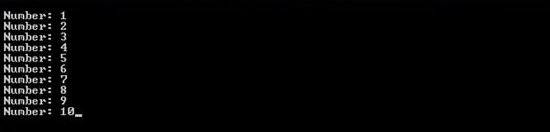
Figure 1 simple program counting from 1 to 10
Description: “statement 1” declares the control variable of this ‘for’ loop. “Statement 2” is the most important part of this code. It initializes the control variable; it sets the continuation condition and it increments the control variable after every successful iteration. Diagram 2 clearly shows how this code works.
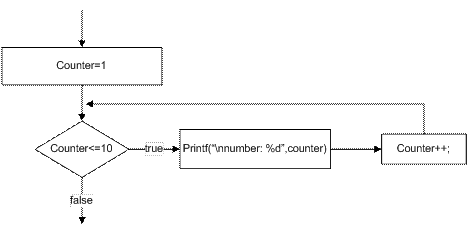
Diagram 2 code 1’s operation
The While Statement
“while” statement is a sentinel controlled repetition which can be iterated
indefinite number of times. Number of iterations is controlled using a sentinel
variable (test expression).
while(test-expression)
{code to execute
}
Hint: test-expression must be initialized otherwise errors will be generated
when trying to compile the code.
Diagram 3 illustrates how “while” statement operates
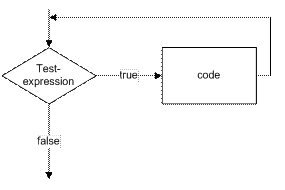
Diagram 3 while statement
Hint: sentinel variable (test expression) must be controlled within the “while” statement, otherwise the loop will run forever.
Example: here we will consider the same example as we did for “for” loop; this is to see how two loops differ from each other.
int counter=1;
while(counter <=10)
{printf("n Number: %d",counter);
counter++;}
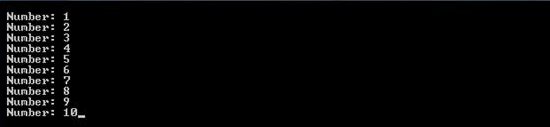
Figure 2 counting from 1 to 10 using while loop
Description: this code does the same job as the code 1 but using “while” statement instead of “for” statement.
The ‘do..while’ statement
“do..while” statement is a sentinel controlled repetition which is quite
different from the other two statements we covered earlier. This statement runs
the code first and then checks the test-expression, so there is always a
guarantee that the code runs at least once. This type of loop is generally used
for password checks and menus.
do{
code to iterate
}while(test-expression)
Hint: you must initialize the test-expression to avoid possible errors.
Diagram 4 illustrates the operation of “do..while” statement.
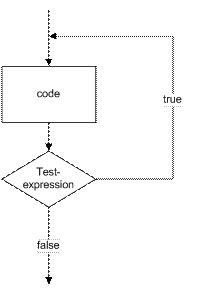
Diagram 4 do..while statement
Example #4: here we will consider a simple menu using “do..while” this code will repeat the menu until “0” is inputted.
int input;
do{printf("n press 1 to print "hello" or 0 to exit : ");
scanf("%d",&input);
switch(input)
{case 1: printf("hello"); break;
case 0: printf("exitting");break;
}}while(input !=0);

Figure 3 simple menu
Description: “switch statement” is used to create a simple menu which allows
actions for two different cases. If and input is 0 then the “while” loop will be
terminated once the test-expression is reached causing the program to exit.
The Break Statement
“break” statement is used to exit the iteration. This statement is usually used
when early escape from the loop is acceptable by the programmer. For example if
we are searching for a data, we can use “break” as soon as we find the data to
exit the loop. You can simply use “break” by writing “break;” at the point where
you want to escape the loop. “break” can be used with all the statements we have
covered in this tutorial.
Diagram 5 shows how the program flow changes by “break” statement.
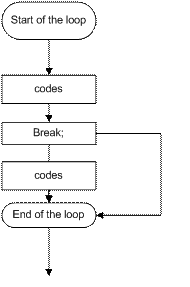
Diagram 5 use of "break"
Example: in this example, we will write a program which will escape the loop using “break” as soon as the number is equal to “2”.
int counter;
for(counter=1;counter<=10;counter++)
{printf("nnumber: %d before break",counter);
if(counter==2)
break;
printf("nnumber: %d after break",counter);
}printf("nloop was escaped at %d",counter);

Figure 4 use of "break"
Description: counter value is initialized to ‘1’. Therefore “statements 1 and 2“
will all be executed in the first iteration, but when the counter is
incremented; “statement 1,2 and 4 “ will be executed because “statement 2” will
escape out of the loop and go to the first line after the loop.
The Continue Statement
“continue” statement is used to skip the remaining code of the loop and start the new one. This statement can be implemented by “continue;”.
Diagram 6 shows the flow of the loop.
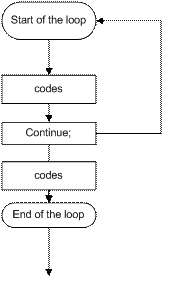
Diagram 6 "continue" statement
Example: we will consider the case in which the loop will skip all the even numbers between 1 and 10.
int counter;
for(counter=1;counter<=10;counter++)
{if(counter%2==0)
continue;
printf("nnumber: %d was not skipped",counter);
}

Figure 5 odd numbers between 1 and 10
Description: “for” statement will iterate 10 times counting from 1 to 10. Every time the counter reaches a number which is a multiple of 2 (counter%2==0), “continue” statement will be used to skip to the next number.
[catlist id=170].