
JSP Basics
Java Server Pages (JSP) is a Java API in J2EE which allows dynamic creation of web pages using Java. It has the same purpose as other existing technologies like CGI or PHP. In this tutorial you will learn about Lifecycle of JSP pages, Dynamic content generation, Invoking Java code using JSP scripting elements, JavaBeans for JSP and Error Handling.
The main difference between servlets and JSPs is that servlets are Java classes and JSPs are not (they are embedded in HTML pages). This difference also specifies where you want to use servlets and where you want to use JSPs: If you generate all of your html pages dynamically and will have complex logic, you will probably use servlets. If dynamic content is very low compared to the static content in your web page, then you will probably use JSPs.
Lifecycle of JSP pages
The lifecycle of a JSP is shown in Figure-1. The most important fact about this figure is that all JSPs are managed by JSP containers and compiled into servlets before they are loaded. Similar to servlets, the same instance is used for all requests since JSP is compiled into a servlet..
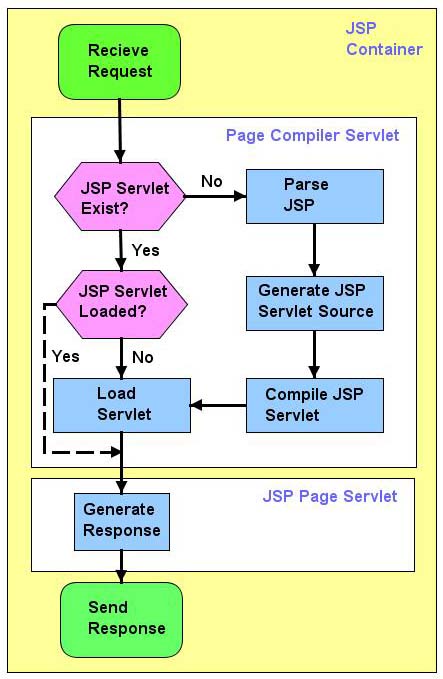
Figure-1 Life cycle of a JSP
Dynamic content generation
In this section, we will create our first JSP which will write “Hello World” to the web page if no user-name parameter is given. If user-name parameter is given (e.g. Smith), then it will print “Hello < user-name >”. (e.g. Hello Smith).
|
The source code shown in this section can be found in HelloWorldJSP project. |
The source code of HelloWorld.jsp is shown in Figure-2.
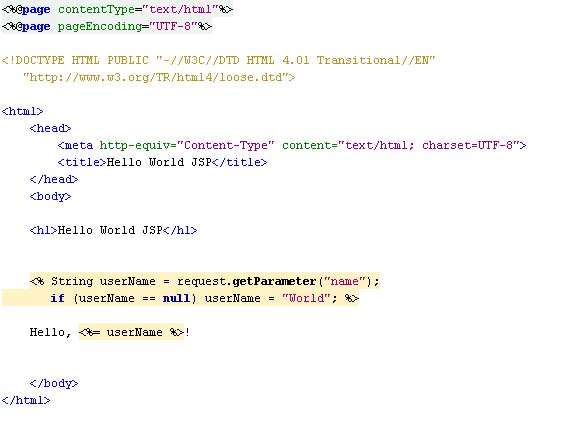
Figure-2 The source code of HelloWorld.jsp
Figure-3 shows the HelloWorld.jsp when it is run without a user-name. The result of running the same JSP with a user-name of John is shown in Figure-4. As you will notice user-name is given to the JSP as a name parameter added to the URL of the JSP.
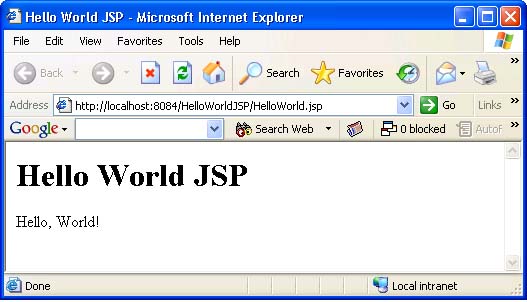
Figure-3 HelloWorld.jsp without a user-name parameter
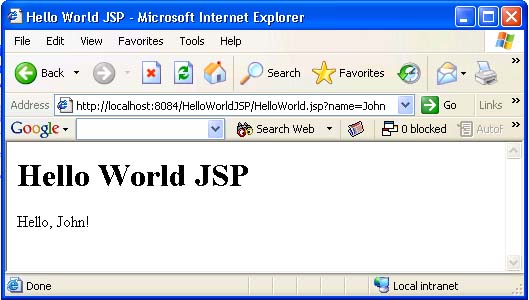
Figure-4 HelloWorld.jsp with a user-name parameter
Invoking Java code using JSP scripting elements
In this section we will create an example which shows how to define Java methods, how to call methods and how to call methods in standard Java libraries using JSPs. Specifically, we will define a factorial method which can return factorial of a number, call factorial method and get a random number from java.lang.Math class in “JavaIntegration.jsp“ file we created.
|
The source code shown in this section can be found in JavaIntegrationJSP project. |
Figure-5 shows the contents of “JavaIntegration.jsp” file. The code is very easy to understand since all we do is to add Java code inside jsp tags and it has comments where they are needed. Figure-6 shows the output of the “JavaIntegration.jsp”.
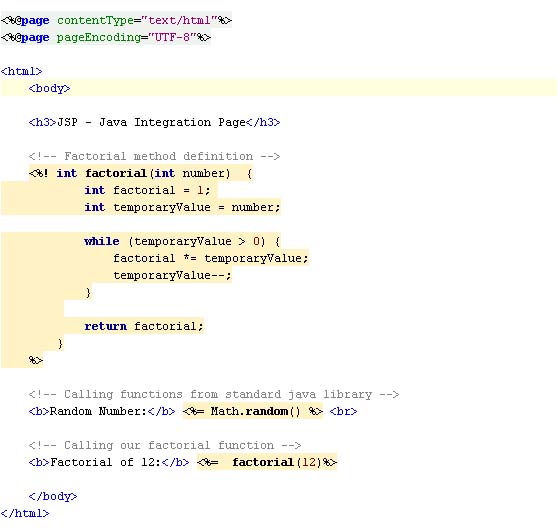
Figure-5 Contents of JavaIntegration.jsp file
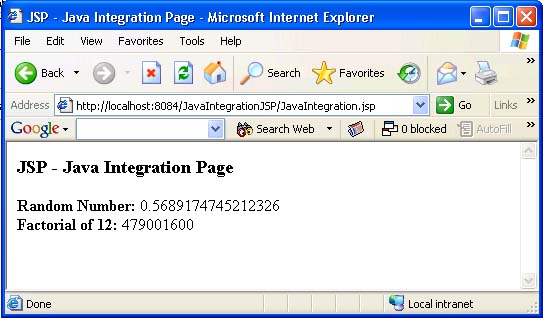
Figure-6 Output of JavaIntegration.jsp file
JavaBeans for JSP
We will modify “HelloWorld.jsp” developed in the “Dynamic Content Generation” section so that it will use a java beans at the background. Figure-5 shows HelloWorldJavaBean class which will be used by the HelloWorld.jsp.
|
The source code shown in this section can be found in HelloWorldBeanJSP project. |
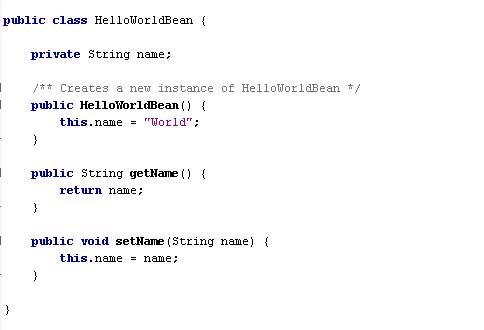
Figure-5 HelloWorldBean class
Figure-6 shows the contents of HelloWorld.jsp file which uses HelloWorldBean by the help of useBean, setProperty and getProperty tags.
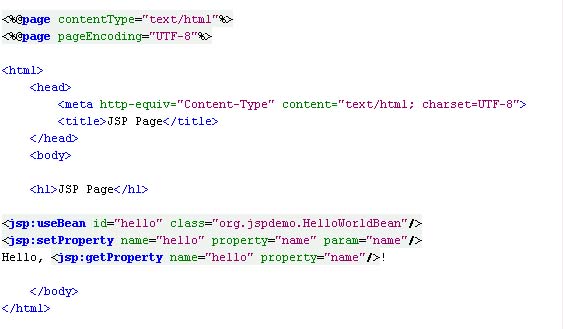
Figure-6 HelloWorld.jsp file
Figure-7 shows the HelloWorld.jsp when it is run without a user-name. The result of running the same JSP with a user-name of John is shown in Figure-8. As you will notice user-name is given to the JSP as a name parameter added to the URL of the JSP as before.
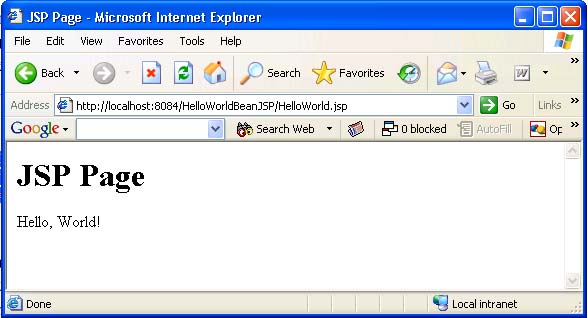
Figure-7 HelloWorld.jsp without a user-name parameter
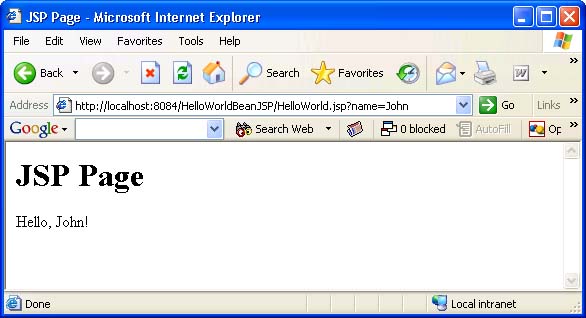
Figure-8 HelloWorld.jsp with a user-name parameter
Error Handling
Although there can be other error handling methods depending your development tools and jsp container, we will show an example for “error.jsp” page strategy in this section.
“error.jsp” page is a java server page where the errors are redirected when any found. So by setting a special parameter for error redirection in our jsp pages we can handle all errors in one jsp page.
|
The source code shown in this section can be found in ErrorPageJSP project. |
Figure-9 shows the contents of the error.jsp file which will be called by index.jsp when an exception occurs. Setting isErrorPage directive to true, we explicitly state that this jsp page is for handling errors to the JSP container. This allows error.jsp to have an “exception” object automatically which can be used for error reporting.
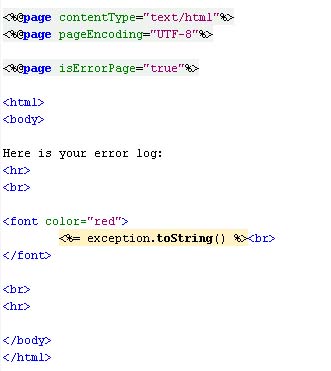
Figure-9 Contents of error.jsp page
Figure-10 shows contents of index.jsp page. Since we tried to convert a non-integer string into an integer, we will get a NumberFormatException and the control is redirected to error.jsp page internally. The errorPage directive is set to the error.jsp since we want to be directed to error.jsp page when some error occurs.
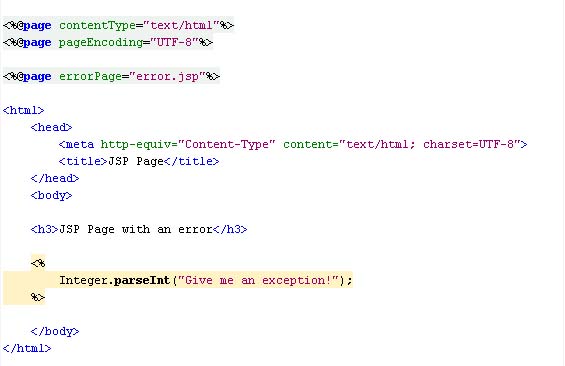
Figure-10 Contents of index.jsp page
The output of index.jsp (which is in fact redirected to error.jsp internally) is shown in Figure-11.
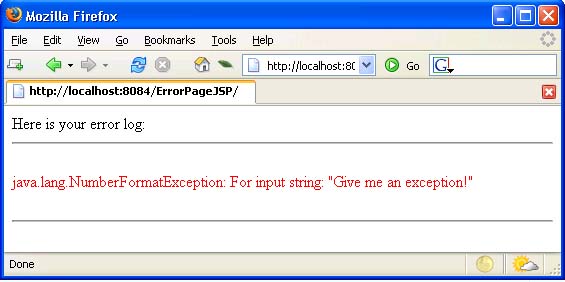
Figure-11 Output of index.jsp page
Links
• Servlet Technology Homepage – http://java.sun.com/products/servlet/
[catlist id=173].