
JavaScript Two Dimensional Arrays
In this JavaScript tutorial you will learn about two dimensional arrays – how to define and access two dimensional array in JavaScript.
Two Dimensional Arrays in JavaScript:
Two Dimensional Arrays are storing elements in a structure similar to that of a table.
Defining Two Dimensional Arrays in JavaScript:
One of the vital points to note is JavaScript does not support multi-dimensional arrays and thereby does not support Two Dimensional Array. In order to create a Two Dimensional Array in JavaScript, the programmer must use the concept of creating the Single Dimensional Array while employing a small trick in the code.
Two-Dimensional Arrays in JavaScript are constructed by creating an array of arrays. JavaScript does not directly allow creation of a Two-Dimensional Array. Two-Dimensional Arrays in JavaScript are constructed when the inner array is created first and then, using this initial array, the outer array is then populated.
For example defining
var Exforsys=new Array(4)
defines 4 storage area for the array named as Exforsys. That is
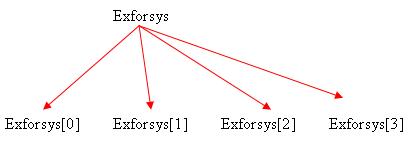
A two-dimensional array can be built by defining another array on each of Exforsys[0], Exforsys[1], Exforsys[2], Exforsys[3]
This is done as follows:
var Exforsys=new Array(4)
for (i=0; i <4; i++)
Exforsys[i]=new Array(4)
This gives structure as follows:
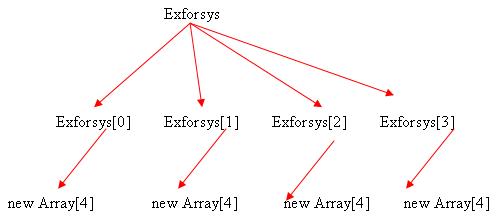
This shows a two-dimensional array constructed using the single dimensional concept of arrays in JavaScript. The next step is adding elements to two-dimensional arrays using JavaScript.
The elements can be added to the two-dimensional array in JavaScript using double brackets. For example, to store elements in the above two dimensional array named Exforsys we write:
Exforsys[0][0]="Example1"
Exforsys[0][1]="Example2"
Exforsys[0][2]="Example3"
Exforsys[0][3]="Example4"
Exforsys[1][0]="Example5"
Exforsys[1][1]="Example6"
Exforsys[1][2]="Example7"
Exforsys[1][3]="Example8"
Exforsys[2][0]="Example9"
Exforsys[2][1]="Example10"
Exforsys[2][2]="Example11"
Exforsys[2][3]="Example12"
Exforsys[3][0]="Example13"
Exforsys[3][1]="Example14"
Exforsys[3][2]="Example15"
Exforsys[3][3]="Example16"
Thus the above two dimensional array named as Exforsys has 4*4 =16 storage spaces.
[catlist id=157].