4. Enter tasks
In this tutorial you will learn how to manage task in MS Project
There are two ways:
– Top down,
– Bottom up.
Under the top down way, you enter the major phases of your work first, then list all tasks needed for each phase.
Under the bottom up, you list all tasks first, then classify groups of tasks according to the phase they belong to.
I would prefer the top down approach because it lessens the possibility of missing tasks.
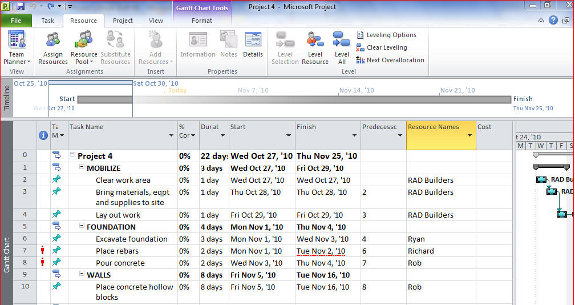
Using the top-down approach, start by typing in the various phases of your project.
I suggest capitalizing the phases to enhance the readability of your schedule.
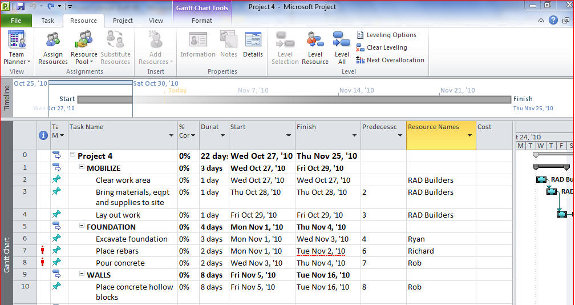
Insert tasks:
To insert task, highlight the row numbers
Right click the highlighted rows
Select Insert Task
Type in the appropriate tasks
Subtasks are inserted in the same manner.
Note that the higher-level task (or phase) gets bold whenever lower-level tasks or subtasks are added.
Delete rows: To delete a task opr row, highlight the row numbers
Right click the highlighted rows
Delete Task
5. Enter duration
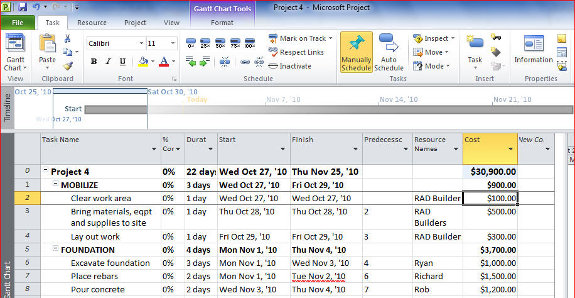
Under the Duration column:
Enter the duration for each task or subtask
[catlist id=194].