
When cubes contain a large number of dimensions and some of the dimensions undergo a change, reprocessing a cube can become a daunting task. However, Analysis server has a solution to this problem. It is possible to Incremental update a dimension. This process does not destroy existing maps and therefore does not invalidate cubes using the dimension.
Dimension Processing
As stated earlier, maps are created when a dimension is processed. However, existing maps of a dimension are destroyed when it is processed and new maps are created. Consequently all cubes accessing the dimension will find it inaccessible and the cube will be invalid. The dimension will become accessible only when the cube is reprocessed. When cubes contain a large number of dimensions and some of the dimensions undergo a change, reprocessing a cube can become a daunting task. However, Analysis server has a solution to this problem. It is possible to Incremental update a dimension. This process does not destroy existing maps and therefore does not invalidate cubes using the dimension.
Some of the changes that are made to a dimension during incremental update are the addition of new members, changing the property of existing members etc. Any other changes to a standard dimension will destroy the map and invalidate the cube. For example, you add new customer records to the customer dimension table. A cube that includes a shared dimension remains available to users while the dimension is incrementally updated, and the added dimension members are available in the cube after the update is complete. Because almost any property of a member can be changed by changing the appropriate field in the underlying dimension table, it is possible to have changed member names after the dimension is incrementally updated. The incremental update is also available only if a single shared dimension is updated. In other words the Incremental update processing option updates a dimension when changes have been made to the underlying tables of a dimension, but no structural changes have been made to the dimension itself.
Let us explore the screens that help the user incremental update a dimension. Let us say that we have added new sales_regions to the table and need to update the dimension to incorporate the incremented table.
Incrementally Updating a Dimension
1. In the console tree, Open Shared Dimensions folder and right click Department dimension and click Process
|
|
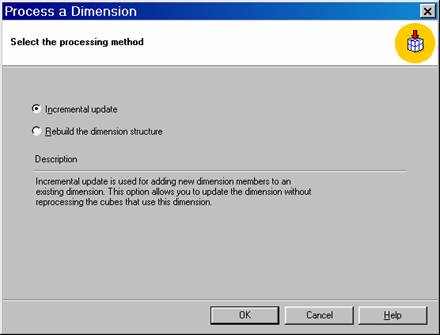
2. Select Incremental update option and click OK. Close the Process Log window.
|
|
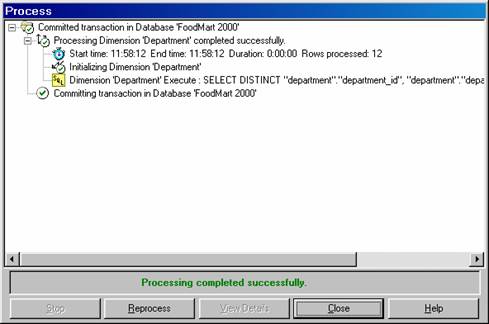
3. When performing incremental update on a dimension, the Analysis server uses an SQL statement to extract information from the dimension. It is a repeat of the process followed when rebuilding the dimensions structure. However, new paths are created only for the new members. The new member is assigned the first unused number for the children under the region. For instance if Vera Cruz from Mexico is added to the dimension table, Vera Cruz will be assigned which is the first available number. However, when the dimension is rebuilt the member Vera Cruz will become the first state in the region and will be given the path.
4. Since the hierarchical view of data is important in Dimension processing, Analysis server will regenerate the Member Id for the entire dimension while incrementally updating the dimension. Changing the member Id does not invalidate the cube because the cube only looks at the path.
{mospagebreak}
Changing Dimensions
If a dimension is flagged as a changing dimension, the existing members can be renamed or the parent of member can be changed. A changing dimension is optimized for frequent changes and it permits more types of changes than standard dimensions. Changing dimensions are useful as changes can be made without interrupting the end user and end users have to have access to changes immediately. Virtual dimensions, parent-child dimensions and regular dimensions using ROLAP storage are all changing dimensions. In changing dimensions levels below the top or above the bottom can be added, modified or moved and no processing is required. The only exception is the addition of a member group where the dimension will have to be processed.
Rebuilding the Structure of a Dimension
The Rebuild the dimension structure option re-creates and loads the dimension. This processing option is required after:
The structure of the dimension is changed. For example, after a level in the hierarchy is added or removed.
Relationships between members in the dimension hierarchy are changed. For example, after the sales regions are redefined so that the cities are now in different regions.
To rebuild the structure of a shared dimension
In the Analysis Manager tree pane, under the database that contains the shared dimension, expand the Shared Dimensions folder.
Right-click the shared dimension, and then click Process.
In the Process a Dimension dialog box, click Rebuild the dimension structure, and then click OK.
|
|
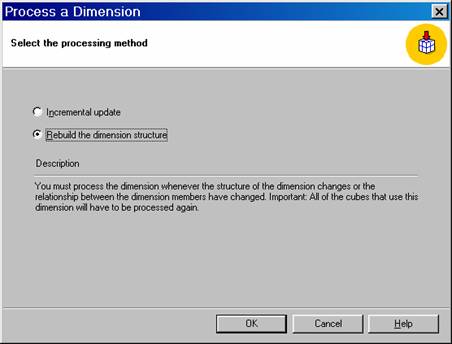
In the Process dialog box, wait for the rebuild to finish processing or click Stop to halt and cancel processing.
Cubes that use the Dimension must be processed after the dimension is processed.
{mospagebreak}
Processing Cubes
While processing a cube the dimension tables are read to populate the levels with members from the actual data from the tables. The fact table is read and specified aggregations are calculated. The results are stored in the cube and the cube is ready to be queried.
Three kinds of options are available for processing cubes.
Full Process: is the processing option used to perform a complete load of the cube. All dimension and fact table data is read and all specified aggregations are calculated. The cube must be processed with the Full Process option when its structure is new or when the cube, its dimensions, or its measures have undergone structural changes. In addition, virtual and linked cubes also require complete processing after they are built, or there is a change in their structure, or a change in one of their shared dimensions. To process a virtual cube or a linked cube, use the Process dialog box.
Cubes with changing dimensions are exceptions to the rule. Where only changes have been made to the structure of changing dimensions of a cube the cube need not be processed with the Full Process option. However, processing with the other options may be required.
Processing a cube with the Full Process option can take a substantial amount of time if there is a large fact table and there are many dimensions with many levels and many items in each level..
If there are changes in the data warehouse schema that affect the structure of cubes, the structure of those cubes will have to be changed and then processed with the Full Process option. If there are changes in or additions to data in the data warehouse, completely process cubes will not be required. Such changes can be incorporated into existing cubes using the Incremental update or Refresh data processing options, depending on how the data changed.
The Full Process option can be used while users continue to query a previously processed cube; however, after processing has completed, users need to disconnect and reconnect to reestablish access to the cube.
Please note that if a shared dimension’s structure is updated and saved but not processed, it will be processed automatically when any cube that incorporates the dimension is processed using the Full Process option. Cubes that use this dimension will not be able to access the cube during this period.
Incremental update is used when new data is to be added to a cube, but existing data has not changed and the cube structure remains the same. The Incremental update option adds new data and updates aggregations.
An incremental update does not impact the existing data that has already been processed. It usually requires significantly less time than processing with the Full Process option. An incremental update can be performed while users continue to query the cube; after the update is complete, users have access to the additional data without having to disconnect and reconnect.
Incremental Updates and Partitions
When partitions are created and managed in multiple partition cubes, the user must take special precautions to ensure accurate cube data. Although these precautions do not usually apply to single-partition cubes, they do apply when they are incrementally updated.
On incrementally updating a cube, a new partition is created and merged with the existing partitions. The Incremental Update Wizard requires the specification of the data source and fact table of the temporary partition. It also requires the specification of a filter to limit the contents of the temporary partition. If the cube contains multiple partitions, specification of the partition into which the temporary partition is merged has to be indicated. If the cube contains only one partition, the temporary partition is merged into that partition.
To ensure accurate cube data, before performing an incremental update on any cube the user must understand the special precautions related to data integrity that apply to multiple-partition cubes. We will be discussing this in greater detail in the lesson on “Managing Partitions”
Refresh data option causes a cube’s data to be cleared and reloaded and its aggregations recalculated. This option is appropriate when the underlying data in the data warehouse has changed but the cube’s structure remains the same.
The Refresh data option can be performed while users continue to query the cube; after the refresh has completed, users have access to the updated data without having to disconnect and reconnect.
Additionally users can make use of a fourth option of “Incrementally update the Dimensions of a cube” in conjunction with any of the options listed above. This option incrementally updates the cubes dimensions as part of cube processing.
{mospagebreak}
Process a cube
In the Analysis Manager tree pane, under the database that contains the cube, expand the Cubes folder.
Right-click the cube, and then click Process.
In the Process a Cube dialog box, click Full Process, and then click OK.
|
|
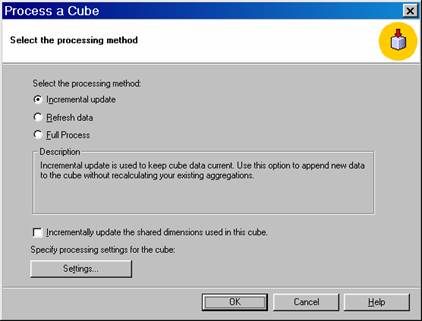
In the Process dialog box, wait for the cube to finish processing, or click Stop to halt and cancel processing.
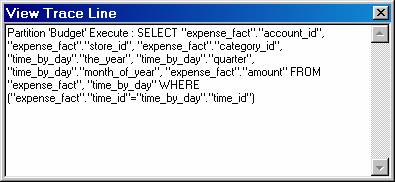
After processing completes, the SQL statement used to process the cube can be viewed..
To view an SQL statement
In the Process dialog box, click a line beginning with the SQL icon.
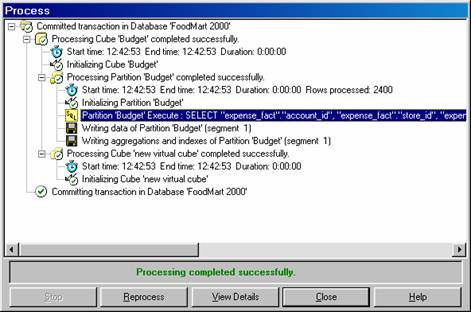
Click View Details.
|
|
The time taken for the processing will depend on the size of the cube and the number of dimensions it has. Also, the storage required for temporary files during processing can be substantially larger than the final size of the cube. If during processing the free space of the disk containing the temporary file folder is exhausted, the user can specify a folder on another disk with more free space.
To change the temporary file folder used by Analysis Services
- In the Analysis Manager tree pane, right-click the Analysis server for which you want to change the temporary file folder, and then click Properties.
- Beside the Temporary file folder box, click Browse, select a new folder, and then click OK.
|
|
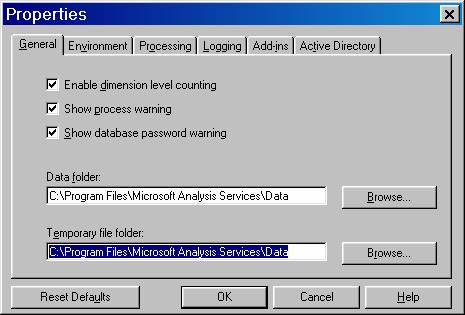
- In the Properties dialog box, click OK.
- The MSSQLServerOLAPService service must be stopped and restarted after this change..
Cube Properties for Processing
Some properties of a cube are used to control its processing. You can set these properties in the properties pane of Cube Editor or in the Cube Processing Settings dialog box, which is displayed when you click Settings in the Process a Cube dialog box. The following table describes these properties.
Processing Optimization Mode
Selection of ‘Regular’ in Cube Editor or ‘After all aggregations are calculated’ in the Cube Processing Settings dialog box, new cube data is not available until processing completes. These values are the defaults. If Lazy Aggregations is selected in Cube Editor or Immediately after data is loaded in the Cube Processing Settings dialog box, new cube data is available before processing completes; however, because the optimizations are not complete when the new data becomes available, query performance is reduced until the optimizations complete.
Stop Processing on Key Errors : Stop processing after encountering missing dimension key errors or Ignore all missing dimension key errors
If Yes is selected in Cube Editor or Stop processing after encountering missing dimension key errors in the Cube Processing Settings dialog box, processing is halted and canceled when the specified limit for the number of dimension key errors is exceeded. (See Key Error Limit.) A dimension key error occurs when a fact table row is encountered that contains a foreign key value not present in the joined primary key column of a dimension table. If No is selected in Cube Editor or Ignore all missing dimension key errors in the Cube Processing Settings dialog box, dimension key errors never halt and cancel cube processing regardless of the number of errors encountered. If one or more dimension key errors are encountered, the cube’s data does not reflect the entire fact table.
Key Error Limit : Processing will stop after
This is the limit for the number of dimension key errors. Cube processing is halted and canceled when the limit is exceeded. The default is 0. If a higher number is selected and processing completes, the cube’s data does not reflect the entire fact table. This property is ignored if No is selected for the Stop Processing on Key Errors property in Cube Editor, or Ignore all missing dimension key errors in the Cube Processing Settings dialog box is selected.
Key Error Log File : File path and name
{mospagebreak}
Incrementally update a cube
This procedure updates a partition. Incorrect use of partitions can result in inaccurate cube data.
- In the Analysis Manager tree pane, under the database that contains the cube, expand the Cubes folder.
- Right-click the cube, and then click Process.
- In the Process a Cube dialog box, click Incremental update.
- (Optional.) To incrementally update shared dimensions contained in the cube during processing, select Incrementally update the shared dimensions used in this cube.
- Click OK to display the Incremental Update Wizard
|
|
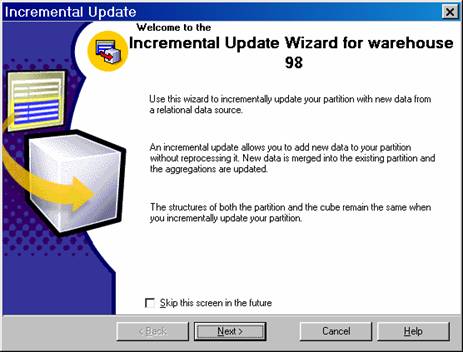
In the Incremental Update Wizard:
In the Welcome step, click Next.
If the cube contains multiple partitions, the Select a partition to update step appears. In the Partition box, select the partition to update, and then click Next.
|
|
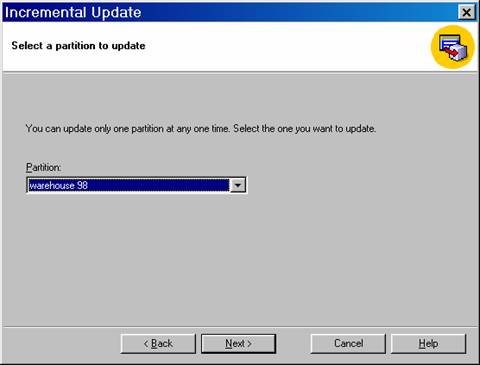
In the Data source box, select the data source that contains the data to add to the partition. The same data source used by the partition can be selected or a different one. By default the same data source used by the partition is initially displayed. To select a different data source, click Change, select the data source, and then click OK. If a different data source is selected, it must contain a fact table with the same structure and columns as the fact table for the partition, and it must contain dimension tables with the same structure and columns as the partition’s dimension tables.
|
|
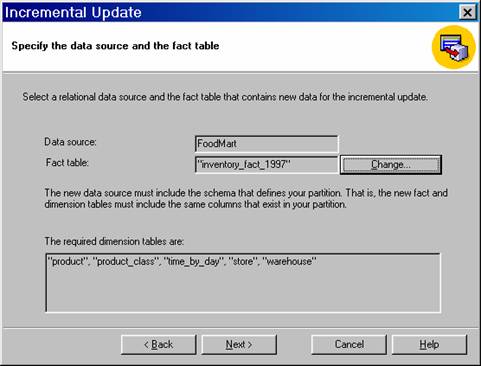
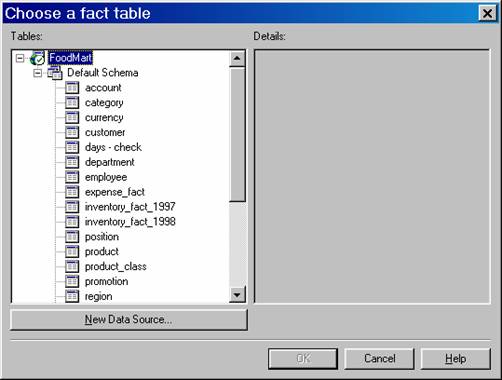
In the Fact table box, select the table that contains the data to add to the partition. The partition’s fact table can be selected or a different table. By default the partition’s fact table is initially displayed. If this table is selected, the user must use a filter, as described in the next step, to ensure that only data not already in the partition is added. To select a different table, click Change, select the table, and then click OK. If a different table is selected, it must have the same structure and columns as the fact table for the partition. The table must also be manually merged with the fact table for the partition after the incremental update completes. Click Next.
|
|
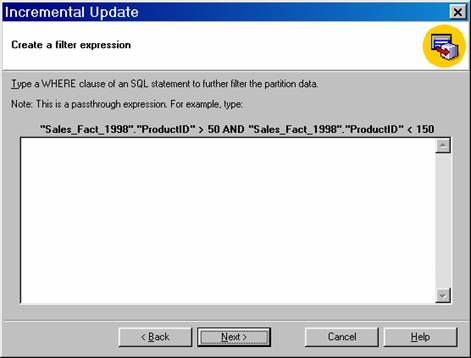
Specify a filter (WHERE clause expression) to limit the data selected from the fact table and added to the partition. A filter is required if the fact table for the partition is selected as the fact table for the incremental update. Click Next
|
|
Click Finish.
In the Process dialog box, wait for the incremental update to finish processing, or click Stop to halt and cancel processing.
To refresh data in a cube
- In the Analysis Manager tree pane, under the database that contains the cube, expand the Cubes folder.
- Right-click the cube, and then click Process.
- In the Process a Cube dialog box, click Refresh data.
- (Optional.) To incrementally update shared dimensions contained in the cube during processing, select Incrementally update the shared dimensions used in this cube.
- Click OK.
- In the Process dialog box, wait for the data refresh to finish processing, or click Stop to halt and cancel processing.
[catlist id=181].