
Exforsys

Analysis Services Training

  1. MSAS - Browsing the Dependency Network
  2. MSAS - Building a Relational Decision Tree Model
  3. MSAS - Introduction to Data Mining
  4. MSAS - Applying security to a Dimension
  5. Tutorial 65: MSAS - Managing Cube Roles
  6. MSAS - Understanding Database Roles
  7. MSAS - Securing User Authentication
  8. MSAS - Introducing Analysis Services Security
  9. MSAS - Writebacks
  10. MSAS - Defining and Creating Drillthrough
  11. MSAS - Defining and Creating Auctions
  12. MSAS - Creating and Maintaining Calculated Members in Virtual Cubes
  13. MSAS - Building a Virtual Cube
  14. MSAS - Understanding Virtual Cubes
  15. MSAS - Introducing Solve Order
  16. MSAS - Implementing Calculations Using MDX Part 2
  17. MSAS - Implementing Calculations Using MDX Part 1
  18. MSAS - Merging Partitions
  19. MSAS - Introduction and Managing Partitions
  20. MSAS - Troubleshooting Cube Processing
  21. MSAS - Optimizing Cube Processing
  22. MSAS - Processing Dimensions and Cubes
  23. MSAS - Introducing Dimension and Cube Processing
  24. MSAS: Optimization Tuning Part 2
  25. MSAS: Optimization Tuning Part 1
  26. MSAS: Usage-Based Optimization
  27. MSAS: Analysis Services Aggregations
  28. MSAS: The Storage Design Wizard
  29. MSAS: Analysis Server Cube Storage
  30. MSAS: Defining Cube Properties
  31. MSAS: Introduction and Working with Measures
  32. MSAS: Introduction and Working with Cubes
  33. MSAS: Virtual Dimensions
  34. MSAS: Introducing Member Properties
  35. MSAS: Creating Custom Rollups
  36. MSAS: Creating a Time Dimension
  37. MSAS: Understanding Hierarchies
  38. MSAS: Dimension Storage Modes and Levels
  39. MSAS: Working with Levels and Hierarchies
  40. MSAS: Working with Parent-Child Dimensions
  41. MSAS : Basics of Levels
  42. MSAS : Working with Standard Dimensions
  43. MSAS : Shared vs Private Dimensions
  44. Understanding Dimension Basics
  45. MSAS : Office 2000 OLAP Components
  46. MSAS : Client Architecture
  47. MSAS : Cube Storage options
  48. MSAS : Meta data Repository
  49. MSAS : Analysis services Tools for Extended Functionality
  50. MSAS : The Wizards
  51. MSAS : The Analysis Manager and Analysis Server
  52. MSAS : The Data warehousing framework of SQL Server 2000 - Part 2
  53. MSAS : The Data warehousing framework of SQL Server 2000 - Part 1
  54. MSAS : Microsoft Data Warehousing Overview
  55. MSAS : Browsing the Cube
  56. MSAS : Designing Storage and Processing the Cube
  57. MSAS : Building the Cube Part #3
  58. MSAS : Building the Cube Part #2
  59. MSAS : Building the Cube Part #1
  60. MSAS : Setting up the Database in Analysis Server
  61. MSAS : Preparing to Create the Cube
  62. MSAS : Introducing Analysis Manager Wizards
  63. Microsoft Analysis Services Installation
  64. MSAS - Applying OLAP Cubes
  65. Understanding OLAP Models
  66. Designing the Dimensional Model and Preparing the data for OLAP
  67. Design of the data warehouse: Kimball Vs Inmon
  68. Defining OLAP Solutions and Data Warehouse design
  69. Microsoft Analysis Services Training
  70. Data Warehouse database and OLTP database
  71. Introduction to Data Warehousing

Ads


Home arrow Technical Training arrow Analysis Services Training

MSAS : Basics of Levels

Author : Exforsys Inc.     Published on: 31st Mar 2005
A level is an element of a dimension hierarchy that describes the hierarchy from the highest level to the lowest level of data. Levels exist within dimensions and are based on columns in the dimension table or member properties in the dimension. They specify the contents and structure of the dimension’s hierarchy and determine the members that are included in the hierarchy and their positions relative to one another within the hierarchy.

Ads

Levels get created when a dimension is created using the Dimension Wizard, Editor or the Cube Editor. The levels can then be maintained and their properties can be set. Measures can be created after the cubes are created. The relationship between the levels, members of a calendar dimension can be illustrated as under:
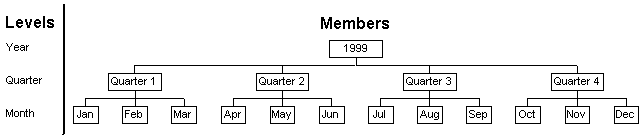
Levels can be defined in three different ways depending on the variety of the dimension in which the level is defined. In regular dimensions the user can select a dimension from the dimension table to supply the members of the level. In parent child dimensions a distinction needs to be made between the level object and a level in the hierarchy. It contains only one level object but the hierarchy of the dimension usually contains multiple levels. Therefore, it is necessary to select two columns from the dimension table. One column will identify the members of the dimension and the other column will identify the parents of the members. The column that contains the member identifiers supplies all the members of the dimension. In a virtual dimension a member property is selected from another dimension or column in the table of another dimension. This column or member property supplies the members of the level.

The Member Key Column property controls the identification of members. The order of the levels in the dimension’s definition, are controlled by the vertical positions of members within the dimension’s hierarchy in regular or virtual dimensions. The vertical order is matched in the levels’ order in the hierarchy. The member’s horizontal position is determined by the level in which it is included.

In parent-child dimensions the horizontal and vertical positions of the members are defined differently as only a single level can be defined. The Parent key Column and the Root Member If defines the vertical positions and the order by property defines the horizontal position.

The (All) level is a special level that is defined as the highest level in the hierarchy. It contains a single member whose value is the aggregation of the values of the members in the immediately subordinate level.

Levels are subordinate to dimensions in the database or cube. They may be derived from or included in the shared or private dimensions or cubes in the database. Member properties are subordinate to levels.

Analysis Manager identifies levels using icons containing small squares. The number of squares in the icon indicates the level’s position in the dimension definition.
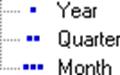
The (All) level icon is displayed only in dialog boxes as

Ads

Parent-Child Dimensions

Dimensions which are specially designed to support self referencing dimension tables in data warehouses are called parent child dimensions. Unlike regular dimensions, the level structure does not depend on the number of columns chosen from the underlying dimension tables and the number of columns mapped to a level in the dimension. Two columns from the underlying dimension table can define relationships among the members of the dimension. A single column supplies the unique identifier of the referenced member, and the other column supplies the unique identifier of the parent for the referenced member. As a result an unbalanced hierarchy is produced. An example of an unbalanced hierarchy is produced below.

Employee ID
Name
Parent Employee ID
1
Jacob

2
Elaine
1
3
Jane
2
4
James
3
5
Elizabeth
4
6
Harry
5

Note that all the records do not have a parent employee ID and one record must be at the top. The topmost record or root member is determined by Analysis Services in four ways using the Root Member If property.

Parent Child dimensions also support ragged hierarchies using the Skipped Levels Column property. The property must contain the name of a column in the dimension table that stores the number of skipped levels between the referenced member and its parent member.

The write enablement of the parent child dimension makes it a changing dimension. The hierarchy or properties of members can be changed directly using Analysis Services. This feature is useful in rapid development scenarios or when an established data warehouse does not exist.

The limitations of a Parent Child dimension are that they do not support huge dimensions as they use MOLAP storage. As a result they cannot also support real-time OLAP.


This tutorial is part of a Analysis Services Training tutorial series. Read it from the beginning and learn yourself.

Analysis Services Training

  1. MSAS - Browsing the Dependency Network
  2. MSAS - Building a Relational Decision Tree Model
  3. MSAS - Introduction to Data Mining
  4. MSAS - Applying security to a Dimension
  5. Tutorial 65: MSAS - Managing Cube Roles
  6. MSAS - Understanding Database Roles
  7. MSAS - Securing User Authentication
  8. MSAS - Introducing Analysis Services Security
  9. MSAS - Writebacks
  10. MSAS - Defining and Creating Drillthrough
  11. MSAS - Defining and Creating Auctions
  12. MSAS - Creating and Maintaining Calculated Members in Virtual Cubes
  13. MSAS - Building a Virtual Cube
  14. MSAS - Understanding Virtual Cubes
  15. MSAS - Introducing Solve Order
  16. MSAS - Implementing Calculations Using MDX Part 2
  17. MSAS - Implementing Calculations Using MDX Part 1
  18. MSAS - Merging Partitions
  19. MSAS - Introduction and Managing Partitions
  20. MSAS - Troubleshooting Cube Processing
  21. MSAS - Optimizing Cube Processing
  22. MSAS - Processing Dimensions and Cubes
  23. MSAS - Introducing Dimension and Cube Processing
  24. MSAS: Optimization Tuning Part 2
  25. MSAS: Optimization Tuning Part 1
  26. MSAS: Usage-Based Optimization
  27. MSAS: Analysis Services Aggregations
  28. MSAS: The Storage Design Wizard
  29. MSAS: Analysis Server Cube Storage
  30. MSAS: Defining Cube Properties
  31. MSAS: Introduction and Working with Measures
  32. MSAS: Introduction and Working with Cubes
  33. MSAS: Virtual Dimensions
  34. MSAS: Introducing Member Properties
  35. MSAS: Creating Custom Rollups
  36. MSAS: Creating a Time Dimension
  37. MSAS: Understanding Hierarchies
  38. MSAS: Dimension Storage Modes and Levels
  39. MSAS: Working with Levels and Hierarchies
  40. MSAS: Working with Parent-Child Dimensions
  41. MSAS : Basics of Levels
  42. MSAS : Working with Standard Dimensions
  43. MSAS : Shared vs Private Dimensions
  44. Understanding Dimension Basics
  45. MSAS : Office 2000 OLAP Components
  46. MSAS : Client Architecture
  47. MSAS : Cube Storage options
  48. MSAS : Meta data Repository
  49. MSAS : Analysis services Tools for Extended Functionality
  50. MSAS : The Wizards
  51. MSAS : The Analysis Manager and Analysis Server
  52. MSAS : The Data warehousing framework of SQL Server 2000 - Part 2
  53. MSAS : The Data warehousing framework of SQL Server 2000 - Part 1
  54. MSAS : Microsoft Data Warehousing Overview
  55. MSAS : Browsing the Cube
  56. MSAS : Designing Storage and Processing the Cube
  57. MSAS : Building the Cube Part #3
  58. MSAS : Building the Cube Part #2
  59. MSAS : Building the Cube Part #1
  60. MSAS : Setting up the Database in Analysis Server
  61. MSAS : Preparing to Create the Cube
  62. MSAS : Introducing Analysis Manager Wizards
  63. Microsoft Analysis Services Installation
  64. MSAS - Applying OLAP Cubes
  65. Understanding OLAP Models
  66. Designing the Dimensional Model and Preparing the data for OLAP
  67. Design of the data warehouse: Kimball Vs Inmon
  68. Defining OLAP Solutions and Data Warehouse design
  69. Microsoft Analysis Services Training
  70. Data Warehouse database and OLTP database
  71. Introduction to Data Warehousing
 

Comments