
In the first tutorial of this series “Introduction to Data Warehousing and OLAP” we briefly touched upon storage options that are used in data warehousing. In the second chapter “ Introducing Analysis Manager Wizards” we learnt how to use the cube Storage wizard to set storage options for the cube we had created. In this section of the tutorial we will be going into a little more detail on the various kinds of storage options available in Analysis Services and will be touching on the pros and cons of the different storage modes.
To recapitulate, a cube is a multidimensional representation of data. The dimensions of a cube are the dimensions of a fact table. Each cell in a cube represents a fact corresponding to a level of detail for the different dimensions in a fact table. Though the graphical representation of a cube can reveal only three faces, the dimensions of a cube can be around 128. The values in the cells of the cube relate the values of the dimension levels that intersect in the cell.
Analysis Services works with Decision Support Systems (DSO) to enable the user create a cube from any data source that has an OLE DB provider. It could be a relational database with a ODBC driver or a text file or a dimensional database.
Cube partitions are logical divisions of data in a cube, broken down by values of a particular dimension of the data source. A partition can be saved separately on a different disk drive from the original cube. This enables the user store the data that is not frequently required in a slower storage media. Partitions can also be distributed and stored on different Analysis servers that are designed to provide a clustered storage approach to cube storage. This distributes the workload across Analysis servers. When partitions are stored on servers other than the one that stores the metadata for them, are called remote partitions.
Analysis services provides for true multi-cube architecture. One or more cubes can be linked together by common dimensions and measures to create a multi cube structure. A measure is a set of values based on the column values of a fact table. Measures are the values which are analyzed and the numeric data is of primary interest to the user. When two or more cubes share common dimensions they can be linked and the process creates a Linked Cube. The shared dimension “Time” for example could be the common measure that is used by two cubes. In fact shared dimensions provide Linked cubes the advantage of creating links between data sets that are apparently unrelated. Linked cubes do not require additional storage and can link cubes based on different storage types. For instance a cube in relational database can be linked to a cube stored in the multidimensional database.
Now that we have recapitulated the facts about cubes, let us re-look at how cubes are stored, the advantages and disadvantages of the various storage options and options relating to storage of partitions and linked cubes and so on.
Cube data and aggregations of such data can be stored with different techniques and modes as already discussed in the earlier tutorials. The Analysis server, along with the Decision Support Services in SQL Server 2000, supports three types of storage options. The Multidimensional OLAP (MOLAP), the relational OLAP (ROLAP) and Hybrid OLAP(HOLAP).
MOLAP is a multidimensional, high performance storage format. The data supporting the cubes is stored in the server as a multidimensional database. It gives the best query performance as it is optimized for multidimensional queries. The disadvantage of this storage format is that it requires the copying of all data and the conversion of such data into appropriate formats for the multidimensional data store and is only suitable for small to medium size data sets.
ROLAP does not require a copy of the original data from the data source. The data remains in the relational data source and a separate set of relational tables is used to store and reference aggregation data in this OLTP system. These tables are called materialized views. They store data aggregations that are defined by dimensions when the cube is created. In ROLAP the aggregation tables have fields for each dimension and measure. The dimension columns are indexed and a composite index is created for all the dimension fields. Due to this, ROLAP is eminently suitable for large databases or legacy data that is infrequently queried. The disadvantage of ROLAP format is that reporting on data and processing of cube data takes time and impacts on the performance of the transaction processing system.
Hybrid OLAP as the name suggests is a combination of ROLAP and MOLAP. The data is retained in relational databases as in ROLAP but the aggregations of data are performed and stored in multidimensional databases. The advantage of this storage format is that it provides connectivity to a large number of relational databases while harnessing the speed of the multidimensional aggregation storage.
All three storage modes include the cube map in the Analysis services. What is the cube map? Cubes are made up of dimensions. When dimensions are processed Analysis services reads the data in the dimension table and makes a map of the dimension. Within the map members are stored, fully qualified, using all levels of hierarchies for the dimension. When the cubes made up of these dimensions are processed, Analysis services first combines the various maps of the dimension tables and constructs a multidimensional map. It then reads the detail records from the fact table in the warehouse and stores detailed values in the data storage area. It is the cube map which makes the data appear like a cube to the end user and since the client cannot see the cube, it is easy to exchange the storage mode of the cube without impacting on the client applications. The figure below illustrates the process by which the cube map is created.
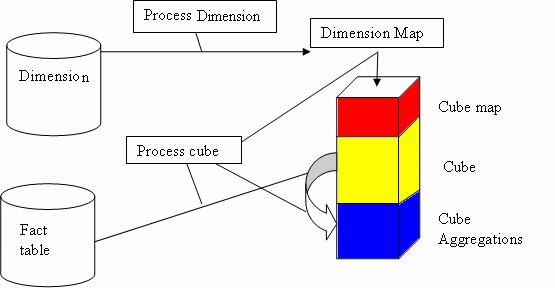
This storage area in the cube is efficiently organized to ensure that key combinations which do not contain a value do not take up room. Data is highly compressed and prior computing of aggregations is done flexibly and intelligently to address the problem of data explosion. This feature makes the cubes very dense and smaller than the data source size and makes storage and retrieval significantly faster.
Until recently a 50 GB cube was considered to be large. Analysis services has dramatically redefined large by allowing for storage modes that can store up to 1.2 terabytes(TB) of non-indexed source data, with 7.7 billion fact rows in a single cube. Queries are returned with sub second response time and the resultant cube size is 416 GB—i.e. 1/3 rd the size of the original data set.
The greatest advantage of Analysis services storage options is that it is transparent. This transparency is seamless for both the developer and the end user. Whatever the storage option selected Analysis services handles the request smoothly. The strength and flexibility built into the design is clear from the fact that cubes can include multiple partitions and each partition can use a different storage option. As a consequence one cube may use all three storage options. This capability is significant because it provides for improved flexibility, ease of data management, Real time OLAP (cubes that automatically and consistently reflect current information from the server database without any need for manual updates) and flexible storage options that best suit the business and technical requirements of the organization.
We will be learning more about cube storage optimization issues in the tutorial “Managing storage and Optimization”.
[catlist id=181].