Exforsys

Analysis Services Training

  1. MSAS - Browsing the Dependency Network
  2. MSAS - Building a Relational Decision Tree Model
  3. MSAS - Introduction to Data Mining
  4. MSAS - Applying security to a Dimension
  5. Tutorial 65: MSAS - Managing Cube Roles
  6. MSAS - Understanding Database Roles
  7. MSAS - Securing User Authentication
  8. MSAS - Introducing Analysis Services Security
  9. MSAS - Writebacks
  10. MSAS - Defining and Creating Drillthrough
  11. MSAS - Defining and Creating Auctions
  12. MSAS - Creating and Maintaining Calculated Members in Virtual Cubes
  13. MSAS - Building a Virtual Cube
  14. MSAS - Understanding Virtual Cubes
  15. MSAS - Introducing Solve Order
  16. MSAS - Implementing Calculations Using MDX Part 2
  17. MSAS - Implementing Calculations Using MDX Part 1
  18. MSAS - Merging Partitions
  19. MSAS - Introduction and Managing Partitions
  20. MSAS - Troubleshooting Cube Processing
  21. MSAS - Optimizing Cube Processing
  22. MSAS - Processing Dimensions and Cubes
  23. MSAS - Introducing Dimension and Cube Processing
  24. MSAS: Optimization Tuning Part 2
  25. MSAS: Optimization Tuning Part 1
  26. MSAS: Usage-Based Optimization
  27. MSAS: Analysis Services Aggregations
  28. MSAS: The Storage Design Wizard
  29. MSAS: Analysis Server Cube Storage
  30. MSAS: Defining Cube Properties
  31. MSAS: Introduction and Working with Measures
  32. MSAS: Introduction and Working with Cubes
  33. MSAS: Virtual Dimensions
  34. MSAS: Introducing Member Properties
  35. MSAS: Creating Custom Rollups
  36. MSAS: Creating a Time Dimension
  37. MSAS: Understanding Hierarchies
  38. MSAS: Dimension Storage Modes and Levels
  39. MSAS: Working with Levels and Hierarchies
  40. MSAS: Working with Parent-Child Dimensions
  41. MSAS : Basics of Levels
  42. MSAS : Working with Standard Dimensions
  43. MSAS : Shared vs Private Dimensions
  44. Understanding Dimension Basics
  45. MSAS : Office 2000 OLAP Components
  46. MSAS : Client Architecture
  47. MSAS : Cube Storage options
  48. MSAS : Meta data Repository
  49. MSAS : Analysis services Tools for Extended Functionality
  50. MSAS : The Wizards
  51. MSAS : The Analysis Manager and Analysis Server
  52. MSAS : The Data warehousing framework of SQL Server 2000 - Part 2
  53. MSAS : The Data warehousing framework of SQL Server 2000 - Part 1
  54. MSAS : Microsoft Data Warehousing Overview
  55. MSAS : Browsing the Cube
  56. MSAS : Designing Storage and Processing the Cube
  57. MSAS : Building the Cube Part #3
  58. MSAS : Building the Cube Part #2
  59. MSAS : Building the Cube Part #1
  60. MSAS : Setting up the Database in Analysis Server
  61. MSAS : Preparing to Create the Cube
  62. MSAS : Introducing Analysis Manager Wizards
  63. Microsoft Analysis Services Installation
  64. MSAS - Applying OLAP Cubes
  65. Understanding OLAP Models
  66. Designing the Dimensional Model and Preparing the data for OLAP
  67. Design of the data warehouse: Kimball Vs Inmon
  68. Defining OLAP Solutions and Data Warehouse design
  69. Microsoft Analysis Services Training
  70. Data Warehouse database and OLTP database
  71. Introduction to Data Warehousing

Ads


Home arrow Technical Training arrow Analysis Services Training

MSAS: Usage-Based Optimization

Page 1 of 2
Author : Exforsys Inc.     Published on: 13th Apr 2005
This tutorial explains the usage of the Usage Based Optimization Wizard, The Server Cache , Query Usage and Manipulating the query log.

Using the Usage Based Optimization Wizard.

Ads

1. When a set of queries have accumulated in the Usage log, the Usage based Optimization wizard can be pressed into service.

2. The task on hand is to select the Logged queries that should be applied and then design aggregations based on them

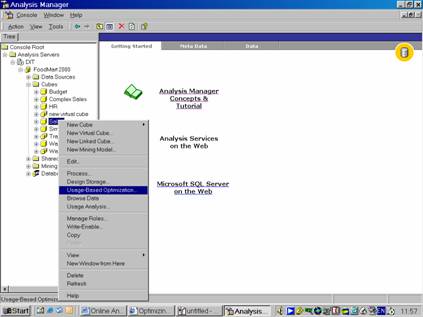
3. Let us assume that a user has browsed the sales cube and accumulated log entries by manipulating data.

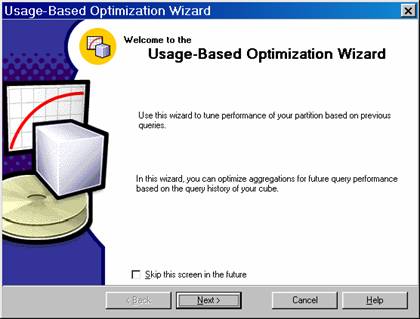
4. Now Right click the Sales cube, click the Usage Based Optimization. Click Next to leave the welcome screen.

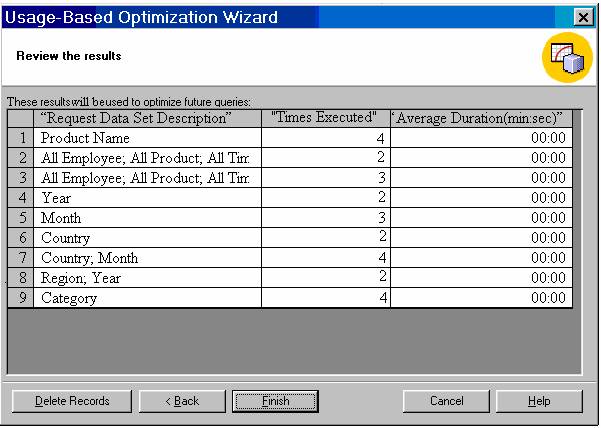
5. On the criteria screen let us select the Queries that Ran more Than…Check box and type 0 in the times box. Click Next to continue to review the filters queries.


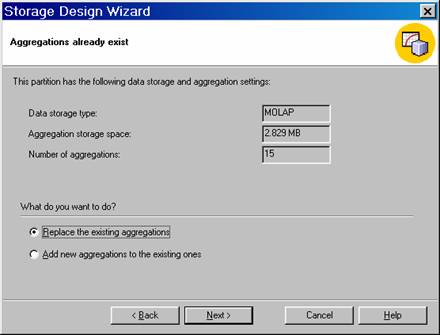
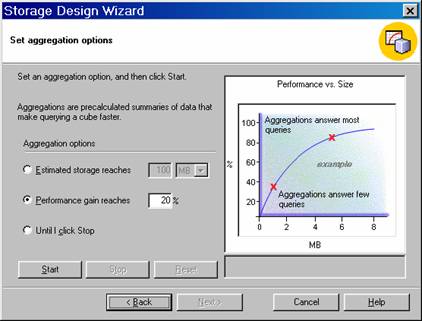
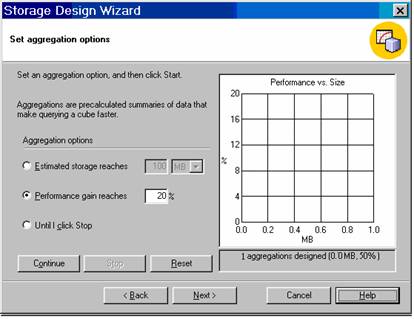
6. On the above screen click Next. The “Aggregations already exists” Storage Wizard screen opens. The user can now add aggregations or replace the existing aggregations.

7. Click Replace The Existing Aggregations and then click Next.

Ads

8.      Click the MOLAP Storage option and click Next.


This tutorial is part of a Analysis Services Training tutorial series. Read it from the beginning and learn yourself.

Analysis Services Training

  1. MSAS - Browsing the Dependency Network
  2. MSAS - Building a Relational Decision Tree Model
  3. MSAS - Introduction to Data Mining
  4. MSAS - Applying security to a Dimension
  5. Tutorial 65: MSAS - Managing Cube Roles
  6. MSAS - Understanding Database Roles
  7. MSAS - Securing User Authentication
  8. MSAS - Introducing Analysis Services Security
  9. MSAS - Writebacks
  10. MSAS - Defining and Creating Drillthrough
  11. MSAS - Defining and Creating Auctions
  12. MSAS - Creating and Maintaining Calculated Members in Virtual Cubes
  13. MSAS - Building a Virtual Cube
  14. MSAS - Understanding Virtual Cubes
  15. MSAS - Introducing Solve Order
  16. MSAS - Implementing Calculations Using MDX Part 2
  17. MSAS - Implementing Calculations Using MDX Part 1
  18. MSAS - Merging Partitions
  19. MSAS - Introduction and Managing Partitions
  20. MSAS - Troubleshooting Cube Processing
  21. MSAS - Optimizing Cube Processing
  22. MSAS - Processing Dimensions and Cubes
  23. MSAS - Introducing Dimension and Cube Processing
  24. MSAS: Optimization Tuning Part 2
  25. MSAS: Optimization Tuning Part 1
  26. MSAS: Usage-Based Optimization
  27. MSAS: Analysis Services Aggregations
  28. MSAS: The Storage Design Wizard
  29. MSAS: Analysis Server Cube Storage
  30. MSAS: Defining Cube Properties
  31. MSAS: Introduction and Working with Measures
  32. MSAS: Introduction and Working with Cubes
  33. MSAS: Virtual Dimensions
  34. MSAS: Introducing Member Properties
  35. MSAS: Creating Custom Rollups
  36. MSAS: Creating a Time Dimension
  37. MSAS: Understanding Hierarchies
  38. MSAS: Dimension Storage Modes and Levels
  39. MSAS: Working with Levels and Hierarchies
  40. MSAS: Working with Parent-Child Dimensions
  41. MSAS : Basics of Levels
  42. MSAS : Working with Standard Dimensions
  43. MSAS : Shared vs Private Dimensions
  44. Understanding Dimension Basics
  45. MSAS : Office 2000 OLAP Components
  46. MSAS : Client Architecture
  47. MSAS : Cube Storage options
  48. MSAS : Meta data Repository
  49. MSAS : Analysis services Tools for Extended Functionality
  50. MSAS : The Wizards
  51. MSAS : The Analysis Manager and Analysis Server
  52. MSAS : The Data warehousing framework of SQL Server 2000 - Part 2
  53. MSAS : The Data warehousing framework of SQL Server 2000 - Part 1
  54. MSAS : Microsoft Data Warehousing Overview
  55. MSAS : Browsing the Cube
  56. MSAS : Designing Storage and Processing the Cube
  57. MSAS : Building the Cube Part #3
  58. MSAS : Building the Cube Part #2
  59. MSAS : Building the Cube Part #1
  60. MSAS : Setting up the Database in Analysis Server
  61. MSAS : Preparing to Create the Cube
  62. MSAS : Introducing Analysis Manager Wizards
  63. Microsoft Analysis Services Installation
  64. MSAS - Applying OLAP Cubes
  65. Understanding OLAP Models
  66. Designing the Dimensional Model and Preparing the data for OLAP
  67. Design of the data warehouse: Kimball Vs Inmon
  68. Defining OLAP Solutions and Data Warehouse design
  69. Microsoft Analysis Services Training
  70. Data Warehouse database and OLTP database
  71. Introduction to Data Warehousing
 

Comments