
Write-Enabled Dimensions
Dimensions can be modified so that the contents of the dimension changes. The impact of these changes can be viewed by end users browsing cubes. End user’s get an added analytical option due to this process.(This option is only available in the Enterprise Edition of Microsoft SQL Server 2000).
Dimensions can be updated using client applications. Administrators can update the members of a write enabled dimension by using Analysis Manager. Both end users and Administrators can change, move, add and delete members. The member property values can also be updated. These updates are collectively referred to as dimension writeback.
Dimension writebacks are not stored in separate writeback tables as in the case of cubes. The writebacks are directly recorded on to the dimension’s table. The changes to the dimension table included in a multiple partition cube are updated during the writeback process.
The end user has to have read write permissions to update a dimension. The Client application must also support this capability.
The dimension editor can be opened from the Cube Editor to update the members of a Dimension and the associated member property values. The write enabled dimension has to be included in a cube that was processed since the dimension was updated.
Administrators can update the members and associated member property of a write enabled shared dimension by invoking the Dimension members pane of the Dimension Editor or Dimension Browser. Private dimensions which are write enabled can be updated using the Dimension Browser opened from the Cube Editor. The write enabled dimension must be included in the cube that was processed since the dimension last changed.
Dimension writeback cannot be done in distributed partitioned cubes.
A Dimension can be write enabled by setting its Write enabled property to True in the Properties pane of the Dimension Editor.
|
|
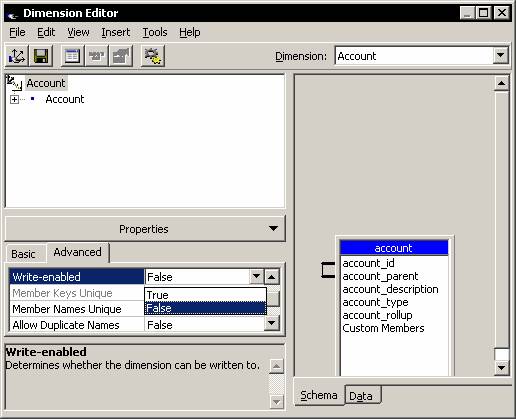
Write enabled dimensions have the same processing requirements as changing dimensions. However, writeback does not require reprocessing of the dimension.
Write Enabled cubes
Data can be written to a cube if the cube is Write-enabled. The ability to write back data to a cube is called Writeback. The Level depth of the member to be changed determines the type of writeback that is to be used. The PivotTable Service supports writeback on server cubes while writeback to local cubes are not supported.
The lowest level member is the member of the dimension which is defined at the lowest level of the dimension. For example if the product dimension has three levels called Product Category, Brand Name and Product name in that order, the Product name would be the lowest level in the dimension. Any writeback to the Product name level is the writeback to the lowest level of the dimension. These types of Writeback are used to modify individual lowest level member data for speculative analysis. To modify all the members of a given aggregate the aggregate level member writeback is used.
SQL Analysis Server maintains a separate table for recording the changes made during a writeback operation. PivotTable Service propagates the data through the affected aggregate members. When a cube is write enabled, end users can record changes to data in the cube. They are stored in the writeback table and are incorporated into query results as if they are a part of the cube. This is extremely useful feature as users can explore scenarios by changing cell values and analyzing the effects of such changes.
When a user changes the value of a cell, the original value of the cell is preserved and an audit trail is recorded in the write back table. Changes can be made to atomic and non-atomic cells in a cube. Atomic cells are the lowest level member of a dimension, whose value cannot be changed by drilling down or slicing. The cube should be write enabled for changes to be made to the atomic cell. Non atomic cells can be changed only when the client application provides a means of distributing the changes among the atomic cells that make up the non atomic cell. The UPDATE CUBE statement can be used to distribute the changes among the atomic cells. Even when changes made to non atomic cells are not distributed, the changes in the writeback table are applied during queries, so that viewers can see the impact of the changes throughout the cube.
In this section we will see how cubes can be write enabled, how the various writeback options can be set, how a writeback table can be converted into a partition and how a cube can be returned to it’s original state. However an end user can make changes to the cube if he has the necessary permissions assigned to him in the cube role.
Write enabled cubes and write enabled dimensions are complementary but different from each other. Users can update cube cells in a write enabled cube. User can update members in a write enabled dimension. The user has the option of using both these features together or in isolation. The procedure for write enabling a dimension and write enabling a cube are different. This is for the purpose of maintaining their security. To write enable a cube, the Microsoft Jet 4.0 OLE DB Provider has to be used. A cube can be only write enabled if all the measures in the cube use the SUM aggregate function. Linked cubes and local cubes cannot be write enabled unless one or more of its component cubes are write enabled. Virtual cube cells that are derived from write enabled cubes can be updated.
Aggregate-Level Member Writebacks
The aggregate level member is defined as a member whose value is dependent upon the values of members related to levels below the aggregate level. Therefore, aggregate level writebacks are more complex. To modify the aggregate level member the user has to modify all the members that are used to construct the value of the aggregate member. A simple procedure would be to use the UPDATE CUBE statement for allocation. Four different types of allocation formulas are used for distributing the desired aggregate value across all the lowest level members. The impact is that all the individual lowest level writebacks are handled easily. Aggregate level writebacks can be used when the Sum aggregate function is used for aggregating values. This kind of writeback is faster as it is treated as a single atomic transaction. This kind of writeback ensures that security or formula validation issues do not leave the cube in an inconsistent state. It must be noted that aggregate level writebacks can produce incorrect results when integer values are allocated due to incremental rounding variations.
{mospagebreak}
Writing a Value Back to a Cell
The value of the cell can be updated in several ways. The level of the value determines the process by which the value is updated. The Writeback method sets the value of a leaf level member directly. This method uses the transaction methods of the connection object. The Cell Allocation method sets the value of the non-leaf member and specifies how the changes should be distributed among the children of the member. The value can be indirectly updated in a cube by modifying the fact table and reprocessing the cube.
Changes made to a local cube only have session scope. To make permanent changes to a local cube changes must be made to the source data and the cube must be rebuilt.
Maintaining Write Enabled Cubes and Writeback data
Users can browse the data and change the displayed cube data in Write enabled cubes. The changes will be saved in a separate table called a Writeback table. The end users will be able to see the net effect of all the changes made by them. Read write access can be granted in a write enabled cube to specific users or groups of users. User access can be limited to specific cells of a cube also. Write back data can be browsed or deleted or write back data can be converted into a partition(this feature is available only in the enterprise edition)
Write Enable a cube
In the Analysis Manager tree pane, under the database that contains the cube, expand the Cubes folder.
Right-click the cube, and then click Write-enable.
|
|
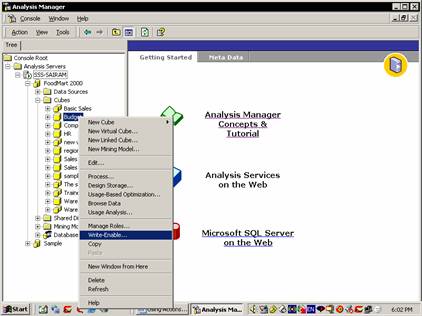
In the Write-enable dialog box, in the Table name box, type a name for the writeback table.
|
|
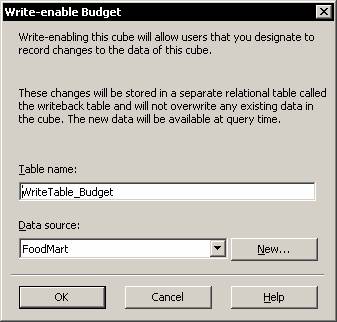
In the Data source box, select a data source name. To specify a new data source, follow these steps:
Click New. Specify Jet OLE DB 4.0.
Click Next to specify the new data source as FoodMart 2000, and then click OK.
|
|
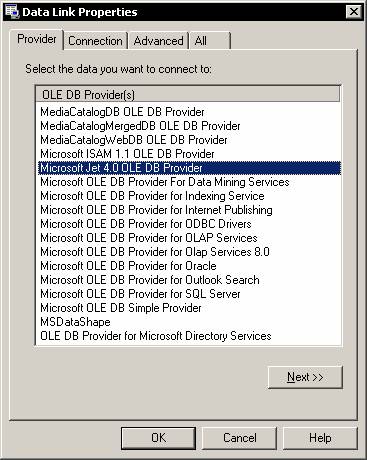
In the Write-enable dialog box, click OK.
{mospagebreak}
To browse writeback data for a cube
In the Analysis Manager tree pane, under the database that contains the cube, expand the Cubes folder.
Right-click the cube, point to Writeback Options, and then click Browse Writeback Data.
|
|
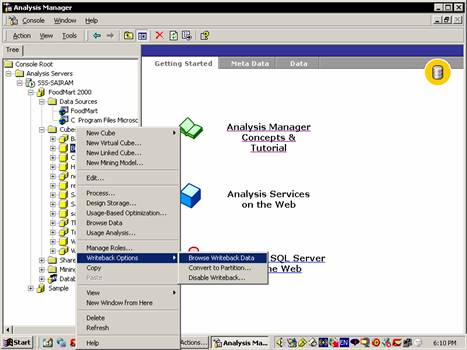
Deleting Writeback Data and Write-Disabling a Cube
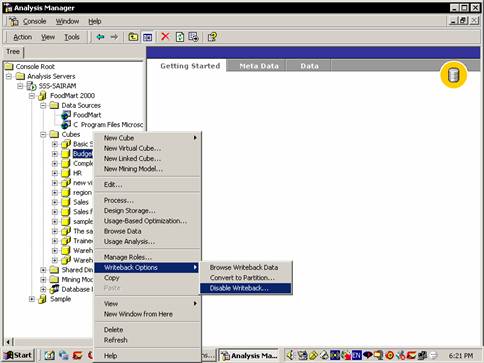
The contents of a writeback table can be deleted using the Delete Writeback Data dialog box. This can be accessed by right clicking write enabled cube from analysis manager tree pane.
In the Analysis Manager tree pane, under the database that contains the cube, expand the Cubes folder.
Right-click the cube, point to Writeback Options, and then click Disable Writeback.
|
|
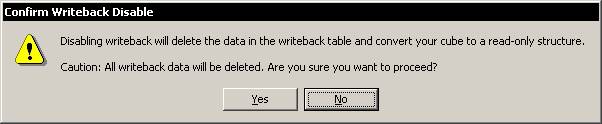
In the Confirm Writeback Disable dialog box, click Yes.
|
|
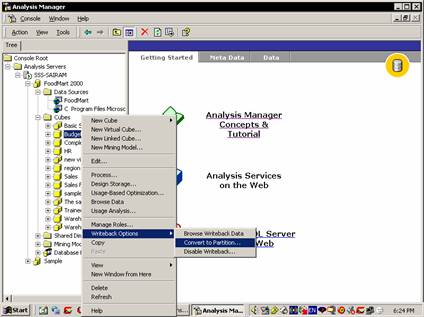
Converting Writeback Data to a Partition
The cube’s writeback table data can be converted into a partition. When a partition is created out of writeback data then, the cube becomes write disabled. All the unrestricted read write permissions granted are disabled. Read and read contingent permissions are not affected. This feature is only available in Enterprise edition of Microsoft SQL Server 2000.
In the Analysis Manager tree pane, under the database that contains the cube, expand the Cubes folder.
Right-click the cube, point to Writeback Options, and then click Convert to Partition.
|
|
In the Convert to Partition dialog box, in the Partition name box, type a name for the partition.
|
|
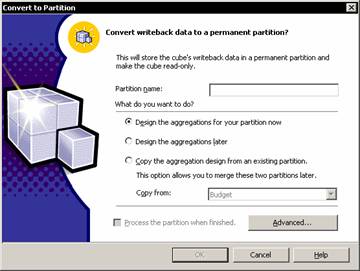
- Select an aggregation design option:
- To design aggregations using the Storage Design Wizard, click Design the aggregations for your partition now.
- To defer aggregation design, click Design the aggregations later.
- To copy the aggregation design of an existing partition, click Copy the aggregation design from an existing partition and select the partition name from the Copy from list. If in the future you might merge the new partition with another, copy the aggregation design of the other partition. Merged partitions must have the same aggregation design.
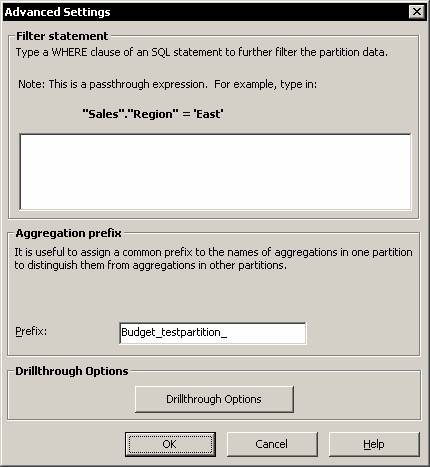
To specify a filter (WHERE clause expression) that limits the data selected from the writeback table and added to the partition, click Advanced.
|
|
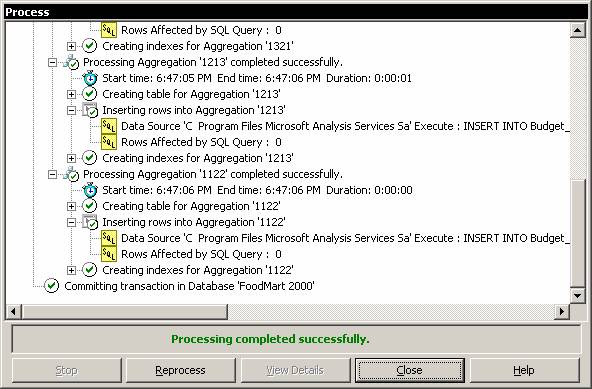
To process the new partition, select the Process the partition when finished check box. Depending on the size of the writeback table, processing may take considerable time.
|
|
Writeback Timeout Property
The Client application attempts to communicate updates to a writeback table on the server. The time taken for communication is set in the Writeback timeout property. When the application attempts to writeback the changes, the PivotTable Service begins count in seconds and ends when the transaction is committed in the number of seconds specified in this property. If the time limit is reached before the changes are applied the commit fails. The client will rollback the transaction when the commit fails and the attempt to commit begins again. This property is to be set when a session is established and it cannot be changed during the session.
Actions, Drillthrough and Writebacks are extremely useful features of Analysis services. Actions allow the end user view data and act on the anlaysis of such data. Drillthrough enables users to view the details of the aggregated data presented in cubes. Writeback enables users to update the data and also view the impact of such changes on the data in the cube.
In the next lesson we will study the process of “Implementing security” in Analysis Services.
[catlist id=181].