
Custom rollups are enabled when the Unary Operators property of the level is set to True. The values of the Custom Rollup are stored in the Define Unary Operator Column dialog box.
Custom Rollup Operators and Custom Member formulas are very similar but the former is much simpler. Where Custom member formulas use Multidimensional Expressions to determine the method of roll up of members, the custom rollup operator uses simple math to determine how the value of the member affects the parent. The aggregation rule consists of a single character code –(+) for addition and (–) for subtraction,( *)asterisk for multiplication and( /) for division. (~) is used to prevent the members from aggregating at all. These codes are called unary operators because each value gets its own operator.
Custom rollup expressions of a previous level are overridden by custom rollup operators. However, custom member formulas of a preceding level can override the custom rollup members of a level.
Custom rollup operators are enabled both for shared and private dimensions. This can be done by setting the Unary Operators property in the properties pane of the Dimension editor or cube editor. Clicking the Edit button beside this property’s value displays the Define Unary Operator Column dialog box. This dialog box can be used to select or create a column to store the formulas. Once this is set, it is possible to select values for Unary_operator member property for a write enabled, shared, parent child dimension in the custom member formula pane of the Dimension Editor or Dimension Browser. If the dimension is not write enabled the Formulas cannot be inserted in Analysis manager. It must be noted that if a cube has a measure whose Aggregate function property is set to Distinct Count, adding a custom rollup operator or expression to a level will cause the structure of the cube to become invalid.
Custom Rollup Formulas and Custom Member Formulas
Custom Rollup formulas and Custom member formulas are Multidimensional Expressions. They determine the cube cell values associated with members. While a custom rollup formula applies to all members (except calculated members) a custom member applies to a single member. Calculated members are not stored in the dimension table and provide additional members to the dimension table unlike Custom rollup formulas and custom member formulas.
Aggregate functions associated with measures are overridden by custom rollup formulas and custom member formulas. For example a measure uses a Sum aggregate function of the following kind.
2001: 2100
First quarter::500
Second quarter :500
Third quarter : 100
Fourth quarter:1000
2002: 900
First quarter: 100
Second quarter: 300
Third quarter: 400
Fourth quarter: 100
If the custom rollup formula specified is Time.CurrentMember.LastChild the result would be
2000:1000
2001: 100
The values for the quarters would remain unchanged.
Custom member formulas perform similar operations but are restricted to single members. The value for the fourth quarter of 2001 member in the Time dimension can be supplied by the formula
Time.[fourth quarter] *1.5
To apply custom rollup formula to only some members of the level, the IIf and RollupChildren functions are used. The RollupChildren function can roll up the children specified, using unary operators specified in the function.
Custom member formulas override custom rollup formulas. Calculated members have to be resolved before custom rollup formulas and custom rollup members are resolved. If a cube has multiple custom rollup formulas and custom rollup members, then the formulas are resolved in the order in which the dimensions have been added to the cube. The order of the dimensions can be viewed and changed using the Cube Editor window.
To specify a custom rollup formula in any level except the All Level, the Custom Rollup Formula property of the level has to be used. To specify it for the All Level the All Member Formula property of the dimension has to be used.
Custom rollup formulas can be specified both in a shared and a private dimension. If a cube contains both a shared and private dimension with custom rollup formulas, then the custom rollup formula of a private dimension takes precedence over a shared dimension’s formula.
Custom member formulas in a level can be enabled using the Custom Members property in the properties pane of the Dimension Editor(shared dimension) or Cube Editor(private dimension). Clicking the ellipsis button beside this property value displays the Define Custom Member Column dialog box in which the formulas can be defined. It must be noted that the formulas can only be created in the custom member formula pane of the Dimension editor or browser only if the dimension is write enabled.
{mospagebreak}
Creating a custom rollup operator for a shared dimension
Access the dimension that will contain the custom rollup operator by right-clicking the dimension, and then click Edit.
In Dimension Editor, in the tree pane, click the level for which to create the custom rollup operator.
If the properties pane is not expanded, expand it by clicking Properties beneath the tree pane.
In the properties pane, click the Advanced tab.
Click the value beside Unary Operators, and then click the edit (…) button.
In the Define Unary Operator Column dialog box, select the Enable Unary Operators check box to enable custom rollup operators for the level.
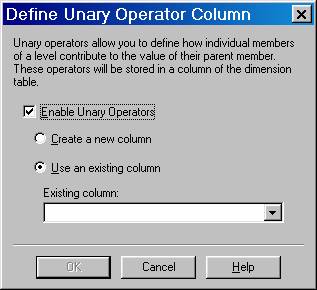
Create or select an existing column to store the custom rollup operators:
To create a new column in the dimension table, select Create a new column, and then in the New column name box, type the name of the new column.
A dimension table can have multiple columns (one per level) that store custom rollup operators. Therefore, it is recommended that the new column name identify the column that stores the members to which the custom rollup operators apply (that is, the column for the level selected in Step 2.) For example, if in Step 2 you selected the Store Country level, and its members are stored in the store_country column, in the New column name box, type:
store_country_custom_rollup_operator
Note If the dimension is not write-enabled, you must use a tool other than Dimension Editor or Analysis Manager to add values to the new column.
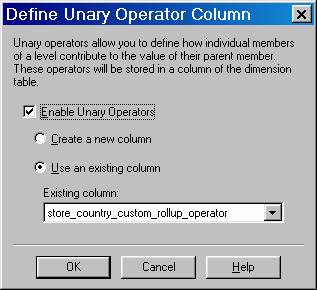
To select an existing column in the dimension table, select Use an existing column, and then in the Existing column box, select the column.
In the Define Unary Operator Column dialog box, click OK.
On the File menu, click Save. After you perform this procedure once for a level, you do not need to repeat it as long as the column that stores the custom rollup operators remains in the dimension table.
(Optional.) To browse your custom rollup operators, click the Data tab, and then expand the dimension members pane. Custom rollup operators are indicated next to member names. If you created a new, unpopulated column in Step 7, the plus operator (+), which is the default rollup operator, will display beside the member names.
(Optional.) To edit custom rollup operators in a write-enabled parent-child dimension, select a dimension member from the dimension members pane, and then select an operator in the column beside UNARY_OPERATOR in the member properties pane.
After editing, click Save on the File menu to commit changes to the dimension table.
Note Before you can edit the write-enabled dimension, it must be included in a cube, and then the cube must be processed.
{mospagebreak}
Creating a custom rollup operator for a private dimension
- Access the cube with the private dimension that will contain the custom rollup operator by right-clicking the cube, and then click Edit.
- In Cube Editor, in the tree pane, click the level for which to create the custom rollup operator.
- If the properties pane is not expanded, expand it by clicking Properties beneath the tree pane.
- In the properties pane, click the Advanced tab.
- Click the value beside Unary Operators, and then click the edit (…) button.
- In the Define Unary Operator Column dialog box, select the Enable Unary Operators check box to enable custom rollup operators for the level.

Create or select an existing column to store the custom rollup operators:
To create a new column in the dimension table, select Create a new column, and then in the New column name box, type the name of the new column.
A dimension table can have multiple columns (one per level) that store custom rollup operators. Therefore, it is recommended that the new column name identify the column that stores the members to which the custom rollup operators apply (that is, the column for the level selected in Step 2.) For example, if in Step 2 you selected the Store Country level, and its members are stored in the store_country column, in the New column name box, type:
store_country_custom_rollup_operator
Note If the dimension is not write-enabled, you must use a tool other than Dimension Editor or Analysis Manager to add values to the new column.
To select an existing column in the dimension table, select Use an existing column, and then in the Existing column box, select the column.
In the Define Unary Operator Column dialog box, click OK.
On the File menu, click Save.
After you perform this procedure once for a level, you do not need to repeat it as long as the column that stores the custom rollup operators remains in the dimension table.
(Optional.) To browse custom rollup operators stored in an existing column, click the Schema tab, right-click the dimension table containing the stored operator, and then click Browse Data. Custom rollup operators are indicated in the respective column indicated in Step 7 for the first 1000 rows of data.
(Optional.) To edit custom rollup operators of a writable dimension, right-click the dimension in the Cube Editor tree pane and click Browse to display Dimension Browser. In the Dimension Browser tree pane, select the dimension member that has the custom rollup operator that you want changed. Click the value next to UNARY_OPERATORS in the member properties pane to modify the value for the selected member.
Note If a dimension with a custom rollup operator is included in a cube that has a measure where the value of its Aggregate Function property is set to Distinct Count, an error will occur when the cube is saved. This is due to invalid cube structure.
[catlist id=181].