


Aggregation Prefix: This is a prefix appended to aggregation name for the cube’s partitions, provided that the partition’s aggregation prefix begins with a plus sign (+). In this case, this property’s value is appended to the beginning of the partition’s aggregation prefix. If the partition’s aggregation prefix does not begin with a plus sign, this property is ignored. To access the aggregation prefix for a partition, in the Analysis Manager tree pane, right-click the partition, click Edit, advance to the Finish step of the Partition Wizard, and then click Advanced
Data Source : The data source for the cube. The partitions of the cube can have different data sources.
Default Measure : The measure that is returned by queries when no measure is displayed on an axis and no slicing measure is specified. If no default measure is specified, an arbitrary measure is the default measure.
Description : The description of the cube.
Fact Table: The fact table for the cube. The partitions of the cube can have different fact tables.
Fact Table Size: The number of rows in the fact table of the cube at the time they were last counted by Analysis Services, or a user-provided estimate of the number of rows.
Key Error Limit: Limit for the number of dimension key errors. The default is 0. Cube processing is halted and cancelled when the limit is exceeded, provided that the Stop Processing on Key Errors property of the cube is Yes. If you select Yes and a Key Error Limit value is greater than 0, and processing completes, the data in the cube does not reflect the entire fact table. The Key Error Limit property is ignored if the Stop Processing on Key Errors property is No.
Key Error Log File: Path and file name of the log file for dimension key errors.
Name: The name of the cube.
Processing Optimization Mode: Values of the Processing Optimization Mode property are Regular (processed data is available after all aggregations have been computed) or Lazy Aggregations (processed data is available immediately after data has been loaded). This property only applies to MOLAP partitions of a cube.
Source Table Filter: The WHERE clause expression applied to the partitions’ fact tables to limit the data in the cube. This property provides defaults for the filters in the partitions of the cube. These filters override this property. To access a filter in a partition, in the Analysis Manager tree pane, right-click the partition, click Edit, advance to the Finish step of the Partition Wizard, and then click Advanced.
Stop Processing on Key Errors: If the user selects Yes, processing is halted and cancelled when the limit for the number of dimension key errors is exceeded. This limit is specified in the Key Error Limit property of the cube. A dimension key error occurs when a fact table row is encountered that contains a foreign key value not present in the joined primary key column of a dimension table. If the user selects No, dimension key errors never halt or cancel cube processing regardless of the number of errors encountered. If one or more dimension key errors are encountered, the data in the cube does not reflect the entire fact table.
Visible: Indicates whether the cube is visible when end users browse the list of available cubes. Microsoft® SQL Server™ 2000 Analysis Services, also offers many powerful optional features that can be used to enhance the analysis performed in cubes and the presentation of cube data. There are additional optional features for dimensions that further enhance cube capabilities. These have already been discussed in the lesson “Using Advanced Dimension Settings”.
Calculated members : Function libraries are used to create members that display values calculated at run time.
Calculated cells: Calculated cells are used to create a multidimensional section of cells, defined by a Multidimensional Expressions (MDX) set expression, to which an MDX value expression is selectively applied depending upon a condition described by an MDX logical expression
Named sets: Named sets are sets of dimension members or sets of Multi dimensional expressions that are created for use in a cube. The options for creating different kinds of named sets are available under the properties pane of the Cube editor. For instance in a Salesperson dimension the user can create named sets for sales persons with the highest sales and the lowest sales. Then in the client application the end user can place the named sets on an axis in a manner similar to a dimension.
Actions: End user initiated operations on a portion of a cube are called actions. Actions enable the end users act upon the output of their analysis. They can go beyond the traditional analysis and initiate solutions to problems discovered during the analysis. They transform the client application from mere data rendering tools to a dynamic part of the enterprises operations. We will learn more about actions in the lesson “Using Actions, Drillthrough and Writeback”.
Drillthrough operations : Users are allowed to see the source data for a cube cell when Drillthrough operations are enabled for a cube.
{mospagebreak}
Enabling Drillthrough for a cube
The drillthrough feature allows the user to see the individual rows and values from the fact table that were input into a cube.
a) On Cube Editor Tools menu click Drillthrough Options
b) In the Cube Drillthrough Options dialog box, select Enable Drillthrough checkbox, click the Select All Button, and Click Ok. Click Ok again when warned that the cube must be saved.
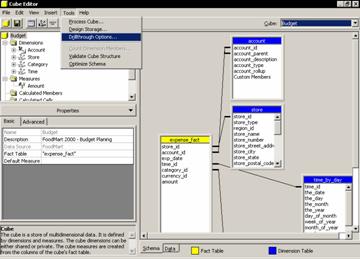
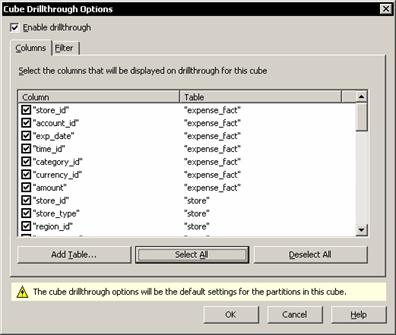
c) Now click the Process cube button, accept the offer to save the cube, decline storage creation and click Full Process processing option, click Ok, and then close the process log window.
d) Browse the data in the Data Tab
Drillthrough is a useful feature, but when used in a cube its usefulness is limited to the amount of data that is already stored in the cube’s fact table.
The Order By Property of the dimension and its impact on cube data
Certain applications like the finance applications aggregate in complex ways. It is very important that the data is presented in some kind of order. The Order By property of the cube is used to set the order in which data is to appear in the output browser of the cube. To set the Order By property of a dimension:
a) In the Dimension folder select the dimension and click the Advanced tab in the properties pane to change the All Level Property to No.
b). Though the Dimension key has no impact on the Analysis server, the client application may derive some benefit by sorting out the order of account members. Expand the dimension and select the level and change its Order By Property to Key and press enter.
c) The dimension members now appear in the proper order.
Using Custom Rollup Operators and Custom Member formulas with cubes
Custom rollup operators are used to properly aggregate values along a dimension. Each member of the dimension needs its own aggregation rule. It may be recalled that aggregation rules consist of single-character codes and these codes are simple arithmetic operators called unary operators. Custom Member formulas provide values for specific members in a fact table and the rules are stored in Multidimensionsal Expressions(MDX). This was discussed in detail in the earlier tutorial “Using Advanced Dimension Settings”.
Creating a cube from a measureless fact table
Some fact tables have no quantitative measures. Yet data from these tables need to be analyzed in different ways and results obtained. For instance a visitor dimension may contain only rows and columns which tell you the id’s of visitors who visited a store in a particular region or district. There may be no quantitative value attached to the information. You may need to have a count of the number of distinct visitors who visited the store. This is done by creating a count measure. The visitor id is dragged and dropped into the measures folder and the Aggregation parameter is set to count and the cube is processed. The Data tab then returns the visitor id and the number of visits made by that visitor. If the aggregation parameter is set to Distinct Count the data returned would tell the user the number of distinct visitors the store received.
Handling very large Flat Dimensions
Very large dimensions with a large number of rows of data may require some amount of grouping to derive some sense from the information. Setting the grouping property to automatic will create groups from the data. The groups are added to the dimension only when the cube is processed. In the Data tab, the group levels are displayed with the + sign and can be collapsed and expanded to view the data. It must be noted that the user has no direct control over the number of groups created automatically by the Analysis services.
Creating a Cube from an Empty fact table
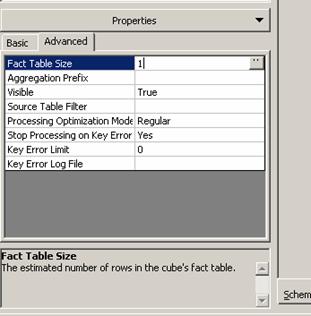
Normally the values in a sales forecast cube will be entered by the user and a fact table may not be required. However, a cube cannot be created without a fact table and hence sometimes an empty fact table is used to create a cube. The fact table will contain columns but no data or rows. It is a placeholder. The user will get a message that there are no rows in the fact table when the dimension is selected. A non-zero value will have to be manually entered as the number of fact table rows before processing the cube. To do this, the user needs to select the cube and on the Advanced Tab of the properties pane, type 1 as the value of the Fact Table Size Property and then click the Process Cube button.
Write enabled cubes and Writeback data
Cube data can be configured so that end users can make changes to it.
{mospagebreak}
Enabling write-back for a cube
Aggregation values of a cube cannot be changed without making the cube internally inconsistent. Values can be written only to the lowest levels of a cube. Incremental change values are written either to the client cache in the PivotTable service or to a special write back table in the relational database by Analysis services. Then, the write back values are dynamically combined with any values in the fact table for the end user.
To write back values to a cube, the client application must have write back capabilities. The browsers in Analysis services and in Microsoft Office 2000 do not have write back capabilities.
Values can be written back to a cube permanently or temporarily. To write back values temporarily during a what-if analysis users may use macros with the PivotTable service. Such written back values will not be visible to other users of the cube and hence will be private. To make the write back visible to other users, the cube must be write enabled.
Write-enabling a cube means to specify a location of a relational table where the write back values will be stored. It may be noted that the user need not write the data back to the same data source as the one containing the fact table. Because the write-back values are stored in a relational table the tools of the relational database system can be used to append the values to original fact table. Then the cube can be processed in Analysis Manager and the write-back data can be deleted. We will be learning more about write back in “Actions, Drillthrough and Writeback” lesson.
Dynamically adding members to a Dimension
The Dimension browser in the Analysis Manager allows the user to add values to a dimension. Unlike writing back values to a cube—where values are stored in a relational table—the new member in the Dimension table is added directly to the original dimension table. The only condition being that the user must have write permissions. This ability to dynamically add members is useful in planning applications. The advantage is that the cube need not even be reprocessed before the new member can be used for analysis.
Removing Dimensions and measures from a cube:
This is a feature that is associated with the virtual cube in Analysis services. The virtual cube is like the view of the relational database system. It is restrictive and is intended to be used like a view in a sense. However, unlike a view, whole dimensions and measures will have to be excluded if the view of data is to be restricted. It is not possible to partially limit the view of a dimension. The advantage is that the virtual cube can be used to combine data from more than one cube. Calculated members can be imported from source cube into a virtual cube when the members used by the calculated member are contained in the cube. A virtual cube can be created using the Virtual cube editor. We will learn more about this in the lesson “Working with Virtual cubes”.
Using the Disabled Property
The disabled property is really the property of a level, but it only exists only within the cube editor. The purpose of the property is to enable the user disable a level from the dimension of a cube whenever he does not require the data in the level. The dimensions of the cube may be shared by other cubes, but the disable property disables the levels only for the cube in hand and not for the other cubes which share the data. For instance if a user does not want to have the lower levels of a product table and only needs the Quarters of a year in the time dimension he can disable the other levels and use only the top levels of the two tables for data analysis. The other levels will be available for other cubes that share the dimension. To disable a level in the dimension, the user should expand the dimension, select the level and set the disabled property to “Yes”
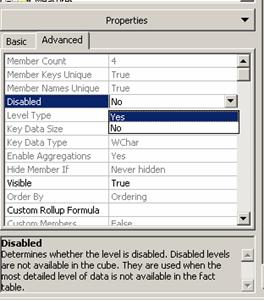
The cube has to then be processed for the disabled property to take effect.
In this lesson we have looked at cubes, measures and properties of cubes and measures and also learnt how to work with cubes, measures and the properties of cubes. In the next lesson we shall look at “Managing Storage and Optimization”
[catlist id=181].