
Understanding Calculated members
Calculated members are members of a dimension whose value is calculated at run time using Multidimensional expressions. The values of a calculated member may be derived from other member’s values. For instance Profit is determined by subtracting the value of member costs from value of member sales. This is unlike an input member whose value is directly loaded from the data base.
The expressions for calculated members are defined when the member is defined. Calculated members can also be defined as measures of a dimension. Values derived from calculated members are not stored. Only the expressions are stored and the calculation is done at run time when a query is generated by the end user.
Calculated members enable users add members and measures to a cube without increasing the size of the cube. The components of the calculated member are derived from the data in the cube but complex multidimensional expressions can be built using arithmetic operators, numbers and a variety of functions. Analysis Services has a library of more than 100 functions and users can register and use other function libraries too.
The Format String property of a calculated member controls the format of cell values displayed to end users. This property can be accessed from the property pane of the Cube Editor or the Virtual Cube Editor. This property accepts the same values as the Display Format property of measures.
All calculated members created in a cube need not be saved. Some calculated members are created for run time use. Such members are created using the CREATE MEMBER statement. The statement property of the is also used in Decision Support Objects(DSO) when calculated members are created programmatically. A calculated member can be created for the duration of a single query using the WITH clause of the SELECT statement.
Calculated members can be created in regular or virtual cubes.
Creating Calculated Members
Calculated members can be created using the Calculated Member Builder. This enables the user specify the following options for the calculated member.
The Parent dimension to be included in the Calculated member. The calculated member will provide a new heading or label in the parent dimension selected.
Calculated members can also be included in the measures instead of the dimension. This option provides a new column or row heading attached to the measures in the browser.
The user can select the parent member to be included in the calculated member. This option is not available if one level dimensions or measures are selected as the parent dimension. The heading for the calculated member is included directly below the member selected as the Parent Member.
The name of the calculated member can be selected. This name appears as a column or row heading for the calculated member values when end users browse the cube.
Value expressions can be specified as an expression that produces the values of the calculated member. This expression is written in Multidimensional expressions(MDX). The expression may contain data expressions that represent the cubes components(dimensions, levels, measures etc); Arithmetic operators, numbers and functions.
Calculated members can be used as components of an expression for creating other calculated members. For instance Profit may be expressed as Sales – Cost value. Costs may be defined as a sum of several items. However the expression for costs has to be first created and then only included in the expression for deriving Profit.
Calculated members can be renamed after they are created.
{mospagebreak}
Using Function Libraries to Build Calculated Members
Microsoft SQL Server 2000 Analysis Services provides an extensive library of functions for use while creating calculated members. However it also supports other function libraries. The libraries used by Microsoft Visual Basic for Application Expression services is automatically registered in Analysis services. Microsoft Excel worksheet library is also automatically registered in Analysis services if Microsoft Excel is installed on the system having Analysis services. Other libraries that are separately installed on the machine can be registered by clicking Register in the Calculated Member Builder.
However, functions in these libraries can be used only if the preconditions for their use are satisfied. The conditions being that the function should accept as arguments only string or numeric data types or array or a variant data type containing string or numeric values. The functions should return only a string or a numeric data type or a variant data type containing string or numeric values. Therefore, it is important that every function should be tested on the above conditions before being used in the creation of calculated members.
If multiple libraries use the same function, the Analysis services library takes precedence over the other libraries. Thereafter precedence is decided on the basis of the order of registration.
It must be noted that if end users are to see the values returned by the functions correctly the relevant library must be installed in the system and registered.
Calculated Member Builder
On the Insert menu of the Cube Editor or Virtual Cube editor click Calculated member. The calculated member builder dialog box opens. The first three boxes determine the dimension’s characteristics of the calculated member–Parent dimension (the dimensions to which it belongs), Parent member (the parent under which it is attached), and Member name.

Let us leave Parent dimension set to Measures. The parent member determines the location of the calculated member in the dimension structure. This option is enabled if you select a parent dimension (other than the Measures dimension) that has more than one level. Clicking change will display the Select the Parent Member dialog box. This option is enabled if the user selects a parent dimension other than Measures that has more than one level.
Note that the Parent Member box is unavailable because the measure dimension does not support hierarchies. In the Member name box, let us enter Average price as the member name.
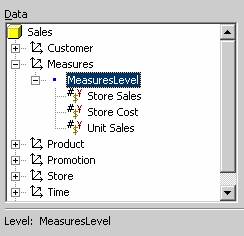
The lower part of Calculated Member Builder provides all the components necessary for building the calculated member expression. Under Data, expand the Measures dimension, and then expand MeasuresLevel. The list of measures appears.
|
|
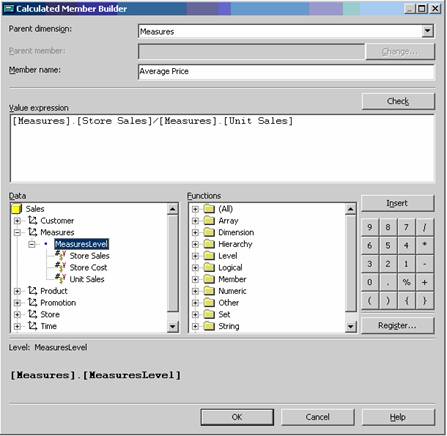
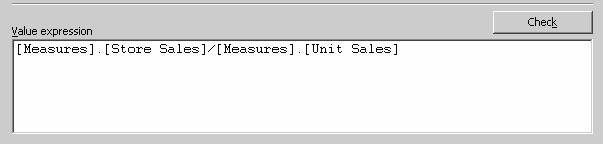
The value expression box allows the user enter values that determine the values of the calculated member. To add a function in the Value expression box, the user has to click in the box, select a function from the functions box, double click the function or click Insert button to insert the function. The function syntax is then displayed in the Value expression box. The arguments and the delimiters can then be replaced with appropriate values.
The user can also type the value expression directly into the box. This method is useful when users want to add functions from libraries other than the native library of Microsoft SQL Server 2000 Analysis Services.
The user can validate the expression entered in the Value expression box by clicking on the Check button.
|
|
The Data pane of the Calculated member builder displays the cube’s dimensions, measures, and existing calculated members. The user can select an object from this pane and click insert button or drag the object to the Value expression box. This will add objects to the pane.
{mospagebreak}
|
|
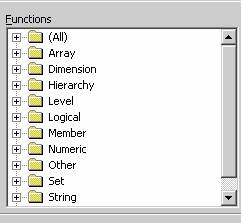
The list of functions for building expressions is available in the right pane of the Calculated member builder. To add functions to the Value expression box the user has to double click the function or select the function and click Insert button. The user can also drag the function to the Value expression box.
|
|
The Insert button helps the user add data to the Value expression box from the Data pane or the Functions pane. To the extreme right of the Calculated member builder is the Number or arithmetic operator buttons. These help the user add numbers and operators to Value expressions.
The Register button at the bottom of the numeric pad displays the Register Function Libraries dialog box on being clicked. The user can register external function type libraries by clicking on this button. The library types supported are *.olb, *.tlb, *.dll. The new library then appears in the function box once the user has identified the library and selected it. Libraries can be added or removed using this dialog box.
Now that we have had a look at the interface of the Calculated member interface let us proceed with building a calculated member. As stated earlier we had named our member name as Average Price. In the MeasuresLevel expand the measures to display all the measures existing in the cube.
|
|
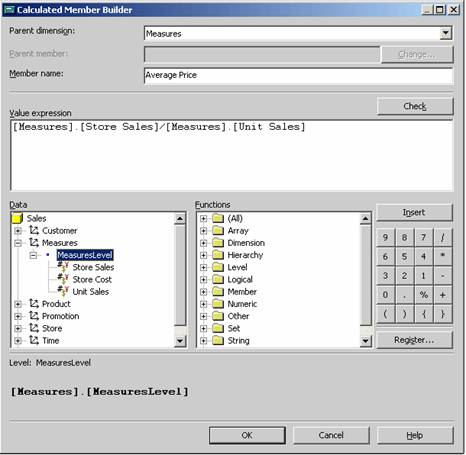
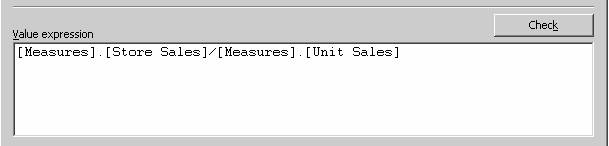
In the Value expression box, construct an expression to produce the values of the calculated member. Use any combination of the following methods to add to the expression:
Select Store Sales, and then drag it into the Value expression box.
In the number and operator pad, click the / operator. The operator appears at the end of the expression in the Value expression box.
Under Data, select the Unit sales measure and drag it to the end of the expression in the Value expression box.
To close Calculated Member Builder, click OK.
To save the cube with the new calculated member, in Cube Editor, on the File menu, click Save.
|
|
The user is brought back to the Cube Editor. Average Price is displayed as a calculated member.

Now right click the cube and browse the data in the cube.

Once the calculated member is added to the cube, all dependent virtual cubes must be processed to ensure that users have access to the calculated members. During the processing of the virtual cubes, end users will remain unaffected so long as they remain connected. However, unless the virtual cubes are processed end user will not be able to see the calculated members. Note that Calculated members in regular cubes are not visible in the Analysis manager tree pane. To create and access them, the user will have to navigate to the Cube Editor.
[catlist id=181].