
If a cube contains multiple partitions, some of them can be stored in different physical locations. Partitions of a cube can also have different data sources. The aggregations of the data in the partitions can also be stored in different locations. The end user sees the cube as a single unit and the partitions are not visible to him. The cube displays all the data in the various partitions as a single composite data structure.

This technology allows portions of the cube to be distributed across multiple locations and in managing cubes that grow in size. Cubes with multiple partitions can be created only if the Enterprise edition of the SQL Server 2000 Analysis Services is installed in the machine. Multiple partition cubes have become an easy and flexible method of managing large data sources or multiple data sources. These are sometimes known as Distributed partitioned cubes. Partitions which are stored in Analysis servers other than the ones in which the cube is created are known as remote partitions.
Partitions can be stored using combinations of options for location of source data, location of aggregation data, storage mode, and aggregation design. The user can create storage options appropriate to his needs.
A partition of a cube may have a different data source from the cube. Even where the same data source is used the cube and the partition need not have the same fact table. Where a different data source is used by a partition, the source must contain a set of tables that are the same as those contained in the cube’s schema. Only minor variations –such as a difference in the name of the fact table– is tolerated.
The data of a cube is a composite of all the data of its partitions. When the data in a partition is changed, or a new partition is added or a partition is deleted from a cube, and the cube is processed, the data in the cube changes.
The aggregations of the partition are stored in the Analysis server in which the cube is defined by default. However the user can choose to store the aggregations elsewhere as a remote partition. The storage mode also determines whether a copy of the partitions source data is stored on the Analysis server computer. Each partition can have a separate aggregation design which determines the number and contents of the aggregations created for the partition. Constraints for storage utilization can be specified using the Storage Design wizard. This helps the user tailor the aggregation design and increase query performance. The Usage Based Optimization Wizard enables the user perform the above actions of optimizing aggregation design based on queries previously sent to the partition’s cube. These aggregations are then created when the cube is processed.
In the object hierarchy partitions are immediately subordinate to the cube. The partition’s data source and its aggregations are subordinate to the partition.
{mospagebreak}
Creating Partitions
Every cube must contain at least one default partition. The partition is created when the cube is created. The Partition Wizard can be used to create additional partitions. The partition can use the same data source or derive its data from a different data sources.
When the same data source is used and the same schema is used, the user can specify the portions of the Cube’s data that is to be allocated to the partition. This can be done in two ways. Different fact tables in the data source can be used for different partitions. The same fact table can be used by multiple partitions with the data in it filtered in different ways.
Benefits of creating partitions to cubes are as below
1. Different partitions of a cube can have different storage modes
2. Partitions can be processed independently of cubes
3. A cube can contain several partitions.
4. Each partition can have different data sources
5. The data sources can be on different physical locations or on the same location
6. The partitions can be distributed across servers for use of end users.
The only precautions that needs to be taken while creating partitions is that each partition must contain unique data. Analysis server provides three methods of ensuring that
1. Create separate fact tables for each partition
2. Specify a filter to restrict rows from a fact table
3. Specify a data slice, a single member of the dimension for a partition.
Working with the Partition Wizard
Expand the Cube folder under the database in which you want to create the partition for a cube. Right click Partitions folder and click on New Partition. This starts the Partition Wizard
|
|
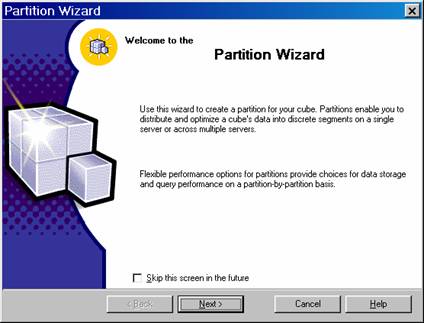
Click Next and the user is prompted to specify the data source and the fact table for the partition. The default data source for the Sales cube is the sales_fact_1998 and the data source is FoodMart2000 database. This can be changed by clicking the change button. Click the Change Button. The list of fact tables is displayed.
|
|
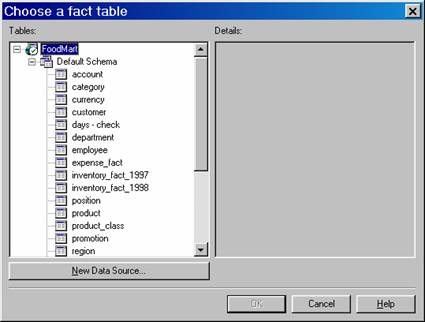
Let us say we want a partition that will give us details of sales in 1997. Let us select sales_fact_1997 as the fact table from the data source FoodMart 2000 database. Now we are prompted to select the data slice. A data slice is a subset of a cube that is stored in the partition.
|
|
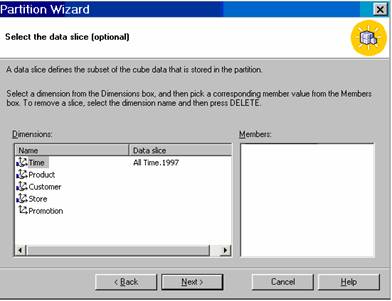
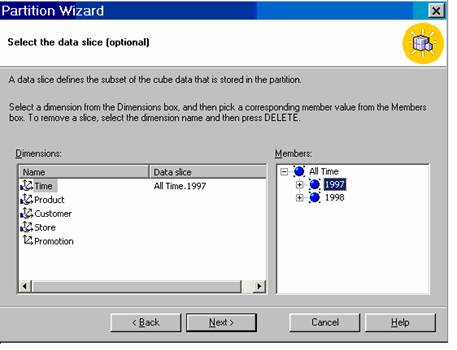
The user will have to pick a dimension from the Dimension box and a member from the member’s box. In the screen shot below the Time dimension has been selected and the1997 member has been selected.
|
|
The type of partition is selected next.
|
|
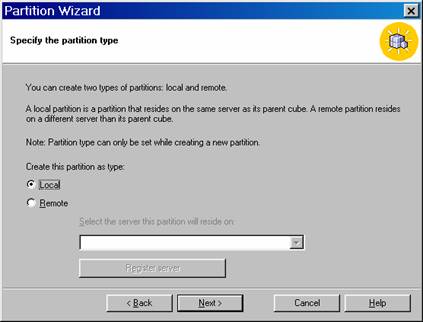
When the user tries to set the partition as “remote” type and he is not a domain user, he gets the following message:

{mospagebreak}
If the partition type has been selected as Local(which is the default), the user can proceed. Click Next to proceed
|
|
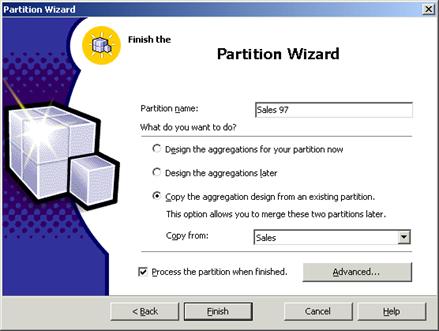
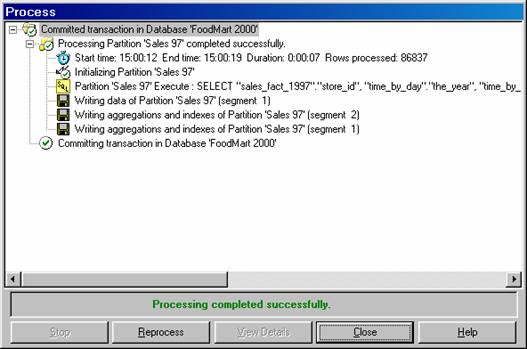
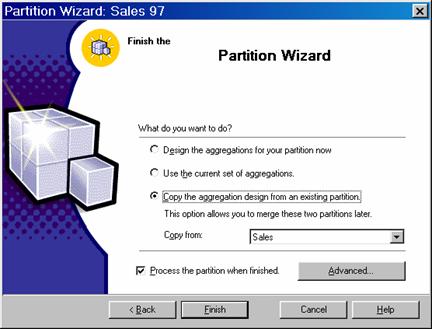
In the Partition name we enter Sales 97 and we decide to copy aggregation design from the existing partitions This type of selection will be useful when the user wants to merge two partitions of a cube. Click Finish. The processing of the cube begins if the ‘Process the partition when finished’ check box is checked. Processing will take some time depending on the size of the data in the partition.
|
|
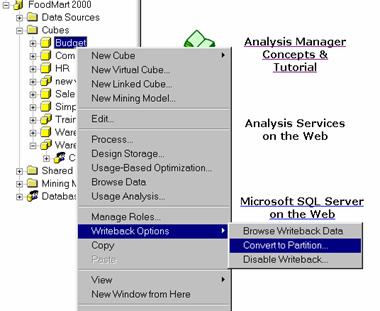
Converting Writeback data to a partition and write diabling a cube
In the Analysis Manager tree pane, under the database that contains the cube, expand the Cubes folder.
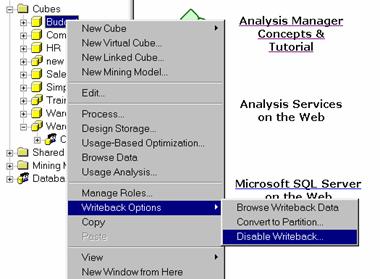
Right-click the cube, point to Writeback Options, and then click Convert to Partition.(These options are available only for write enabled cubes)
|
|
In the Convert to Partition dialog box, in the Partition name box, type a name for the partition
|
|
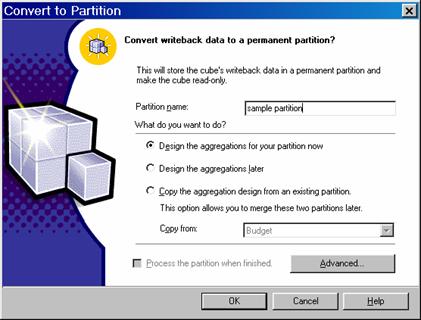
Select an aggregation design option:
To design aggregations using the Storage Design Wizard, click Design the aggregations for your partition now.
To defer aggregation design, click Design the aggregations later.
To copy the aggregation design of an existing partition, click Copy the aggregation design from an existing partition and select the partition name from the Copy from list. If in the future you might merge the new partition with another, copy the aggregation design of the other partition. Merged partitions must have the same aggregation design.
To specify a filter (WHERE clause expression) that limits the data selected from the writeback table and added to the partition, click Advanced.
To process the new partition, select the Process the partition when finished check box. Depending on the size of the writeback table, processing may take considerable time.
To disable writeback select Writeback options and click on Disable writeback
|
|
{mospagebreak}
Using a filter when editing an existing partition
In the partitions folder right click the Sales 97 partition and click Edit.
|
|
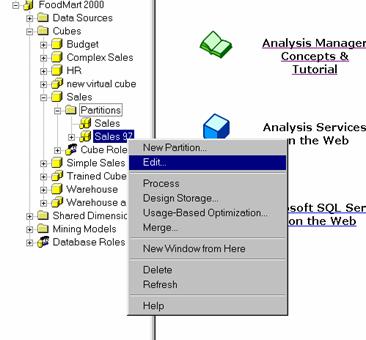
The Partition Wizard opens. Navigate to the last screen of the partition wizard by clicking next in the screens of the Wizard. On the Final screen click the Advanced button The Advanced settings dialog box allows the user enter a filter statement. In the Filter box type “State”.”Country”<> ‘USA’ and click Ok
|
|
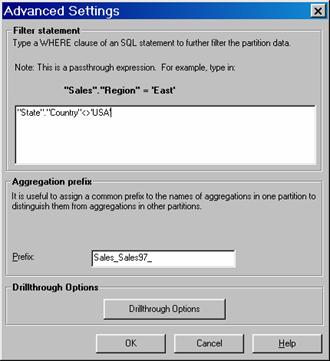
Note that the Aggregation prefix value in the Advanced settings dialog box determines what prefix the Analysis Server uses when creating ROLAP aggregation tables in the relational data source. If ROLAP storage is not being used the aggregation prefix has no impact. The Drill through options button is useful only when drill through has been enabled for the cube.
On click ok to the Advanced settings the user is brought back to the Finish screen of the Partition Wizard. Now click Copy The Aggregation Design From An Existing partition option, select the check box for processing the cube and click Finish.
|
|
Select the Sales97 partition and browse the data. One of the greatest advantages of using filters is the flexibility it provides. Unlike a slice, the user can reference any field in any table used in the SQL query, not just the members of the dimension. Since the filter uses SQL the user can use any expression supported by the relational database system.
[catlist id=181].