
The Data warehousing framework of SQL Server 2000
The following illustration details the Microsoft SQL Server 2000 data warehousing overview.
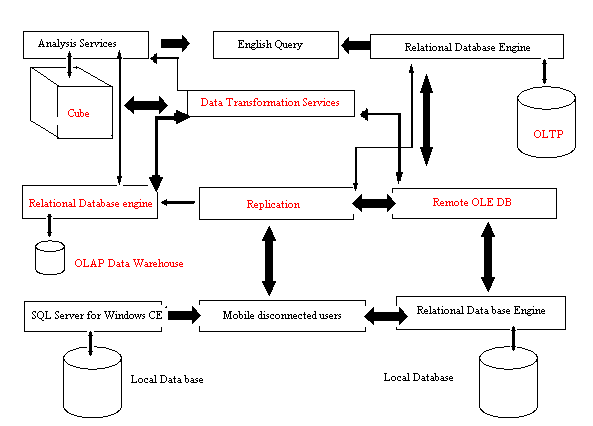
The relational database engine of the SQL server is a modern, highly scalable and reliable engine for storing data. The database stores data in tables and each table represents objects that are of interest to the enterprise. It could be details of vehicles, employees, customers, vendors and so on. Each column in the table represents an attribute of the object modeled by the table and the rows represent a single occurrence of the type of object modeled. Applications use the T-SQL (Transact-Structured Query language) to access the data in the database.
The SQL Server 2000 can be scaled by clustering servers that cooperate to form terabyte sized databases that can be accessed by thousands of users simultaneously. The database is tuned by the engine dynamically as users connect to it and resources are freed when users log off. This implies that smaller editions of SQL server can be used for individuals and workgroups that do not need dedicated database administrators. SQL Server for Windows CE is the server programming model that is used by mobile users. Large production databases of the enterprise model have easy to use graphical interfaces and administration utilities as features of the model.
The downtime of SQL Server 2000 is minimal. It is highly reliable and can continue running for long periods of time. Administrative actions can be performed at run time. The database engine has been integrated with the Windows 2000 and Windows NT failover clustering and this allows users to define virtual servers that keep running even when a physical node has failed. Log shipping can also be used to maintain a warm standby server and replace a production server within minutes of failure.
Security is optimum in the SQL Server 2000 relational database engine. The authentication protocol can be integrated with the Windows authentication so that passwords are protected against network sniffers. C2 level auditing can be set up for users accessing a database and they can use Secure Sockets layer encryption to encrypt all data transferred between the application and the database.
The database engine allows users to access data from any OLE DB data source using the distributed query feature. The table in the data source can be referenced in Transact SQL statements as if the tables actually reside in the SQL Server database. In addition, the full text search feature enables sophisticated pattern matches against textual data stored in SQL databases or Windows files.
Finally the relational database engine can store detailed records of all the transactions that are generated by the OLTP systems and can support the processing requirements for Fact tables and dimension tables of large data warehouses.
Microsoft provides a large number of relational interfaces that are flexible, supportive of business intelligence application types and developers. The conventional procedural SQL- DML interfaces are SQL and T-SQL interfaces. OLE DB and ADO interfaces are the COM interfaces. They encapsulate SQL and T-SQL DML and enable rich object oriented programming structures. The attractive Web based interface is the ADO.Net interface that is provided in the SQL Server 2000. At the lowest level are the ODBC and JDBC interfaces that define a procedural call-level interface. These are interfaces that do not use COM. At the higher level is the object oriented interface recommended by Microsoft—OLE DB for developing tools, utilities and components. This provides support for flexible, high performance data manipulation. At the highest level is the ADO(ActiveX Data Objects) interface. This interface encapsulates and abstracts OLE DB and provides object oriented facilities to connect to, retrieve, manipulate or update data from the SQL Server. Application developers are insulated from the complexity of programming COM interfaces by this interface. ADO.Net is an interface designed by Microsoft for access to data from remote web based applications. The technology used reduces the network roundtrips between the application and the database since they access the database in short bursts and connect only when database operations need to be performed.
The Data Transformation Services (DTS)
The Data Transformation Services (DTS) is a set of services used to build the data warehouse or the data mart. Large amounts of data stored in the Online Transaction Processing systems and historical data sources need to be analyzed by enterprises for evaluating mission critical decisions. Microsoft’s build and manage functionality in SQL Server 2000 has advantages and strengths as under:
- The process and workflow orientation of the DTS package is flexible and adaptable. It helps automate ETL execution and the transformation capabilities can be easily extended using object oriented build and manage capabilities.
- DTS supports non database data structures and files
- It integrates facilities that organize its packages into transactions and execute completely or have the facility to rollback if execution fails. The transactional lookup queries incorporate data from other sources into the transformation task on the data source.
- The DTS packages can be versioned and password protected
- The DTS packages can execute on Windows server platform even outside the database and their processing does not interfere with the processing in the production Business intelligence applications.
- Data Transformation services tools inbuilt into the SQL Server 2000, help in extracting data from heterogeneous, OLE DB data sources and summarizing and aggregating data to build a data warehouse
The DTS interfaces inbuilt into Microsoft SQL Server 2000 are:
- DTS Import/Export Wizard copies data to and from an instance of Microsoft SQL Server and maps transformations on the data.
- DTS Designer is a graphical tool that helps build complex packages with work flows and event driven logic. This tool can be used to edit and customize packages created with the DTS import Export Wizard.
- DTS and SQL Server Enterprise Manager are options available for manipulating packages and accessing package information from SQL Server Enterprise manager.
- DTS Package Execution Utilities include a run utility, a set of dialog boxes used to schedule and run packages and the dtsrun utility, which is a command prompt utility used to run packages.
- The DTS Query Designer is a graphical tool used to build queries in DTS.
However, building Data warehouses is not the only function performed by DTS. It can be used to retrieve data from one data source, perform complex transformations on the data and then store it in another data source. DTS can also work with any data source apart from working with SQL Server databases or Analysis Services cubes. The only condition being that the data should be accessed through OLE DB.
[catlist id=181].