Parent child dimensions when viewed from within a cube reveal some interesting features. We will add an private employee parent child dimension to the sales cube and study the features thereof.
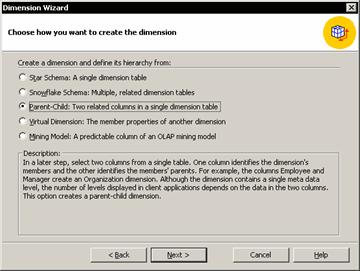
In the cube Editor right click the Dimensions folder and click New Dimension to launch the Dimension wizard
Select the parent child option and click Next.
Select the Employee dimension table and click Next.
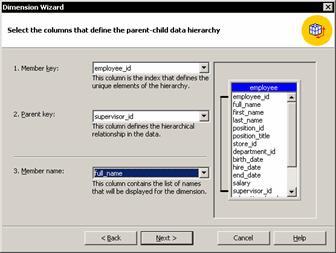
Select the Employee_ID in the member key list, Supervisor_ID in the Parent Key List, and Full_Name in the Member Name list. Then click Next.
Click Next to skip the Advanced options screen. Type Employee as the dimension name, clear the check box that allows you to share the dimension and click Finish.
Click the Data tab to see the Data Pane and drag the employee dimension down to the row area, replacing the existing dimension. The cube will display the sample data because it hasn’t been processed and the dimension members will be visible.
Expand the members to see the entire employee hierarchy.
Allow data for non-leaf members
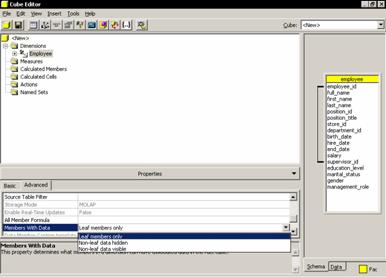
In a parent child dimension there are values in the fact table both at the leaf level and at the parent level. Before processing the cube it is important to change the property of the dimension.
In the cube tree, select the Employee dimension and switch to Advanced tab of the properties window. A drop down list for the Members with the Data Property is displayed. There are three values: Leaf Members only(default); Non-Leaf Data Hidden and Non-Leaf Visible. Select the third option so that a comparison can be made on the sales figures.
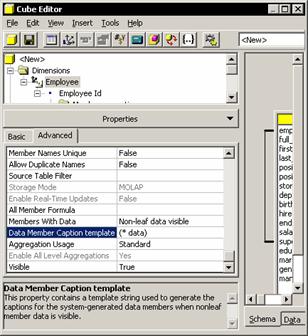
The data pane refreshes to include new members for the supervisor data. The new member names are in parentheses. Since the total rows for the supervisor clearly include the word “Total”, the user may want to simply display the employee name for the new data fields. The template for displaying the new member name can be changed.
Clear the Data Member caption Template property and press enter.
Click the Process cube button, click Yes to save the cube and No to design storage and Ok to fully process the cube. Then close the process log window and expand all the levels of the employee dimension.
{mospagebreak}
Manage levels within a parent child dimension
The parent child dimension hierarchy is derived from a single dimension table. There is no need for an All level in this dimension as explained earlier in this tutorial.
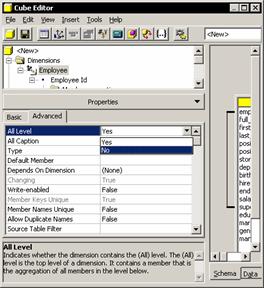
In the cube tree, select the Employee Dimension and on the Advanced tab of the Properties window, change the value of the All Level Property to No and press Enter. The preview window is refreshed to show a hierarchy with no All Level. Specific names can be assigned to levels of a parent child dimension if required.
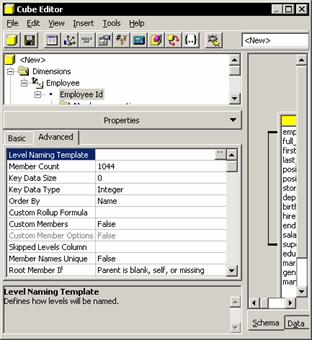
Expand the Employee dimension and select the Employee Id level on the Advanced tab of the properties window, select Level naming Template property and click the ellipsis button.
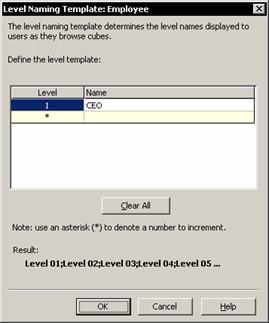
Click in the box to the right of the asterisk(*) and type CEO. Do not press Enter. Note that the Asterisk changes to 1 as the user types in the name of the level and a new row with an asterisk appears;
Click in the box in the second row, and type Supervisor and so on till all the levels required are entered. The levels are automatically created below the lowest level specified are given sequential numbers. Levels can only be skipped if the dimension level contains a column indicating how many levels to skip.
Click the schema tab to display the source tables for the cube. Right click the heading of the employee table and click Browse Data. Check whether the table contains a Skipped_Levels column. The employee table in the FoodMart database does not contain a Skipped_levels Property.
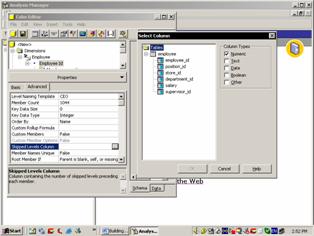
To set the skipped level property of the Employee table(on the assumption that it has a Skipped_Levels column) select the Skipped_Levels column and click OK. This will have no impact until the cube is processed. Within the dimension skipping levels will create a ragged hierarchy. The term ragged means that some members have unusual relationships with their parents. In a ragged parent dimension, extra space is added in the place of one or more parents.
Click Process cube button, click yes to save the cube, No to design storage and OK to fully process the cube. Close the process log window and click Data tab to view the data. Expand the levels of the employee dimension.
In this tutorial we have focused on understanding the various kinds of dimensions that can be created and the flexibilities provided by Analysis Services in the creation and manipulation of these dimensions. In the next tutorial we will look at some of the advanced features of creation of dimensions.
[catlist id=181].