
In this tutorial you will learn how to use Oracle Data Pump Export, Invoking Data Pump Export from command prompt and Oracle Enterprise Manager (OEM). I am going leave the rest of the export options as home work for you. Make sure you try out other options and parameters and then come back and share your comments and discoveries over here, which will help several other exforsys community members who come here is search of knowledge and information. So then, let me begin to show you about the Oracle Data Pump Export!
What is Data Pump Export
Data Pump export is a new feature in Oracle 10g and provides enhanced functionality for the Export Utility (exp) available in previous version. The new Data Pump export provides improved features and better performance. Data pump utility is useful when you need to clone a database, refresh the development database or move the databases between different operating systems. Another big advantage is the network export feature, using which you can export the data to the target server directly using data filters and metadata filters; without having to create the dump files.
Data Pump Export basics
The Data Pump export utility can be invoked via two methods:
- By using the expdp command from the command prompt
- By using “Export to Export Files” under data movement section of the OEM.
The characteristic of the export operation is determined by the export parameters that you specify. These parameters can be specified either on the command line or in a parameter file.
Data Pump Export modes
There are 4 export modes available in the data pump.
- Database – Export the entire database
- Schemas – You can selectively export the required schema rather everything
- Tables – If you are looking to restore few sets of tables
- Tablespace – this option is same like Tables export but exports all of the tables from any tablespace.
How to use Data Pump Export
Now, let’s take a look at few methods through which you can invoke Data Pump Export.
- Oracle EM
- Command Prompt
Using Data Pump Export from Oracle EM
The procedure to use export utility using OEM is outlined here below.
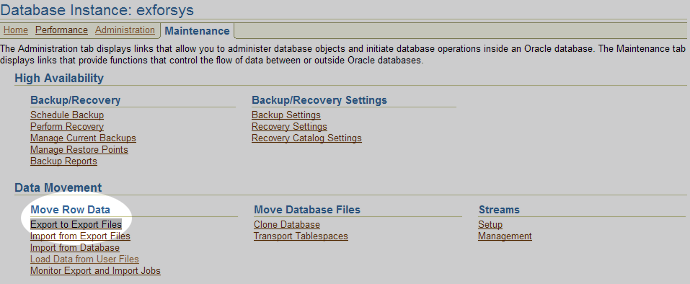
Step 1: Login to OEM, navigate to Maintenance -> Data Movement -> Move Row Data, select “Export to Export Files”
The screenshot below shows the OEM screen to initiate the export. Click on Export to Files to initiate the export process.
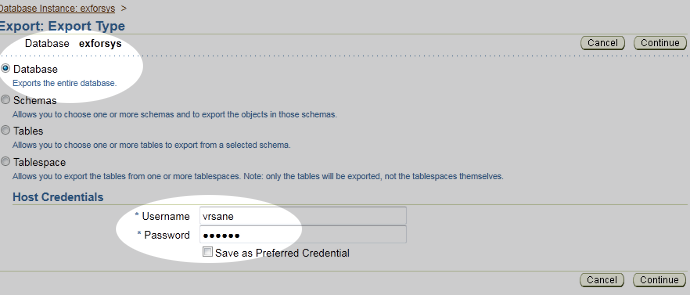
Step 2: The screenshot below shows the initial step during the export feature.
You will need to provide host username and password which is required to interact with host for read/write access to the file system.
There are several options like exporting full database, schemas, Tables and Table space. In this exercise we are going to use “Exports the entire database” option.
Step 3: The screenshot below shows the first step during the export feature. You will need to provide directory where the export files should be saved. Select DATA_FILE_DIR and select “Create Directory Object” button.

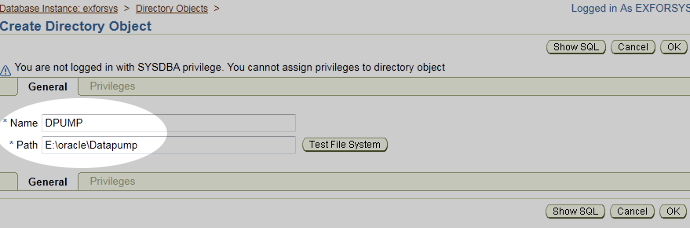
Step 4: The screenshot below shows entering the directory path where you would like the export files to be saved.
Note: If you are going to work with OEM remotely and using any userid other than sysdba privileged id, you will need to issue the following command.
GRANT READ,WRITE ON directory DPUMP TO "username"
Please make sure you replace username with the actual username you will be using to login.
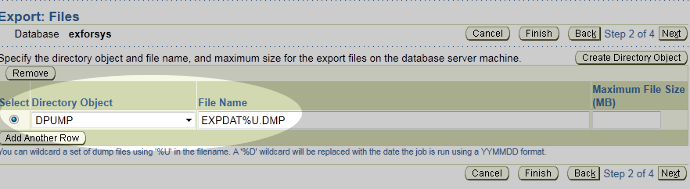
Step 5: The screenshot below shows the directory parameter and the file name that will be used.
Step 6: The screenshot below shows scheduling options if you would like to run later time, give it a name for the job and click next to continue.

Step 7: The screenshot below shows the final step before we invoke the export process, if you would like to see the PL/SQL code generated by the job, click Show PL/SQL link. Click Submit Job to continue.
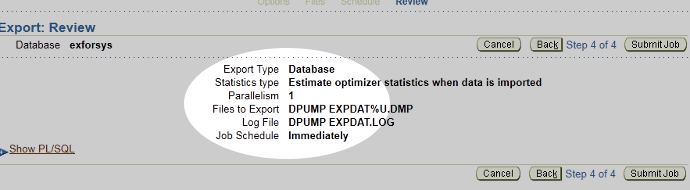
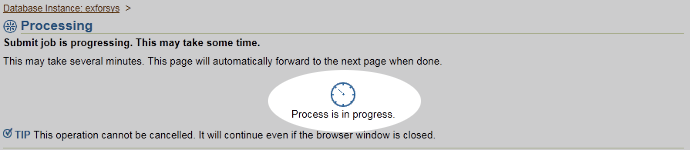
Step 8: There is no need of action now, please wait for few mins, you will be returned to next step.
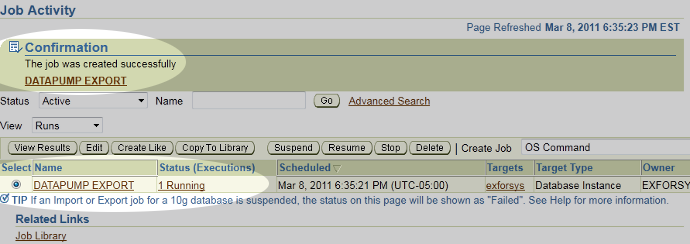
Step 9: Once the job is completed you will see confirmation message as shown below.
Step 10: Summary of Export job is shown in the following screen.

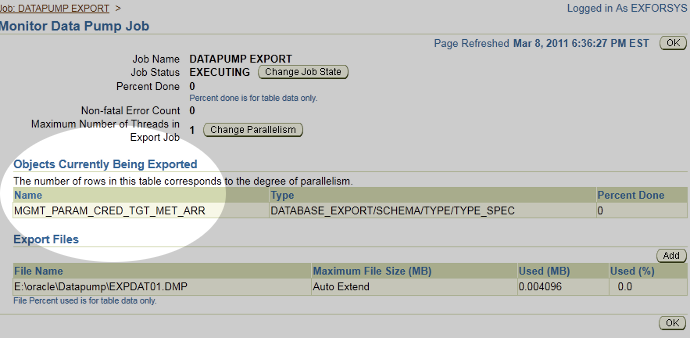
Step 11: The screenshot below shows the status of the job. Now verify the files in the folder based on the directory you had entered. There will be 2 files, EXPDAT.LOG and EXPDAT01.DMP files. Verify the log file for any errors and you should see like this for successful export.

Dump file SET FOR EXFORSYS.DATAPUMP EXPORT IS:
E:oracleDatapumpEXPDAT01.DMPJob "EXFORSYS"."DATAPUMP EXPORT" successfully completed at 18:40:40
Using Data Pump Export from Command Prompt
Now let us learn to use data pump export from command prompt
We are going to use the same export directory for command prompt export. There is no need to create a new directory.
Launch command prompt and type the following command to invoke DataPump Export utility. Make sure replace the username, password and any other parameters values based on your need.
In the exercise, we are going to perform export enter database. Make sure you have EXP_FULL_DATABASE role for the username you are going to use.
expdp username/password@servicename DIRECTORY=dpump DUMPFILE=dumpfile.DMP
FULL=y LOGFILE=logfile.LOG

After successful completion, you should see the message something like this.
It is best practice to check the logs all the time even you are sure of successful completion.

Once you practice the basics of Data pump, I would recommend you read Oracle manual for additional parameters and options. If you are stuck or have questions, feel free to comment.
[catlist id=177].