
Technical Training
Oracle Apps 11iOracle Apps 11i : Asset Management - Asset Adjustments
Oracle Apps 11i : Asset Management - Asset Adjustments
In this tutorial you will learn about Asset Adjustments - Single Asset Reclassification, Adjusting Units, Assigning Units, Adjusting Financial Information and Single Asset Transfers.
Asset Adjustments
You can adjust an asset by reclassifying, changing the number of units, adjusting the financial information, or performing a mass change.
Single Asset Reclassification
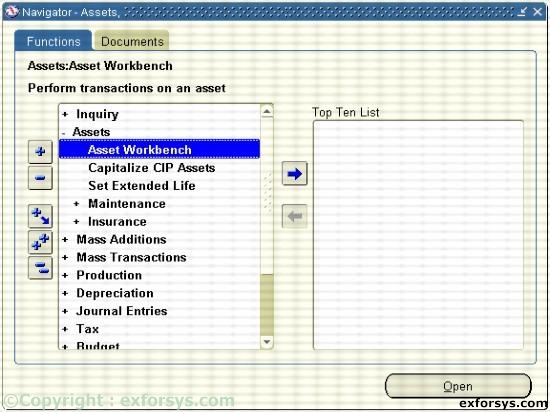
Figure 1. Navigating to Single Asset Reclassification.
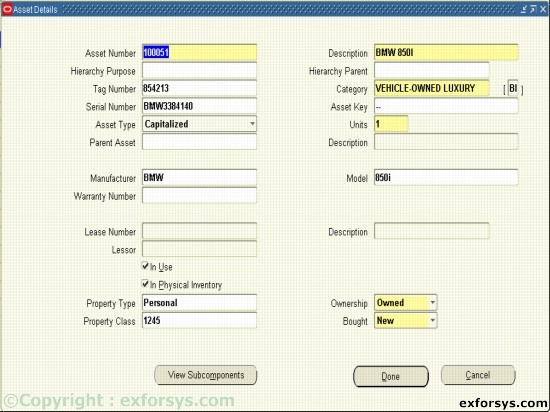
Figure 2. Single Asset Reclassification.
Reclassify assets to update information, correct data entry errors, or when consolidating categories.
Adjusting Units
a) You can change the number of units for the asset in the Asset Details window.
b) You update assignment information when you change the number of units.
c) You are not retiring these units; you are adjusting the number of units to reflect the correct amount. d) When you save your work, Oracle Assets navigates to the Assignments window so you can update distribution information.
Assigning Units
a) You can update the distribution lines for the asset to reflect the new units.
b) The Units to assign field displays the number of units to be distributed.
c) The Units to assign field must be zero before you save your work.
d) If all units remain in the original cost center, Oracle Assets does not create any journal entries.
Adjusting Financial Information
Correct an error or update financial and depreciation information for single asset or a group of assets. You can also override depreciation information for an asset while adding it using the Detail Additions process.

Figure 3. Adjusting Financial Information.
Single Asset Transfers
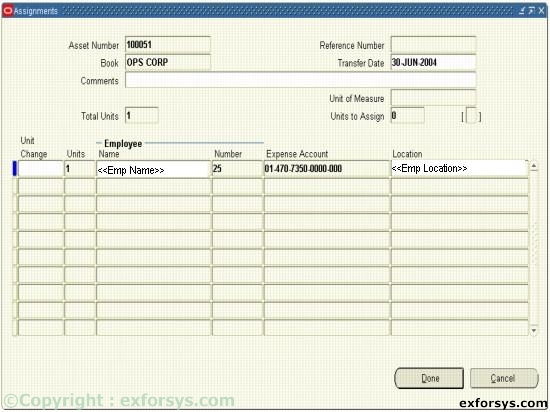
Figure 4. Create Single Asset Transfer.
You can transfer assets between employees, depreciation expense accounts, and locations.
Oracle Apps 11i
- ERP Overview
- Oracle Apps 11i: Overview of popular ERP Products
- Oracle Apps 11i: Advantages of Oracle E-Business Suite
- Oracle Apps 11i : Getting started with Oracle Applications
- Oracle Apps 11i: Internationalization Support and Multiple Reporting Currencies
- Oracle Apps 11i : File System
- Oracle Apps 11i Installation - System Requirements
- Oracle Apps 11i - Using Rapid install and the Steps Before Apps Installation
- Single Node and Multi Node Installation Part 1
- Single Node and Multi Node Installation Part 2
- Oracle Apps Application Framework
- Oracle Apps Table Registration API
- Oracle Apps Concurrent Processing
- Oracle Apps Concurrent Library Window
- Oracle Apps Message Dictionary
- Oracle Apps Flex fields
- Oracle Apps Implementing Key Flex field and Descriptive Flex field
- Oracle Apps Template Form
- Special Triggers in the Template Form in Oracle Apps 11i
- Creating New Forms in Oracle Apps 11i
- Creation of Master Detail Block in Oracle Apps 11i
- Registering New Forms in Oracle Apps 11i
- Oracle Apps 11i: Setting up Chart Of Accounts (COA)
- Oracle Apps Sys Admin - Users and Responsibilities
- Oracle Apps 11i : Creating Journals through Oracle GL
- Oracle Apps 11i : Suppliers
- Oracle Apps 11i : Asset Management - Asset Book Positioning
- Oracle Apps 11i : Asset Management - Asset Books Regions
- Oracle Apps 11i : Asset Management - Manual and Quick Additions
- Oracle Apps 11i : Asset Management - Mass Additions
- Oracle Apps 11i : Asset Management - Asset Adjustments
- Oracle Apps 11i : Asset Management - Mass Transfers
- Oracle Apps 11i : Asset Management - Depreciation
- Oracle Apps 11i : Asset Management - Retirements
- Oracle Apps 11i : Asset Management - Journal Entries
- Oracle Reports 6i


