
Exforsys

Oracle Apps 11i

  1. ERP Overview
  2. Oracle Apps 11i: Overview of popular ERP Products
  3. Oracle Apps 11i: Advantages of Oracle E-Business Suite
  4. Oracle Apps 11i : Getting started with Oracle Applications
  5. Oracle Apps 11i: Internationalization Support and Multiple Reporting Currencies
  6. Oracle Apps 11i : File System
  7. Oracle Apps 11i Installation - System Requirements
  8. Oracle Apps 11i - Using Rapid install and the Steps Before Apps Installation
  9. Single Node and Multi Node Installation Part 1
  10. Single Node and Multi Node Installation Part 2
  11. Oracle Apps Application Framework
  12. Oracle Apps Table Registration API
  13. Oracle Apps Concurrent Processing
  14. Oracle Apps Concurrent Library Window
  15. Oracle Apps Message Dictionary
  16. Oracle Apps Flex fields
  17. Oracle Apps Implementing Key Flex field and Descriptive Flex field
  18. Oracle Apps Template Form
  19. Special Triggers in the Template Form in Oracle Apps 11i
  20. Creating New Forms in Oracle Apps 11i
  21. Creation of Master Detail Block in Oracle Apps 11i
  22. Registering New Forms in Oracle Apps 11i
  23. Oracle Apps 11i: Setting up Chart Of Accounts (COA)
  24. Oracle Apps Sys Admin - Users and Responsibilities
  25. Oracle Apps 11i : Creating Journals through Oracle GL
  26. Oracle Apps 11i : Suppliers
  27. Oracle Apps 11i : Asset Management - Asset Book Positioning
  28. Oracle Apps 11i : Asset Management - Asset Books Regions
  29. Oracle Apps 11i : Asset Management - Manual and Quick Additions
  30. Oracle Apps 11i : Asset Management - Mass Additions
  31. Oracle Apps 11i : Asset Management - Asset Adjustments
  32. Oracle Apps 11i : Asset Management - Mass Transfers
  33. Oracle Apps 11i : Asset Management - Depreciation
  34. Oracle Apps 11i : Asset Management - Retirements
  35. Oracle Apps 11i : Asset Management - Journal Entries
  36. Oracle Reports 6i

Ads


Home arrow Technical Training arrow Oracle Apps 11i

Oracle Apps 11i : Asset Management - Asset Books Regions

Author : Exforsys Inc.     Published on: 9th Oct 2005    |   Last Updated on: 11th Oct 2005

Oracle Apps 11i Tutorials : Asset Management - Asset Books Regions

In this tutorial you will learn about various Asset Books Regions like Calendar Region, Accounting Rules Region, Natural Accounts Region, Journal Categories Region and Asset Categories Regions.

Ads

Calendar Region

Allow Purge : Purges data from the asset book.

GL Set of Books : Enter the GL set of books for creating journal entries.

Prorate Calendar : Determine depreciation rate.

Current Period : Oracle Assets updates the current period field each time the current period is closed and the next period is opened. Only one period can exist at the time for each asset book. Set up the depreciation calendar for at least one period before the current period.

Divide Depreciation : Divides the annual depreciation over the book’s fiscal year periods. Select evenly to divide depreciation evenly to each period or by days.

Divide if Retired in the First Year : Selected when depreciating one year old assets.

Last Depreciation Run : Initially defaults to the current date, which is update by Oracle assets

Accounting Rules Region
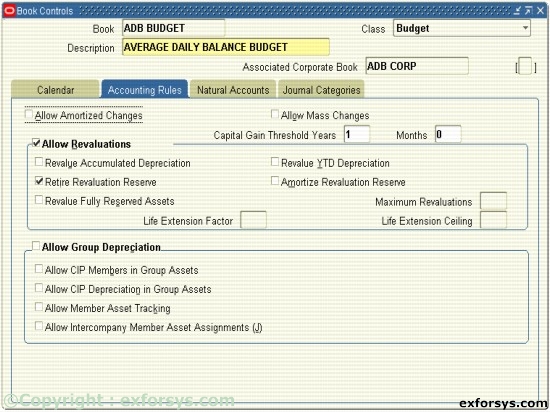
Figure 1. Accounting Rules Region.

Allow Amortized Changes, Allow Mass Changes : To allow amortized changes and mass changes in the asset boos, select the check boxes.

Capital Gain Threshold : The minimum time you must hold an asset for Oracle Assets to report it as a capital gain when you retire it. To report a capital gain for all retiring assets, enter zero for the threshold.

Allow Revaluation : Selected, specifying the applicable revaluation rules.

Natural Accounts Region
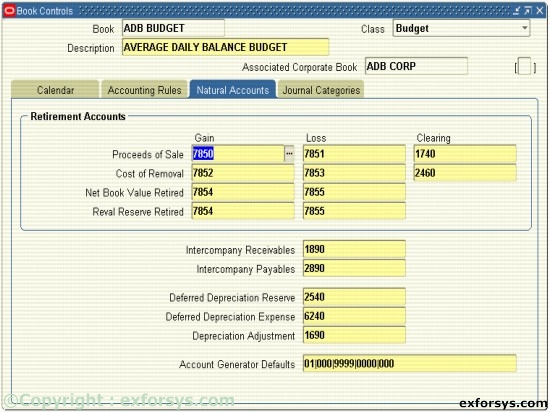
Figure 2. Natural Accounts Region.

These accounts represent values for the natural account segment from the accounting flexfield associated with the GL set of books assigned to this Asset Book.

Retirement Accounts : Set up your gain/loss accounts for Oracle Assets to create individual journal entries for each gain/loss amount to single or separate accounts.

Other Natural Account Defaults : Enter Intercompany Receivables and Payables clearing account numbers.

Account Generator Defaults : By default, Oracle Assets creates journal entries without cost center level detail for all accounts except the depreciation expense account, to create journal entries using the expense account’s balancing segment in the assignments window and the account segment from the asset category or book, depending on the account type.

Journal Categories Region

Figure 3. Journal Categories Region.

Implementation considerations for the Journal Categories Region:

Journal Source

  • This source labels the journal entries that are sent from Oracle Assets to the GL.

Journal Categories

  • Choose the Journal Category names you want to use when journal entries are generated from Oracle Assets to the General Ledger.

You cannot create new Journal Sources and Categories in this form. You must choose from LOV of already defined sources and categories. Typically, these are defined in the Oracle GL application.

Ads

Asset Categories Regions

The asset category region is comprised of 3 regions:

Header Region

  • Contains general information about the category that remains the same regardless of the asset book that is being attached to the category.

General Ledger Accounts Region

  • Contains the default GL accounts and natural account segments that will be used when assets are added that are assigned to this category. The default GL accounts are setup for each asset book that is associated with this asset category regardless of whether that asset book will create journal entries for the GL.

Default Depreciation Rules

  • This region contains depreciation rules information that is setup for each asset book associated with asset category.


This tutorial is part of a Oracle Apps 11i tutorial series. Read it from the beginning and learn yourself.

Oracle Apps 11i

  1. ERP Overview
  2. Oracle Apps 11i: Overview of popular ERP Products
  3. Oracle Apps 11i: Advantages of Oracle E-Business Suite
  4. Oracle Apps 11i : Getting started with Oracle Applications
  5. Oracle Apps 11i: Internationalization Support and Multiple Reporting Currencies
  6. Oracle Apps 11i : File System
  7. Oracle Apps 11i Installation - System Requirements
  8. Oracle Apps 11i - Using Rapid install and the Steps Before Apps Installation
  9. Single Node and Multi Node Installation Part 1
  10. Single Node and Multi Node Installation Part 2
  11. Oracle Apps Application Framework
  12. Oracle Apps Table Registration API
  13. Oracle Apps Concurrent Processing
  14. Oracle Apps Concurrent Library Window
  15. Oracle Apps Message Dictionary
  16. Oracle Apps Flex fields
  17. Oracle Apps Implementing Key Flex field and Descriptive Flex field
  18. Oracle Apps Template Form
  19. Special Triggers in the Template Form in Oracle Apps 11i
  20. Creating New Forms in Oracle Apps 11i
  21. Creation of Master Detail Block in Oracle Apps 11i
  22. Registering New Forms in Oracle Apps 11i
  23. Oracle Apps 11i: Setting up Chart Of Accounts (COA)
  24. Oracle Apps Sys Admin - Users and Responsibilities
  25. Oracle Apps 11i : Creating Journals through Oracle GL
  26. Oracle Apps 11i : Suppliers
  27. Oracle Apps 11i : Asset Management - Asset Book Positioning
  28. Oracle Apps 11i : Asset Management - Asset Books Regions
  29. Oracle Apps 11i : Asset Management - Manual and Quick Additions
  30. Oracle Apps 11i : Asset Management - Mass Additions
  31. Oracle Apps 11i : Asset Management - Asset Adjustments
  32. Oracle Apps 11i : Asset Management - Mass Transfers
  33. Oracle Apps 11i : Asset Management - Depreciation
  34. Oracle Apps 11i : Asset Management - Retirements
  35. Oracle Apps 11i : Asset Management - Journal Entries
  36. Oracle Reports 6i
 

Comments