
Oracle Apps 11i : Asset Management – Retirements
In this tutorial you will learn about Asset Management – Retirements; Types of Asset Retirement. – Full Retirement, Partial Retirement, Undo or Reinstate Retirements, Retiring Separately Across Depreciation Books, Reinstating Retired Assets – Reinstating with a PENDING status, Reinstating with a PROCESSED Status and Reversing a Reinstatement.
Retirements
1. You retire an asset fully or partially when it is lost, stolen, damaged, sold, returned, or for any other reason that causes you to stop using it.
2. You retire assets by units or costs.
3. You can perform a mass retirement by retiring a group of assets.
4. You can synchronize asset disposal information between Oracle Assets and external systems via the Mass External Retirements interface.
5. You can reinstate retired assets within certain limits.
6. You perform current and prior period retirements and reinstatements within the same fiscal year.
7. You create journal entries to separate accounts for each component of the gain or loss.
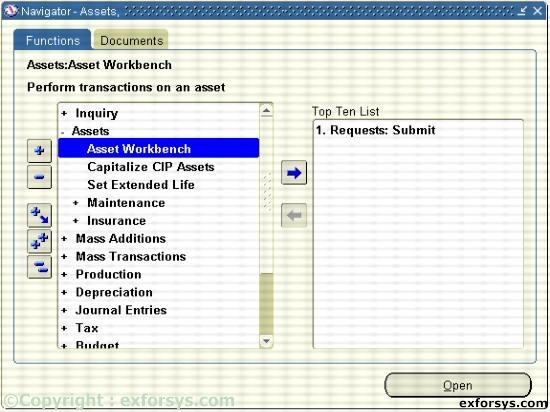
Figure 1. Navigate to Asset Workbench.
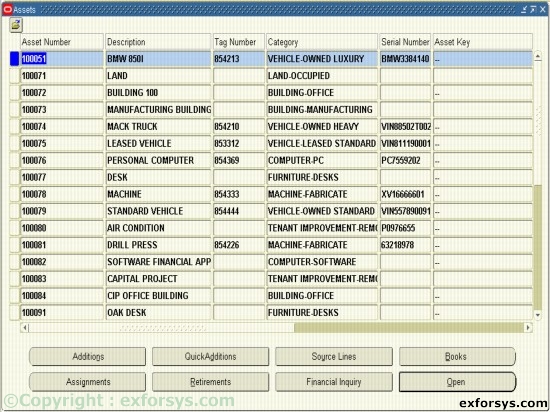
Figure 2. Select the Asset number to retire.
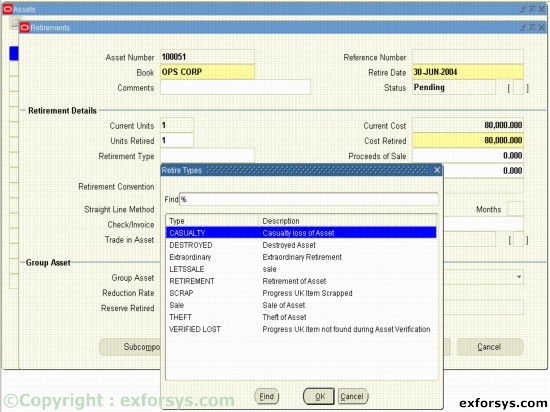
Figure 3. Types of Asset Retirement.
Full Retirement : Retiring an entire asset including all of its units and cost.
Partial Retirement : Retiring part of an asset by cost or specified units.
Undo or Reinstate Retirements : Within certain restrictions, you can undo or reinstate an asset retirement, and Oracle Assets will continue to track the asset and depreciate it if appropriate.
Retiring Separately Across Depreciation Books : Retire an asset from any depreciation book without affecting other books
Reinstating Retired Assets
The effect of your reinstatement depends on the status of the retirement.
Reinstating with a PENDING status:
Choose undo retirement to delete the retirement transaction.
No Journal entries are created, and there is no audit trail.
Reinstating with a PROCESSED Status
Choose Reinstate to create the reinstatement transaction.
When you run the Calculate Gains and Losses program, Oracle Assets creates journal entries to reverse the effects of the retirement.
Reversing a Reinstatement
If you decide to reinstate a retired asset, you can query the reinstatement by using the original retirement number.
Choose Undo Reinstatement.
[catlist id=183].