
Oracle Apps 11i Free Training : Concurrent Library Window : This tutorial discusses about the Concurrent Library Window Navigation,create request set in oracle applications and Running Requests.
Concurrent Library Window
Use this window to register program libraries, which are lists of immediate concurrent programs that you wish to link with a concurrent manager. Concurrent managers use the programs in a program library to run their immediate programs. You must register libraries before you can define concurrent managers. You can only include immediate-type concurrent programs in program libraries.
After adding any immediate concurrent program to your library or creating a new library, you must rebuild and relink your library before your changes take effect. After you rebuild and relink your library, the system administrator must restart the concurrent manager using your library.
You can only register program libraries that you have already built at the operating system level.
Navigation Application Developer à Concurrent à Library
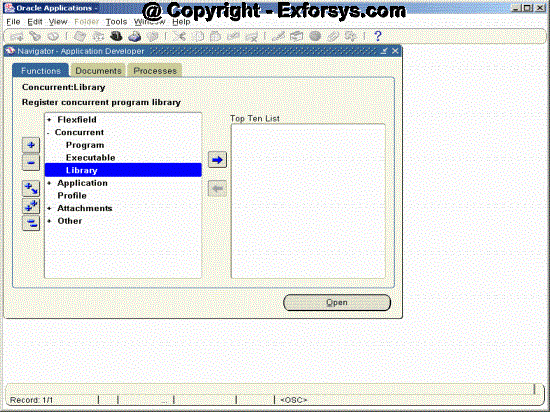
Figure 9. Concurrent Library Window Navigation
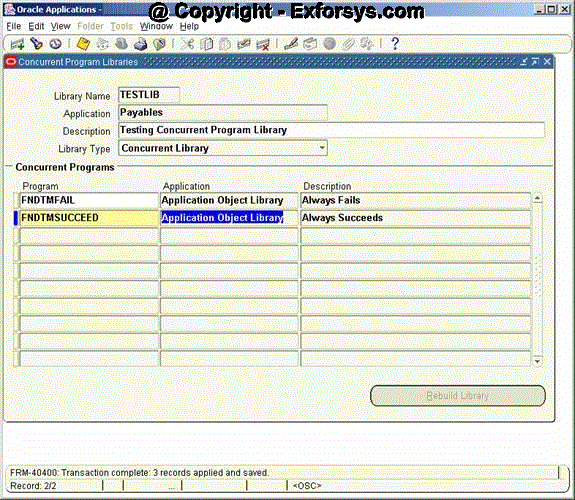
Figure 10. Concurrent Library Window
Field Description
i) Library Name – This is the same name you gave to your program library file at the operating system. The library name must be eight characters or less.
ii) Application – The bin directory under the application top directory should contain the executable program library file.
iii) Description – Description of the library.
iv) Library Type – There are two types of program library you can define:
v) Concurrent Library – A library of immediate concurrent programs to link with a concurrent manager.
vi) Transaction Library – A library of transaction programs to link with a transaction manager.
vii) Program – Enter the name of an immediate-type concurrent program executable that you linked into your program library at the operating system. This block verifies that the program name and application name you specify uniquely identify a defined concurrent program executable.
viii) Application – Application of the concurrent program.
Request Sets
Request sets are the group of concurrent programs that are related to each other. When a request set is run all the concurrent programs are executed according to the outcome of the previous concurrent program defined in the request set.
To create request set in oracle applications.
Navigation – System Administrator -> Requests -> Set
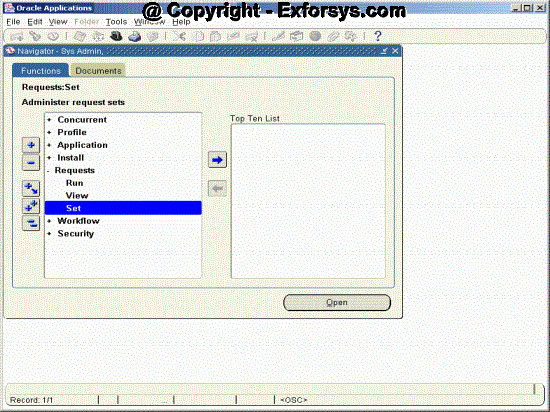
Figure 11. Request Sets Definition Form Navigation
Request Sets Screen
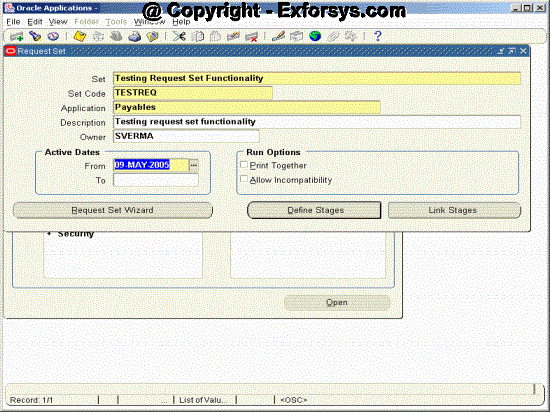
Figure 12. Request Sets Definition Form
i) Set – Give the user-friendly name of the request set. This is the name, which will show in the figure14 when user is trying to run the request set.
ii) Set Code – This is the code of the request set.
iii) Application – Application to which the request set belongs to.
iv) Description – Give the brief functional description of the request set.
v) Owner – Usually the person who is creating the request set.
vi) Active Dates From– The date from which you want your request set to be active.
vii) Active Dates To – The date upto which you want your request set to be active.
viii) Print Together – Check this if you want all the stages of the concurrent program to be printed together
ix) Allow Incompatibility – Check this if you want to define incompatibility between the stages of the request sets.
{mospagebreak}
Click on the Define Stages Button and you will get Following Screen (figure 13).
Define Stages Screen
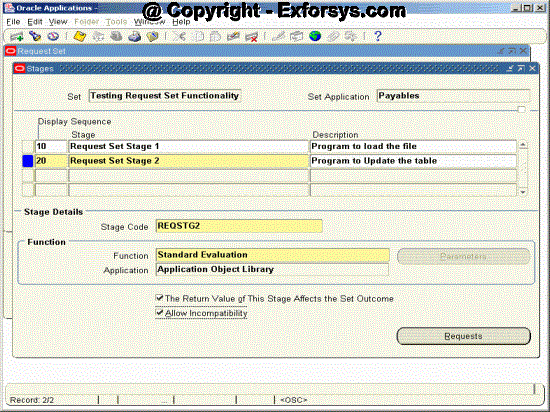
Figure 13. Request Sets Stages Form
Field Description
i) Set Name and Set Application Name will get defaulted from the previous screen. You need to define all the stages, which you want to run as the part of the request set.
ii) Enter the ‘Sequence’, any relevant ‘Stage name’ and ‘Description’ for this stage.
iii) Stage Code: Enter a Stage Code for the stage. This code is used internally by Oracle Applications to reference the stage.
iv) Function: The function file specifies how the outcomes of the requests in this stage affect the outcome of the stage. The default value for this field is the Standard Stage Evaluation function. This function bases its completion status on the normal completion status of the requests it contains.
v) Application: This field is defaulted to ‘Application Object Library’.
vi) The Return Value of this Stage Affects the Set Outcome: Ensures that the request set’s completion status is equal to the completion status of this stage.
vii) Allow Incompatibility: Allows your system administrator to specify programs that this stage is incompatible with (may not run with). Leave Allow Incompatibility unchecked to specify that this stage of the request set may run with all other concurrent requests or request sets.
viii) Click on the ‘Requests’ button and following screen (figure 14) will be displayed.
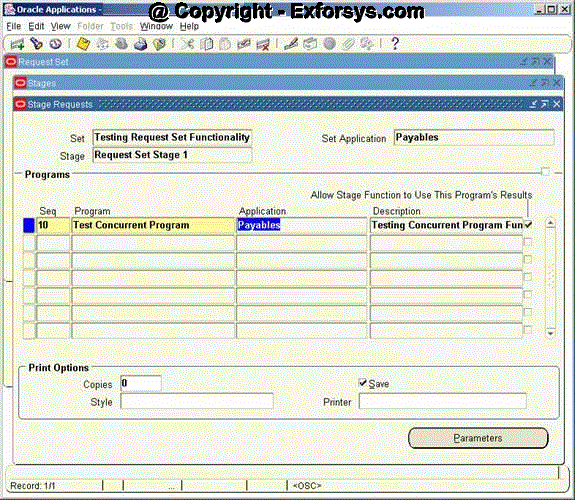
Figure 14. Request Sets Stages Requests Form
Field Description
i) The ‘Set’, ‘Set Application’ and ‘Stage’ fields default from the previous screen.
ii) Enter the ‘Sequence’ number.
iii) Select the concurrent program name from the LOV in the ‘Program’ field. Also Enter relevant description.
iv) ‘Print Options’: Enter the number of ‘Copies’, print ‘Style’ and ‘Printer’ name.
When you click parameters button, following screen (figure 15) will be displayed with the parameters defaulted from the concurrent program definition. You can overwrite the default value for the parameters in this screen.
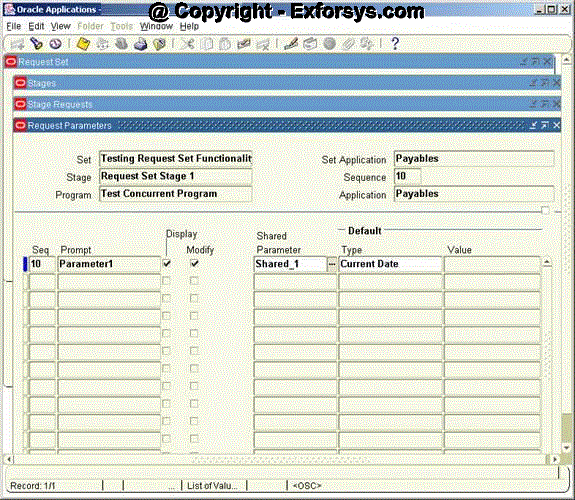
Figure15. Request Sets Stages Parameters Form
Field Description
i) Sequence: The Sequence field displays the order in which each request parameter appears when you run the request in the Submit Requests window.
ii) Prompt: The Prompt field shows the request parameter’s prompt.
iii) Display: Check the Display check box to specify that you can see a request parameter at submission time, or uncheck the check box to specify that a parameter should not be displayed at submission time. If a parameter is not displayed, then its default value will be used.
iv) Modify: Modify check box specifies whether you can insert or change the value for a request parameter at submission time.
v) Shared Parameter: The shared parameter field enables you to enter the value for a parameter only once even if it occurs across multiple requests in a request set.
Following screen (figure 16) will be displayed when you click the link stages button on the Request Sets Screen.
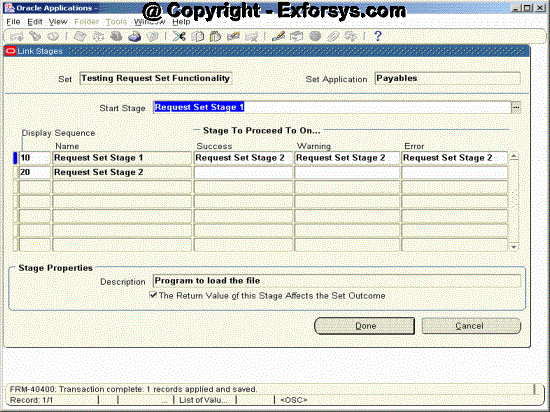
Figure 16. Request Sets Link Stages Form
This form (figure 16) is used to define the dependencies between the various stages of the request sets.
Field Description
i) Set – Defaulted from Request Sets Screen
i) Set Application – Defaulted from Request Sets Screen
ii) Start Stage – Stage with you want to be run as the first stage of the program.
iii) Display Sequence – Defaulted from Define Stages Screen
iv) Name – Defaulted from Define Stages Screen
v) Success – You need to enter the name of the stage which you want to run when the Stage in the Name field completes successfully.
vi) Warning – You need to enter the name of the stage which you want to run when the Stage in the Name field completes with warning.
vii) Error – You need to enter the name of the stage which you want to run when the Stage in the Name field completes in error.
Save the record by Clicking File->Save or Cntl-S. Your request set definition is complete.
{mospagebreak}
Running Requests Concurrent Programs or Request sets can be manually submitted by the users or scheduled to run at any point of time with any frequency. Concurrent Programs or request sets are assigned to any responsibility using a request group.
For running concurrent programs navigate to the particular responsibility to which the request is assigned.
Go to Requests and Click on Run as shown in the figure 17 below.
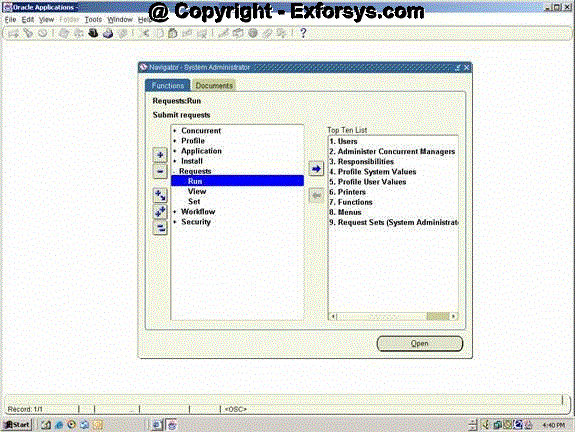
Figure 17. Request Run Form
You will see following screen (figure 12). While running concurrent program select single request, for request sets select Request set and click ok.
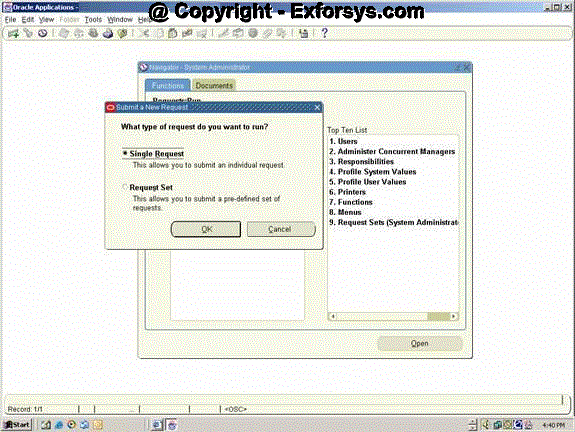
Figure 18. Request Submit Form
You will get following screen (figure 19). Please write the name of the concurrent program in the name field. You can also choose the name from the list of values by clicking the icon at the end of the name.
Standard Request Submission
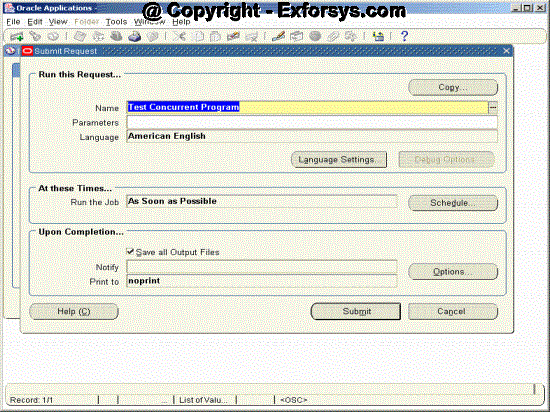
Figure 19. Submit Request Form
If there are any parameters for the concurrent program then that will be populate in the below fashion (figure 20). Either enter the parameter values manually or select from list of values.
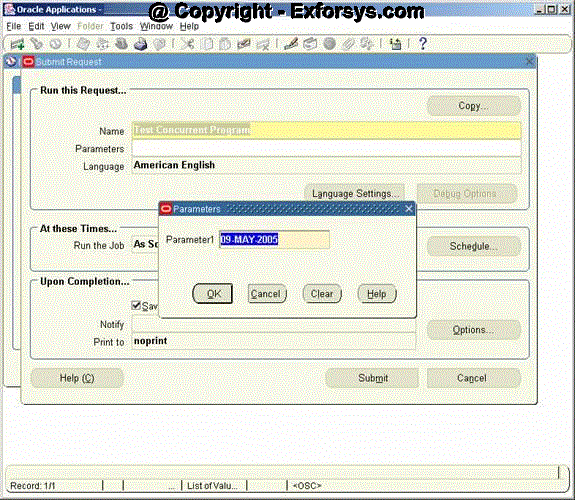
Figure 20. Submit Request Parameter Form
{mospagebreak}
After entering the parameters for the request click submit button. Once your request is submitted you will get following message with the request id.
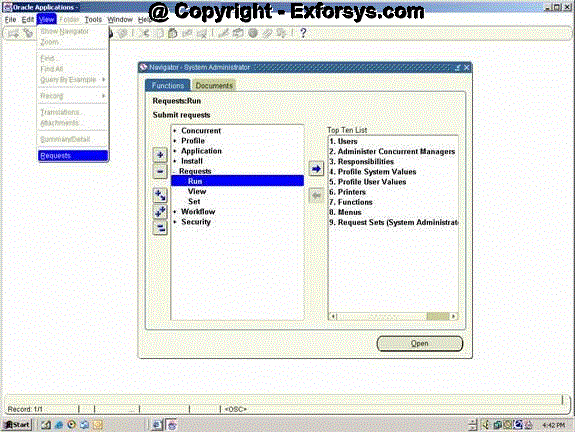
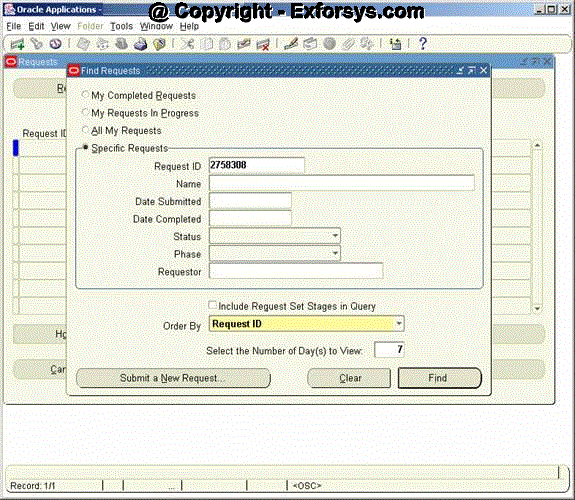
Figure 21. Request id Form Click View->Requests Figure 22. View Request Form Click View->Requests to Navigate to Find Requests Form. You can query your requests by using following Find Requests Form (figure 23). Figure 23. Find Request Form The query could be based on the following parameters After entering the appropriate query criteria click on Find Button. You will find below form (figure19) with all the requests matching the query criteria. Figure 24. Running Request Form
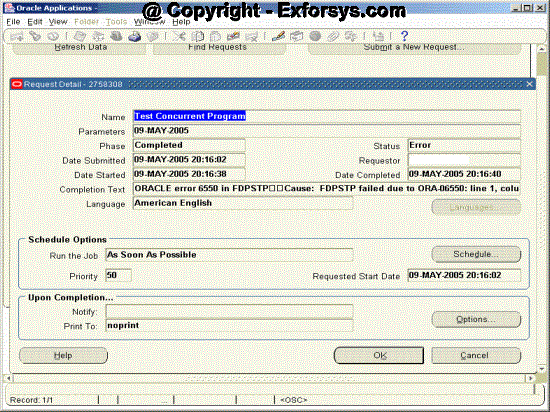
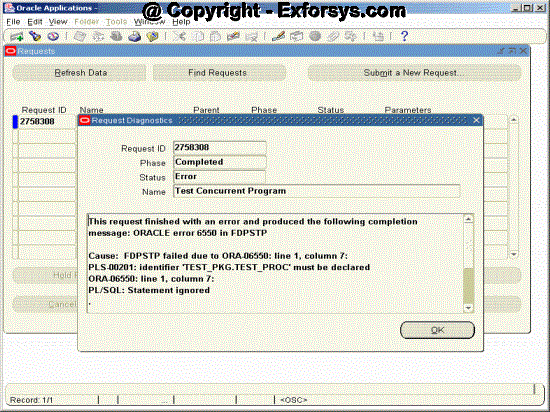
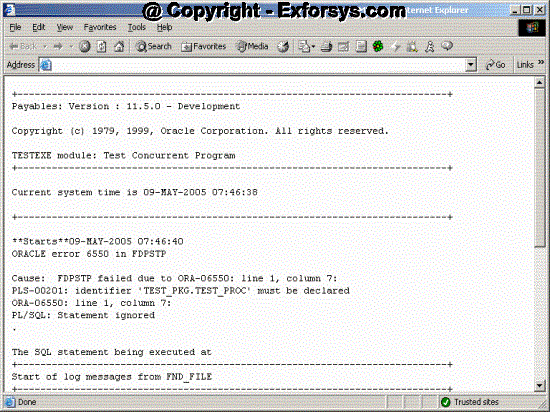
Click the view details button on figure 24 and you will find following form (figure 25) with the details of the request. Figure 25. View Request Detail Form Click the Diagnostics button on figure 24 and you will find following form (figure 26) with the details of the request. Figure 26. Request Diagnostics Form Click the View Log Button on figure 24 and you will find following form (figure 27) with the Log file of the request. Figure 27. Log File Form 1. What is the use of shared parameter in request sets?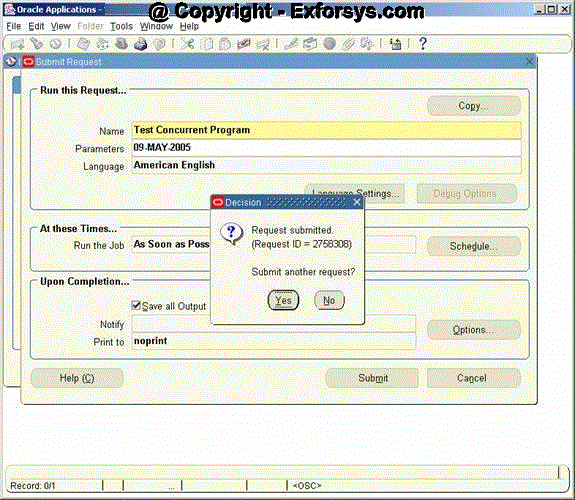
Request Id Request Id
Name – Name of the request
Date Submitted
Date Completed
Status
Phase
Requestor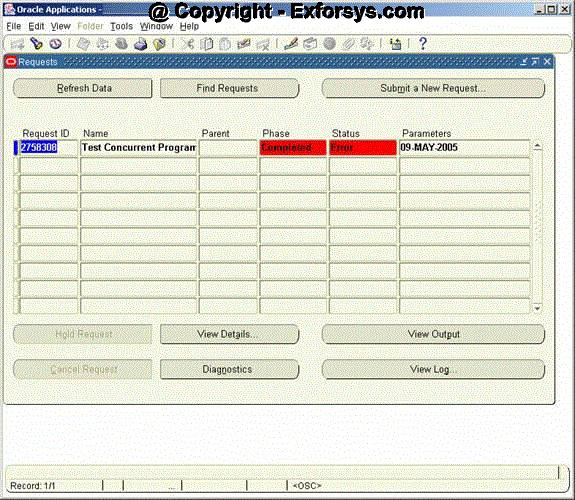
Frequently asked questions
2. What is the link between concurrent program and its executable?
3. Can I run my stored procedure through oracle applications?
4. How do I copy a concurrent program definition?
5. What is the meaning of incompatibility for concurrent programs?
6. Why do we define request sets?
7. What is the significance of ‘modify’ check box on request set parameters screen?
8. What kind of concurrent programs are used while creating concurrent program library?
9. How do I see all the requests in progress that were submitted by me?
[catlist id=183].