
Oracle Apps 11i Free Training : Concurrent Processing : This document talks about the concurrent processing in oracle applications. It will give the step-by-step procedure of creating concurrent programs in oracle applications. All types of concurrent programs are described in detail. Concurrent programs can be scheduled to run or manually run in oracle applications. In Oracle Applications, concurrent processing simultaneously executes programs running in the background with online operations to fully utilize your hardware capacity, hence the name ‘Concurrent Processing’. You can write a program (called a ”concurrent program”) that runs as a concurrent process. Typically, you create concurrent programs for long–running, data–intensive tasks, such as posting a journal or generating a report.
Concurrent Programs
A concurrent program is an instance of an execution file, along with parameter definitions and incompatibilities. Concurrent programs use concurrent program executables to locate the correct execution file. Several concurrent programs may use the same execution file to perform their specific tasks, each having different parameter defaults and incompatibilities.
Concurrent Program Executable
A concurrent program executable links an execution file or and the method used to execute it with a defined concurrent program. Under Concurrent Processing, an execution method may be a program written in a standard language, a reporting tool, or an operating system language.
An execution method can be a PL/SQL Stored Procedure, an Oracle Tool such as Oracle Reports or SQL*Plus, a spawned process, or an operating system host language.
Concurrent Program Execution File
A concurrent program execution file is an operating system file or database stored procedure which contains your application logic and can be executed by either invoking it directly on the command line or by invoking a program which acts upon it. For example, you run a Pro*C program by invoking it on the command line. You run a SQL script by running SQL*Plus and passing the name of the SQL script without the .sql extension.
Steps to Create a Concurrent Pro
1. Executable :
The first step in creating a concurrent program in oracle applications is to create the concurrent program executable. To do this, navigate to Application Developer responsibility after you login to Oracle Applications. To login, you can take the help of the ‘Topic11 – Oracle Applications Login Document’.
To open the Executable form follow the below mentioned navigation path.
Application Developer à Concurrent à Executable.

Figure 1. Executable Form Navigation
You will see the form as shown in figure 2 below.

Figure 2. Executable Form
Field Description
i) Executable – Enter executable name here. Enter any user friendly name.
ii) Short Name – Enter short name for your executable. This is used for mapping the executable with the concurrent program. Usually executable name are of 8 characters.
iii) Application – Give the application to which the executable belongs to. E.g. you want some program to run from oracle payables then account payables should be entered as application name.
iv) Description – Give the brief description of the executable in this field.
v) Execution Method – Here you need to choose the appropriate execution method for your executable. Following are the possible execution methods which are commonly used in oracle applications.
- Oracle Reports – used for the RDF reports
- Host – used for shell scripts, basically the language of the host operating system
- PL/SQL Stored procedure – used to run the stored procedure through oracle applications
- SQL*Loader – used to run the sql loader programs
- SQL*Plus – used to run the anonymous PL/SQL blocks. It will get executed in the same fashion as you are running on SQL Plus.
- Java Stored Procedure – The execution file is a Java stored procedure.
- Java Concurrent Program – Used for program written in Java.
- Spawned – used for c or pro*c Program. Mainly used by standard oracle interfaces.
- Perl Concurrent Program – used for programs written in CGI Perl.
- Request Set Stage Function – PL/SQL stored function that can be used to calculate the completion statuses of request set stages.
- Immediate – execution file is a program written to run as subroutine of the concurrent manager. Oracle doesn’t recommend use of this executable type.
- Multi-Language function – execution file is an MLS function that supports running concurrent program in multiple languages.
PL/SQL Stored Procedure, Oracle Reports, Host, SQL*loader, SQL*Plus are the most commonly used executable types.
vi) Executable File name – This should contain the name of the executable file. In case of PL/SQL Stored procedure or Java Stored Procedure it should be the fully defined name of the stored procedure.
vii) Subroutine Name – This field is only used when executable type is spawned or immediate.
viii) Execution File Path –
ix) The Stage Function Parameters button opens a window that allows you to enter parameters for the Request Set Stage Function. This button is only enabled when you select Request Set Stage Function as your Execution Method.
{mospagebreak}
2. Concurrent Program :
Once you have defined the executable, the
second step is to define the concurrent program. To define a concurrent program,
you need to open the form using the navigation path below.
Navigation – Application Developer -> Concurrent ->Program

Figure 4. Concurrent Program Form Navigation
The form would look like as shown in the figure 4 below.
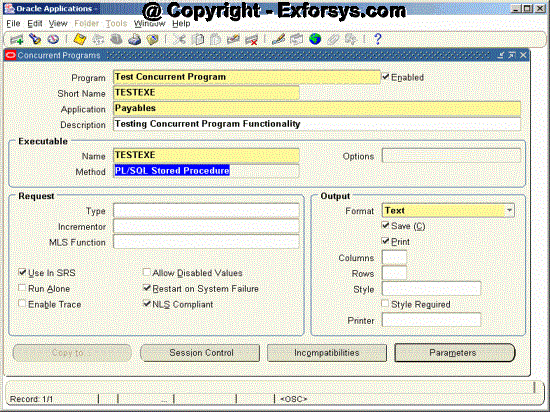
Figure 4. Concurrent Program Form
Field Description
i) Program – Give user friendly name for your concurrent program. This name will be displayed in Requests submission screen while submitting the requests.
ii) Short Name – Give short name for concurrent program. This is used within the database tables in oracle applications. It’s a common practice to have the Short name same for the executable and the concurrent program.
iii) Application – Give the application to which the concurrent program belongs to. E.g you want some program to run from oracle payables then account payables should be entered as application name.
iv) Description – Give the brief description of the concurrent program.
v) Executable – Enter the short name of the executable (Defined in Executables Screen) you want to attach to this concurrent program.
vi) Method – will be defaulted once you enter executable short name
vii) Options – will be defaulted once you enter executable short name
Normally default values are given for the other fields. Following is the significance of these fields.
viii) Request Type – Concurrent program can be associated to a predefined request type so that only few concurrent managers can run the program.
ix) Incrementor – To be used by Oracle only.
x) MLS Function – This feature allows the program to be submitted once by the user but runs it in the multiple languages.
xi) Use In SRS – Only when this check box is checked the Concurrent Program would be available in Standard Request Submission (SRS) through the request group.
xii) Allow Disable Value – This will allow the disabled values in the value sets to be used while entering the values of the parameters in the Concurrent Program.
xiii) Run Alone – Indicates that program is incompatible with all other concurrent programs and should be run alone.
xiv) Enable Trace – This will enable the SQL trace for the concurrent program and will generate the trace file when concurrent program is run. Only used in development environments to check the performance of the concurrent program.
xv) Restart on system Failure – This option is used to indicate that concurrent program should automatically be started when concurrent manager is restored after the system failure.
xvi) NLS Compliant – This box is checked if the program allows for a user to submit request of the program that will reflect a language and territory that are different from the language and territory that the users are operating in.
xvii) Output Format – Format in which output should be printed. Possible format values are
- HTML
- TEXT
- PS (Post Script)
- PCL(HP’s Printer Control Language)
xviii) SAVE – Check to indicate that output should be automatically saved in an operating system file.
xix) PRINT – Whether you want the output to be sent to printer for printing.
xx) Column / Rows – Column and Row length of the concurrent program output. Oracle Applications uses this information to decide the print style.
xxi) Style Required – Print Style
xxii) Printer – A particular printer on which output should be sent.
Save the data that you have entered using Ctrl+S or File à Save.
{mospagebreak}
3. Concurrent
Program Parameters :
The 3rd step in defining concurrent program is to define the parameters. To do this, click on the Parameters button as shown at the bottom the form in figure 4. The following screen (figure 5) is displayed when you click on parameters button. This screen is used to define the parameters in the concurrent program.

Figure 5. Parameter Window
Field Description
i) Program – will be defaulted from Concurrent Program
ii) Application – will be defaulted from Concurrent Program
iii) Conflicts Domain – Enter the parameter which will hold the value of the conflict domain of the program.
iv) Security Group – This field is for HRMS security only.
v) Seq – Enter sequence number for the parameter
vi) Parameter – name of the parameter, will be displayed in parameter entry screen
vii) Description – description about the usage of the parameter
viii) Enabled – check box to enable or disable the parameter. Disable a parameter when you don’t want to use it.
ix) Value set – enter the name of the value set which you want to use to validate the value enter in the parameter field.
x) Description – will be defaulted from value set definition
xi) Default Type – choose the default type for the default value of the parameter. Possible default types are
- Constant : The default value can be any literal value.
- Profile : The default value is the current value in the user profile option defined in the Default Value field. Use the profile option name, not the end–user name. You do not need to include $PROFILE$.
- SQL Statement : The default value is determined by the SQL statement you defined in the Default Value field.
- Segment : The default value is the value entered in a prior segment of the same parameter window.
xii) Display size – Enter the field length in characters for this parameter. The user sees and fills in the field in the Parameters window of the Submit Requests window.
xiii) Token – For a parameter in an Oracle Reports program, the keyword or parameter appears here. The value is case insensitive. For other types of programs, you can skip this field.
4. Incompatible Programs Window :
To navigate to this form, click on the Incompatibilities button on the bottom of the form shown in figure 4. This window is used for defining the incompatibilities of the concurrent program. Identify concurrent programs that should not run with your concurrent program as they might interfere with its execution.

Figure 6. Incompatibilities Form
Field Description
i) Program – Defaulted from Concurrent Programs Window
ii) Application – Defaulted from Concurrent Programs Window
iii) Application – Application of the concurrent program which is incompatible to the defined concurrent program.
iv) Name – Name of the concurrent program which is incompatible to the defined concurrent program.
v) Scope – Used to identify if concurrent program is incompatible if the program or also with its child requests.
vi) Type – Enter Domain or Global. If you choose Domain, the incompatibility is resolved at a domain-specific level. If you choose Global, then this concurrent program will be considered globally incompatible with your concurrent program, regardless of which domain it is running in.
5. Session Control :
To navigate to this form, click on the Session Control button on the bottom of the form shown in figure 4. This is a new functionality given in 11.5.10 to control the database session while executing concurrent program using following three parameters. The form would look like as shown in figure 7.

Figure 7. Session Control Form
Field Description
i) Consumer Group – resource consumer group of the concurrent program can be specified. A resource consumer group defines a set of users who have similar resource usage requirements. An overall resource plan specifies how resources are distributed among the different resource consumer groups. Resource consumer groups and resource plans provide a method for specifying how to partition processing resources among different users.
ii) Rollback Segment – Rollback segment specified here would be used instead of the default rollback segment. If you specify a rollback segment here, your concurrent program must use the APIs FND_CONCURRENT.AF_COMMIT and FND_CONCURRENT.AF_ROLLBACK to use the specified rollback segment.
iii) Optimizer mode – Optionally specify an optimizer mode. You can choose ALL_ROWS, FIRST_ROWS, Rules, or Choose. You would specify an optimizer mode only for a custom program that may not perform well with the default cost-based optimizer (CBO) and needs tuning. You can use a different optimizer mode until your program is tuned for CBO.
{mospagebreak}
6. Copy to Window :
To navigate to this form, click on the Copy To button on the bottom of the form shown in figure 4. This window can be used to copy the definition of the concurrent program. Give the program name to copy the definition.

Figure 8. Copy To Form
Field Description
i) Program – Enter the program name to be copied
ii) Short Name – Short Name of the program to be copied
iii) Application – Application name of the concurrent program to be copied
iv) Include Incompatible programs – Check this box if you want incompatibilities to be copied
v) Include Parameters – Check this box if you want parameters to be copied.
[catlist id=183].