
Oracle Applications 11i File system
An Oracle Applications Release 11i system utilizes components from many Oracle products. These product files are stored below a number of key top-level directories on the database and application server machines. Depending on how you chose to install Applications, these product directories may be located on a single machine (the simplest case) or on multiple machines (the most common type of deployment). Operating system environment settings indicate the location of the various files in the file systems of the database and application server machines.
This topic discusses the association between these environment settings and the corresponding files and directories.
Note:
- The
DATA or DATA_TOP directory is located on the database server machine, and contains the system tablespaces, redo log files, data tablespaces, index tablespaces, and database files. - The
DB directory is located on the database server machine, and contains the ORACLE_HOME for the Oracle9i database. - The
APPL or APPL_TOP directory contains the product directories and files for Oracle Applications. - The
ORA directory contains the ORACLE_HOMEs for the Applications technology stack components. - The
COMN or COMN_TOP (or COMMON_TOP) directory contains directories and files used across products.
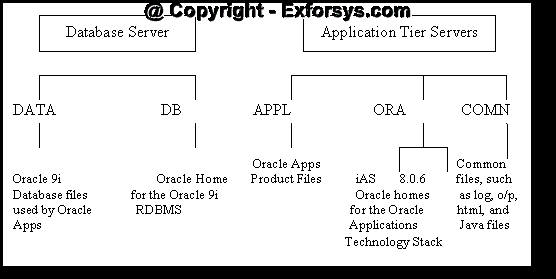
Figure 2. Applications Directory Structure
The DATA Directory
The
DB and ORA Directories
Oracle Applications supports employing an Applications database of one version, while linking Applications programs using the tools from a second or third version of the database. This multiple ORACLE_HOMEs configuration allows new features of the database to be supported, while maintaining compatibility with earlier releases. Release 11i utilizes three ORACLE_HOMEs:
1. The 9.2.0 ORACLE_HOME (Applications database home) is located in the
2. The 8.0.6 directory contains the ORACLE_HOME for the Developer 6i products (Forms, Reports, and Graphics). The product libraries in the 8.0.6 ORACLE_HOME are used to relink Oracle Applications executables.
3. The iAS directory, also under the
The APPL Directory
Oracle Applications files are stored in the
The APPL_TOP directory contains:
1. The core technology files and directories.
2. The product files and directories (for all products).
3. The main applications environment file, called
4. The consolidated environment file, called APPS
Product Directories
Each product has its own subdirectory under APPL_TOP. The subdirectories are named in accordance with the product’s standard abbreviation, such as gl for Oracle General Ledger. Within each product directory is a subdirectory that is named using the base Oracle Applications release number, such as 11.5.0. This directory contains the various subdirectories for the product files.
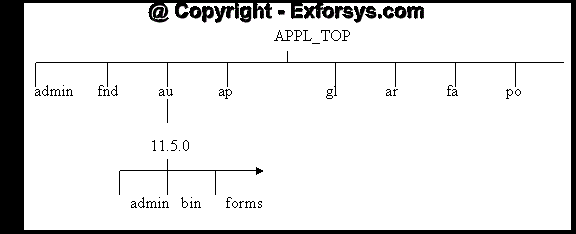
Figure 3. APPL_TOP Sub-directory structure
{mospagebreak}
The COMN Directory
The
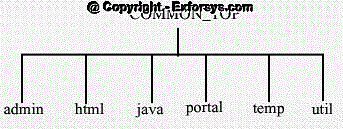
Figure 4. Common Top directory structure
The admin Directory
The admin directory, under the COMMON_TOP directory, is the default location for the concurrent manager log and output directories. When the concurrent managers run
Oracle Applications reports, they write the log files and temporary files to the log subdirectory of the admin directory, and the output files to the out subdirectory of the admin directory.
The html Directory
The OA_HTML environment setting points to the html directory. The Oracle Applications HTML-based sign-on screen and Oracle HTML-based Applications HTML files are installed here. The html directory also contains other files used by the HTML-based products, such as JavaServer Page (JSP) files, Java scripts, XML files, and style sheets. Rapid Install and the AD utilities copy the HTML-based product files from each
The java Directory
The JAVA_TOP environment setting points to the java directory. Rapid Install installs all
Oracle Applications JAR files in the Oracle namespace of this JAVA_TOP directory. The java directory also holds third-party Java files used by Oracle Applications, as well as other zip files.
The portal Directory
The portal directory contains the Rapid Install Portal files. The Rapid Install Portal is a web page that provides access to post-install tasks that may be necessary for your installation, plus server administration scripts, installation documentation, and online help. Using a browser, you can view the Rapid Install Portal after you run Rapid Install.
The temp Directory
The temp directory is used for caching by some products such as Oracle Reports.
The util Directory
The util directory contains the third-party utilities licensed to ship with Oracle Applications. These include, for example, the Java Runtime Environment (JRE), Java Development Kit (JDK), and the Zip utility.
The scripts Directory
The scripts directory contains application tier control scripts such as adstrtal.sh and adstpall.sh, which are located in the
[catlist id=183].