
Oracle Apps 11i Tutorials : Implementing Key Flex field and Descriptive Flex field
This tutorial tells you about implementation and other features provided in the implementation section .
Implementing Flex fields
Key Flexfield
The basic steps in defining a key Flexfields are as given below. You may or may not use all the steps. The detailed explanation is being followed after the steps.
- Identifying Key flexfields that are required for you Oracle Applications installation
- Designing a Key flexfield structure
- Selecting the appropriate Key flexfield to define
- Defining structure information for the Key flexfield
- Defining segment attributes
- Defining flexfield qualifiers
- Defining segment qualifiers
- Implementing optional features as needed
To define the key Flexfield structure, you need to open the Key Flexfield segment form as shown in the figure 5 below. The navigation path is Application Developer à Flexfield: Key à Segments.
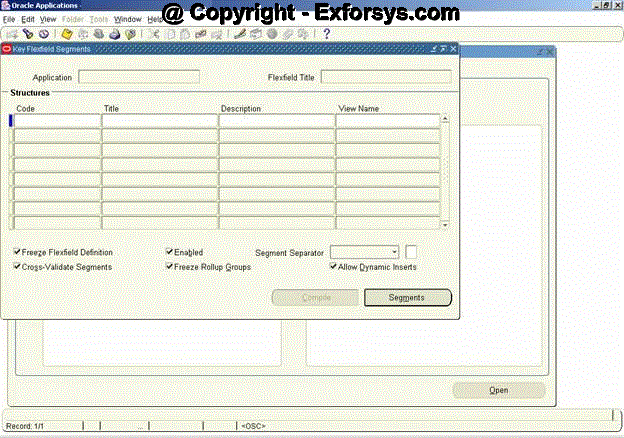
Figure 5. Key Flexfield Segments Form
Lets say you are defining the structure for an Accounting Flexfield. Query for the Flexfield Title “Accounting Flexfield” using the Flexfield Title window as shown in figure 5 above. If there are already existing structures for Accounting Flexfields, they would be listed in the Structures window as shown in figure 6 below.
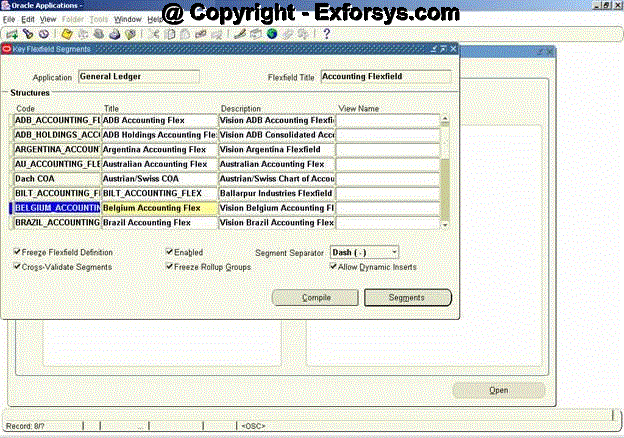
Figure 6. Listing of existing structures for Accounting Key Flexfield
Lets say you want to define a new structure for the Accounting Flexfield with the structure code as “NEW_ACCOUNTING_STRUCTURE”. Enter the code name in the Code window and the title as “New Accounting Flexfield Struc” in the Title window. Enter an optional description for the new structure which may include the purpose of the new structure. Save the changes. The form would look like as shown in figure 7 below.
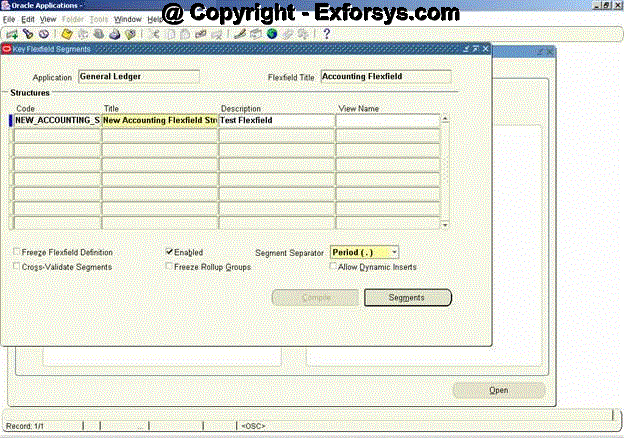
Figure 7. Structure definition for a new Accounting Flexfield
There are few check buttons on the form in the figure 7 above which can be left unchecked/checked as shown in the figure above.
The Enabled checkbox is checked by default. You can optionally uncheck it. You cannot delete a Key flexfield structure, but you can disable it by unchecking the Enabled checkbox. Next, you may select a Segment Separator other than the default period. Your choices are period, dash, pipe, or any custom character. You must have a segment separator.
Next, you can select whether you want to Cross-Validate Segments. Unchecking this checkbox will disable cross-validation for this Key flexfield structure. You can then identify whether you want to Freeze Rollup Groups. If you mark this checkbox, you will not be able to change the assigned rollup groups in the Define Segment Values form. As a last step, you can determine whether you want to Allow Dynamic Inserts for Key flexfield structures. If you do not allow dynamic inserts, you must create all flexfield combinations in the combination form.
You can freeze your flexfield structure by checking the Freeze Flexfield Definition checkbox. Once frozen, you can only make very limited changes to the flexfield structure definition. If you need to change the flexfield structure definition, first uncheck the Freeze Flexfield Definition checkbox and make the changes. Next, reactivate the Freeze Flexfield Definition checkbox. You will receive a warning message that tells you that unfreezing this flexfield and making changes to the segment definitions could affect the validity of the data already existing for this flexfield. Changing a Key flexfield structure will not update existing flexfield data. Do not freeze your flexfield structure yet, as you have not entered the segment attributes for your flexfield structure.
Once the above fields are defined click on the Segments button at the bottom of the form. The new form would look like as shown in figure 8 below. Enter the values as shown in the form below. You can use the already defined Value Sets for the various segments. If you have not defined them earlier, they can be created using the Value Set button at the bottom of the form. Save the changes. To assign a flexfield qualifier to each segment, select the segment on the form and then click on the Flexfield Qualifiers button as the next step.
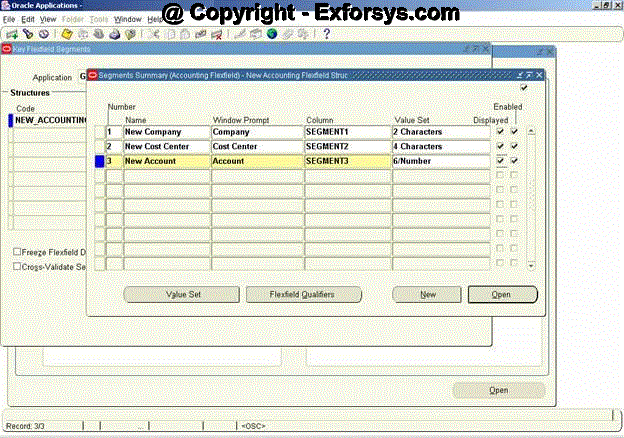
Figure 8. Accounting Flexfield Segment Structure form
Select the New Company segment and click on Flexfield Qualifier button. Check the Balancing Segment for the New Company structure as the flexfield qualifier. The form would look like as shown in figure 9 below. Follow the same steps to choose the flexfield qualifiers for the remaining 2 segments. Check Cost Center Segment for New Cost Center and Natural Account for New Account segments respectively. Save the changes and close the Structure form.
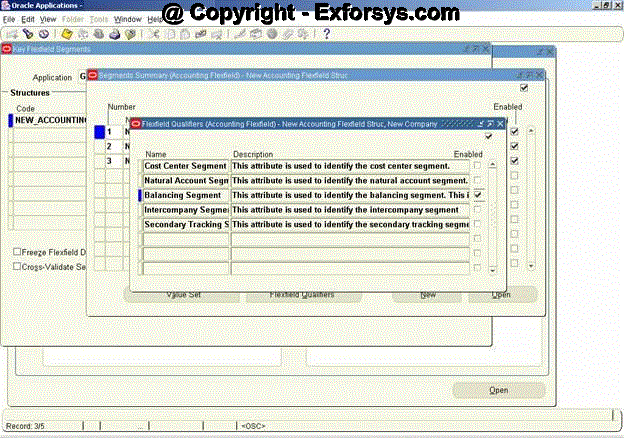
Figure 9. Flexfield Qualifier form
As the next step, the form shown in figure 7 would be visible now. Click on the Freeze Flexfield Definition button. Then compile the flexfield structure. You can compile your flexfield structure by hitting the Compile button. Compiling a flexfield structure will automatically save the flexfield structure. You will see the dialogue box as shown in figure 10 below. Choose OK on the dialogue box.
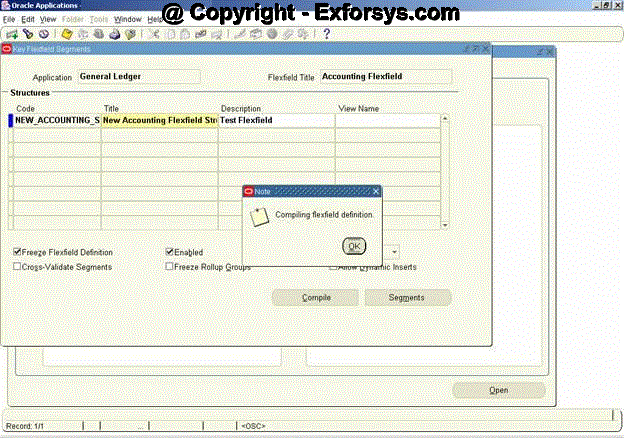
Figure 10. Compiling Flexfield Definition
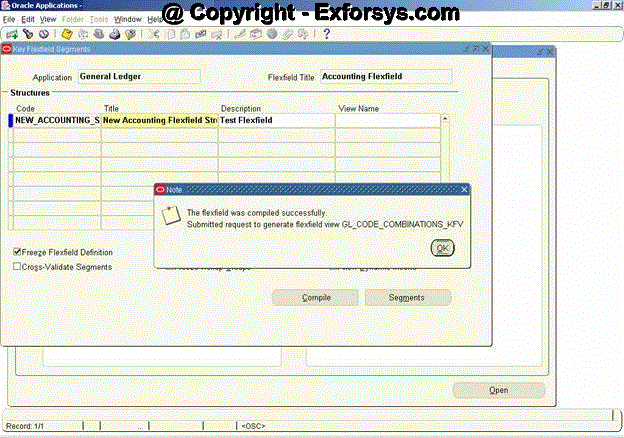
Figure 11. Dialogue box for compilation of flexfield structure
Click on OK and the flexfield definition would be saved.
{mospagebreak}
Descriptive Flexfield
The descriptive flexfield could be defined for a custom form or a standard form but in either case, the descriptive flexfield is required to be defined in the system first. If the descriptive flexfield is to be defined on a custom table then the custom table is required to be registered with Applications Objects Library before it can be used in the descriptive flexfield definition. To register custom tables under AOL refer to the document on Table Registration. The standard tables come registered with the Oracle Applications therefore you do not need to register them again.
To register the descriptive flexfield, open the register form using the navigation path : Application Developer à Flexfield à Descriptive à Register. The form would look like as shown in figure 12 below.
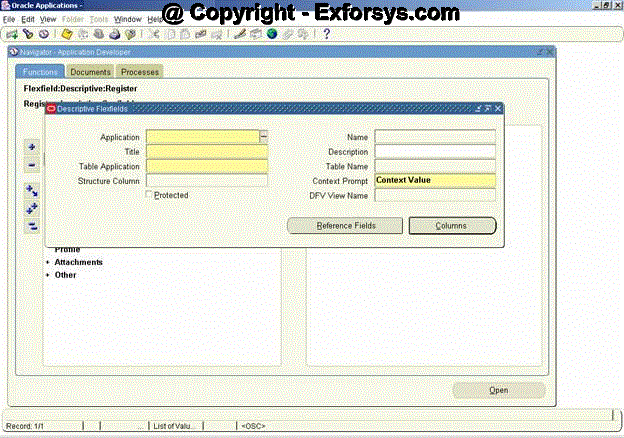
Figure 12. Descriptive Flexfield Register form
Once you have identified the additional information you want to capture in a Descriptive flexfield, you must determine the usage. There are two types of segments for Descriptive flexfields:
- Global segments
- Context-sensitive segments
Global Segments
A global segment is a segment that will always be displayed in a Descriptive flexfield window common to all context values, and it is the most commonly used type of Descriptive flexfield. Each global segment maps one-to-one to a database column. Descriptive flexfield segments are usually stored in columns named ATTRIBUTE1 to ATTRIBUTEn, where n is the maximum number of segments for a given Descriptive flexfield.
Context-Sensitive Segments
A context-sensitive segment is a segment that may or may not be displayed in a Descriptive flexfield window, depending on a context value. A context value can be derived from another field in the same block or from the context field. The field from which a context value derives its value is called a reference field. Remember, a Descriptive flexfield is associated with a database table, not a single form. A context field is a special field appearing in the Descriptive flexfield window. You can use a context field to allow users to enter their own context values or override what is defaulted from the reference field. The context value, whether from a reference field or a context field, determines which context-sensitive segments will be displayed.
Let’s say, you need to define a DFF for the Human Resource à People à Enter and Maintain form. The DFF field ( [ ] ) is already provided on the form. Depending upon whether the details being entered are for an employee or an applicant, you want to decide on the details to be entered in the database.
For an employee the details required are:
1. Drivers License Jurisdiction
2. Drivers License Number
3. Global ID
4. Country of Origin
5. Security Clearance
6. Badge Number
7. Bonded?
8. Hired Via Acquisition
9. Acquired Company
10. Original Hire Date
11. Proposed Retirement Date
12. Proposed Retirement Reason
13. Service Start Date
14. Union Seniority Date
And the details required if the person is an applicant are:
1. Current Employer
2. Employer’s Phone
3. Verification Check Date
4. Verification Checked By
5. Reference Check Date
6. Referenced Checked By
7. Pre-Employment Physical Date
The DFF prompt fields have to depend on the value entered in the context field. If the value entered is EMP then the prompt for the employee details should pop-up and if the value entered is APL then the prompt for Applicant details should pop-up.
The steps involved are :
Register the DFF using the Descriptive Flexfield registration form as shown in figure 13 below. Standard DDF’s are already registered with oracle applications and hence this step can be skipped for seeded DFF’s.
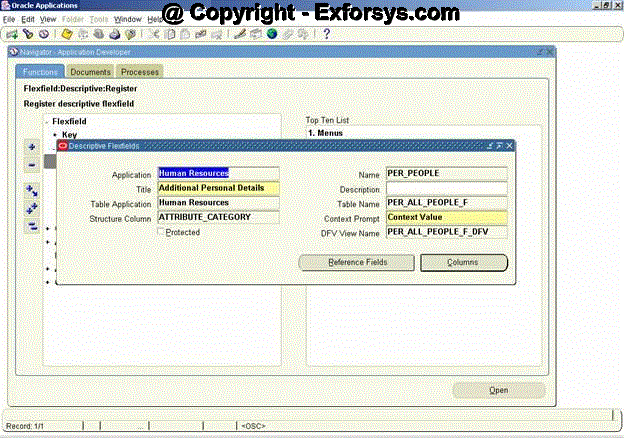
Figure 13. DFF Register Form
Forms and flexfield routines use the combination of application name and flexfield name to uniquely identify your flexfield. The details of the fields on the above forms are:
Application
Application name where you want to register your DFF.
Name
Use this name when you use flexfield routines to call your descriptive flexfield from your forms or programs.
Title
Flexfields displays this unique title at the top of the flexfield window when your users enter your descriptive flexfield.
Table Name
Enter the name of the table that contains your descriptive flexfield columns. Your table must already exist in the database, and it should already have columns for your descriptive flexfield segments, as well as a structure column. These segment columns are usually called ATTRIBUTE1, ATTRIBUTE2, …, ATTRIBUTEn.
You must register your table with Oracle Applications before you can use it in this field.
Structure Column
Enter the name of the column, such as ATTRIBUTE_CATEGORY, in your table that your flexfield uses to differentiate among descriptive flexfield structures. Your descriptive flexfield uses this column to let your users see different descriptive flexfield structures based on data supplied by the form or the user. You must have a structure column even if you only intend to use one descriptive flexfield structure.
Context Prompt
Enter a default context field prompt that asks your user which descriptive flexfield structure to display. Depending upon how your application installer defines your descriptive flexfield, your user may or may not see a context field as part of the descriptive flexfield pop-up window. Descriptive flexfield windows display this context field prompt if the installer allows the end user to override the default context field value.
If your application installer defines it, the context field appears to the user as if it were simply another flexfield segment (with the prompt you specify here). Your user enters a value in the context field, and other descriptive flexfield segments pop up based on that value. The installer can modify the context field prompt using the Define Descriptive Segments window.
{mospagebreak}
Protected
In some cases, you may want to create a descriptive flexfield that cannot be inadvertently changed by an installer or user. This type of flexfield is called a protected descriptive flexfield. You build a protected descriptive flexfield the same way you build a normal descriptive flexfield. The main difference is that you check the Protected check box after defining your segment structures. Once a descriptive flexfield is protected, you cannot query or change its definition using the Descriptive Flexfield Segments window. You should define your descriptive flexfield segments before you change the Protected check box.
Reference Fields Window
Use this window to specify any form fields that might serve as descriptive flexfield reference fields. Your flexfield can use values in one of these fields (context field values) to determine which flexfield structure to display.
Columns
These are columns of the table that would to be used in the DFF. You may declare all columns here even if they are not being used in the DFF presently.
Save the changes and close the form. You need to define the structure of the DFF now. To do this open the Segments form using the path Application Developer à Flexfield à Descriptive à Segments.
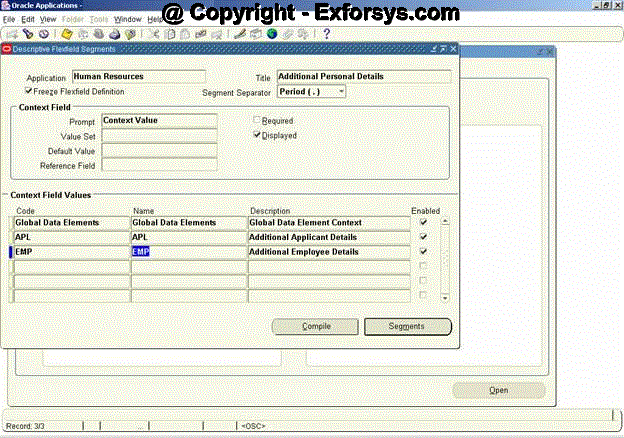
Figure 14. DFF Segments Form
The segment form as shown in the figure 14 above is used to enter the context field values upon which the prompts in the pop-up would depend. The EMP and APL are the values that a user would enter in the context prompt for the DFF. The pop-up would decide the prompts on the basis of this value.
Global Data Elements are those prompts which would be displayed in the all the values for the context prompt.
To determine the structure of the DFF on APL context value, click on segments button at the bottom when the APL value in Context Field Values is selected. The fields to be entered are shown in figure 15 below.
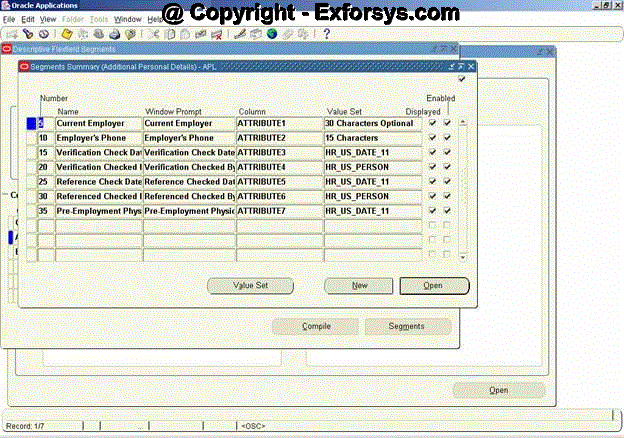
Figure 15. Prompts for the APL context value
Figure 16 below shows the prompts for the EMP context value.
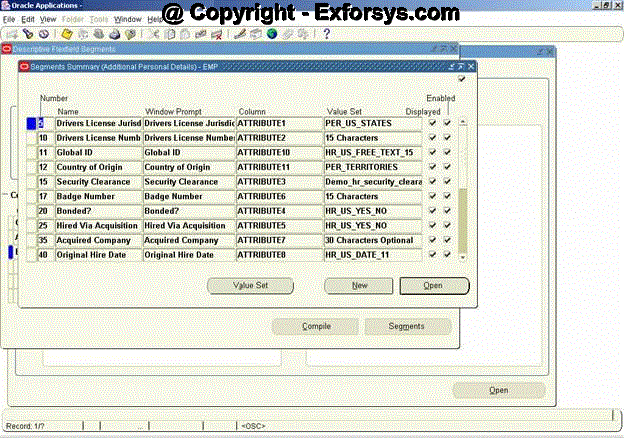
Figure 16. Prompts for the EMP context value
Save the changes and click on compile to freeze the DFF definition. You may optionally use the Value Sets for the values to be entered in the various prompts.
The DFF is now ready to be used from the form. To enable the DFF on the form, follow the steps below.
Open the form using the form builder and write the following code in WHEN-NEW-FORM-INSTANCE trigger of the form. Standard forms (already defined by oracle) will have this code already present in the appropriate triggers.
FND_DESCR_FLEX.DEFINE (
BLOCK=> ‘TEST_DESC’,
FIELD=> ‘DESC_FLEX_TEST’,
APPL_SHORT_NAME=>’HR’,
DESC_FLEX_NAME=>’DESC_FLEX_TEST’
);
Where BLOCK is the name of block containing DFF item
FIELD is the DFF item on form
APPL_SHORT_NAME is the short name of the application with which the flex field is registered
DESC_FLEX_NAME is the name of the registered flexfield (Step 3)
Also write the following code in ‘WHEN-NEW-ITEM-INSTANCE’ at the form level:
FND_FLEX.EVENT (‘WHEN-NEW-ITEM-INSTANCE’);
The DFF would look like as shown in the figure 18 and figure 19 below depending upon the context value provided in the form as shown in figure 17 below.
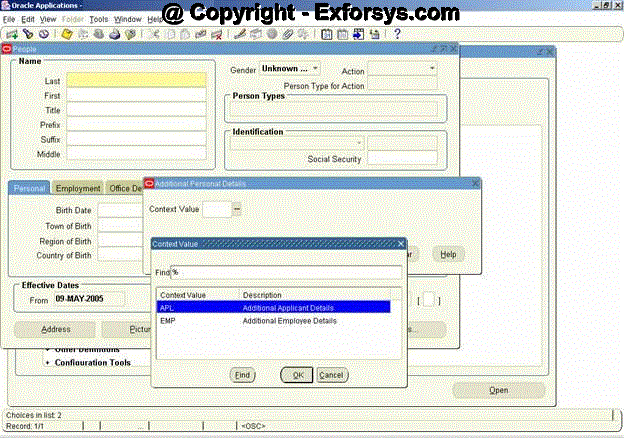
Figure 17. Context Prompt
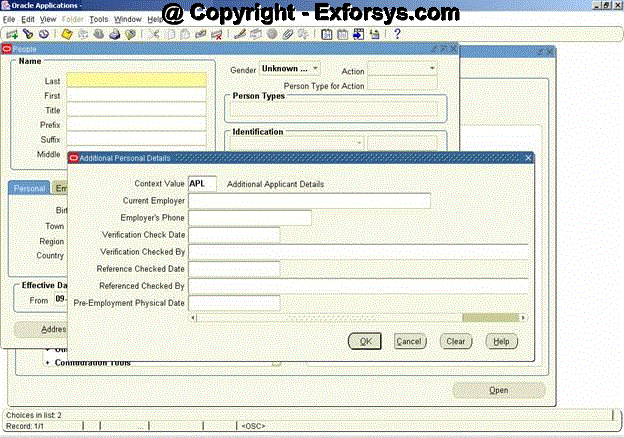
Figure 18. Prompt for APL Context Value
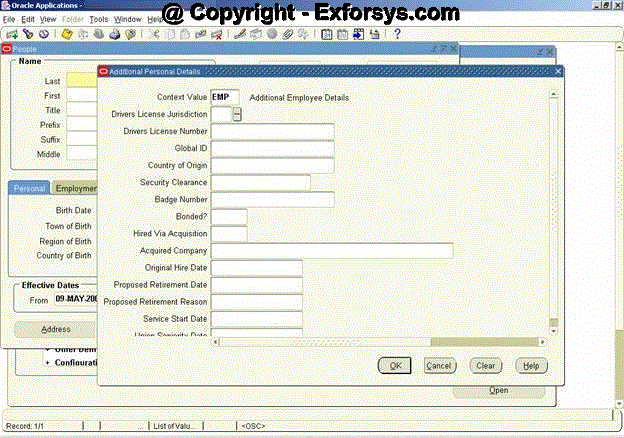
Figure 19. Prompt for EMP Context value
Frequently Asked Questions
1. What is the difference between key flexfield and Descriptive flexfield?
2. What are context sensitive segments in descriptive flexfields?
3. What is the significance of structure id in key flexfields?
4. Can we use other columns (beside attributes) as segments for DFF?
5. Which procedure should be used to make the DFF read only at run time?
6. What is the significance of cross validate segments in the Key flexfield structure screen (figure 6)?
7. What is the significance of reference field in a DFF?
8. How do I enter the default value of Key flexfield or DFF segment?
9. What is the difference between flexfield qualifier and segment qualifier?
10. How do I define global segment qualifier?
11. Which procedure should be called to enable a DFF in a form?
12. Do we need to register Standard DFF’s?
13. Are the value sets mandatory for DFF segments?
14. What is the maximum number of segments that can be defined for KFF?
15. How do I enable a database column to use it in a DFF segment?
[catlist id=183].