
Oracle Apps 11i Free Training : Message Dictionary : This document discuss about message dictionary in oracle applications. It talks about the standards to be followed while defining the messages in oracle applications. It also discusses the usage of messages in the forms and concurrent programs.
Overview of Message Dictionary
Message Dictionary lets you catalog messages for display from your application without hard coding them into your forms and programs.
Using Message Dictionary, you can:
- Define standard messages you can use in all your applications
- Provide a consistent look and feel for messages within and across all your applications
- Define flexible messages that can include context–sensitive variable text
- Change or translate the text of your messages without regenerating or recompiling your application code.
Define Messages
Following things should be complete before defining the messages.
1. Register your application. Standard applications come registered with oracle applications and hence you can skip this step if you are defining messages for any standard application.
2. Create a mesg directory under your application’s base directory (e.g $AP_TOP if application is oracle payables) where oracle application object library can store your message files.
Navigate to below mentioned path to define your messages.
Navigation – Application Developer->Application->Messages
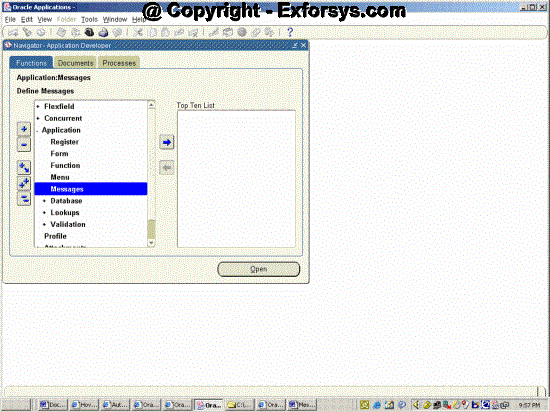
Figure 1. Define Messages Navigation
Click on messages and following screen will appear.
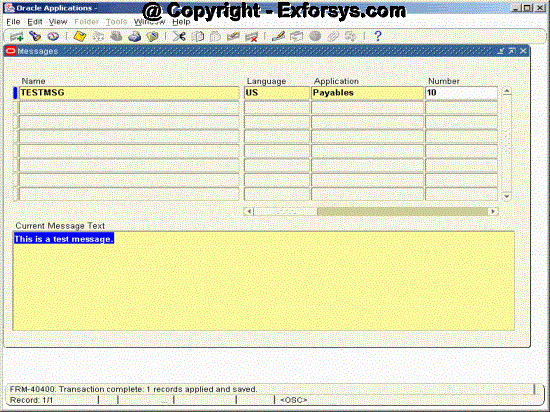
Figure 2. Define Messages
Following fields are required while defining messages.
Name – Any meaningful name made of letters, numbers, hypens and underscores upto 30 characters can be used. This is used while invoking message dictionary through forms or concurrent programs.
Language-Language code for the language in which you want to get your message displayed. The common value is US.
Application – Name of the application for which you want to define the message.
Current Message Text – The text of the message which you to be displayed when your message is used in forms or concurrent programs.
{mospagebreak}
Following fields are optional while defining messages.
Number – Enter any appropriate number for your message. If you define a non-zero message number for your message, Message Dictionary automatically prepends your message with the prefix APP:
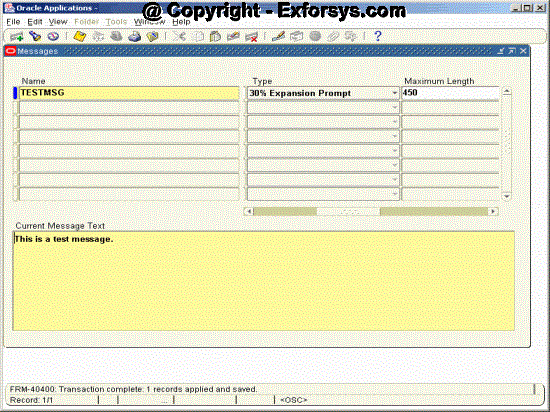
Figure 2.1 Define Messages
Type– Use the message type to classify your messages. The message type does not affect how your messages can be called in your code.
In Oracle Applications, the message type is used to help translators translate messages within length expansion constraints that vary by message type. For certain message types, this form enforces message byte length limits smaller than 1800. The message length limits (in bytes) are 60 for Menu Entry, 250 for Hint, and 80 for Title (note that these limits are for translated messages, so messages in English should be 30% shorter if they will be translated).
Maximum Length – In Oracle Applications, the maximum length (in bytes) is used to help translators translate messages within length expansion constraints imposed by the form or program that uses the message. Specifying a maximum length is particularly important where the expansion constraint is tighter than would otherwise be expected for a particular type of message. If your message is in English, the maximum length you specify should be at least 30% longer than your actual English message to allow for expansion during translation.
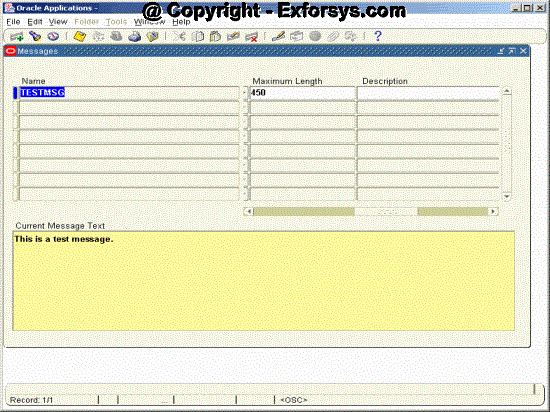
Figure 2.2 Define Messages
Description – You should enter information in this field that would help explain the context of this message to translators. This field is required if the message is of type Token or Other.
After defining your message you need to run “Generate Messages” program to build your message file. Your new messages take effect as soon as your concurrent request finishes successfully and you have placed the new file in the appropriate directories.
Navigation – Application Developer->Other->Requests->Run
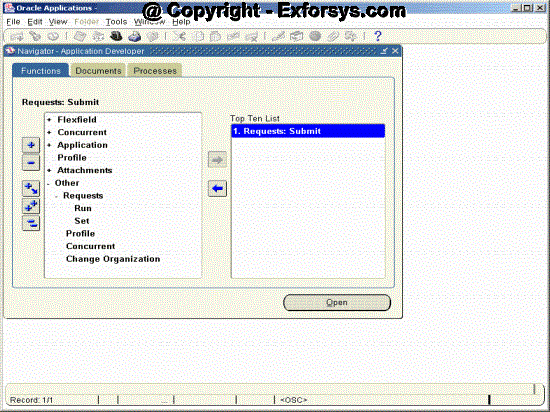
Figure 3 Running Generate messages Navigation
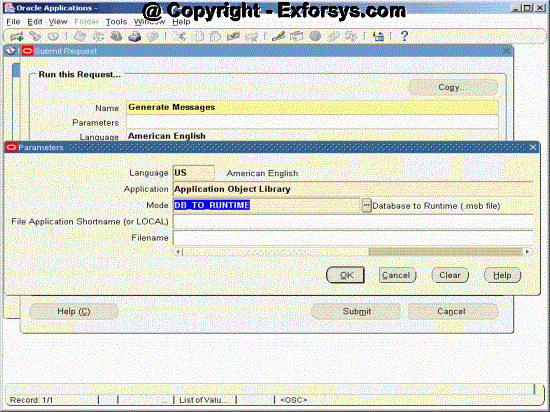
Figure 4 Running Generate messages parameters
{mospagebreak}
Required Parameters to Generate Messages Program
Language – Enter the language in which you want the messages to be generated. The normal value used is US.
Application – Enter the application name for which you have defined the message.
Mode – Following four values are possible for this parameter
a. DB_TO_RUNTIME – This will create a msg file under the application top directory.
b. DB_TO_SCRIPT – This will create a script(.msg file) that can be used to load messages to other database. This would be normally used in case of upgradation only.
c. SCRIPT_TO_DB This will take a script(.msg file) and load the messages in it to the database. This would be normally used in case of upgradation only.
d. SCRIPT_TO_RUNTIME – This will take script(.msg file) and load the messages in to the database and also create the msg file under application top.
Optional Parameters of Generate Messages Program
File Application Shortname (or Local) – Here we should enter the application short name of the application for which we want to generate the msg file. Generally this field is left blank and system automatically generates the file name.
Filename – Here we should enter the name of msg file to be generated. Generally this field is left blank and system automatically generates the file name.
Application Message Standards
Oracle Applications use messages to communicate with users. Typical messages include warnings and error messages, brief instructions, and informative messages that advise your user about the progress of concurrent requests, work done, and anything else of interest or helpful to users.
Forms–based applications display messages on the user’s screen; applications also print messages to output and log files. Messages are part of the product, and should be treated with the same amount of care and attention to the user interface as a form.
These message standards help you write messages that are brief, clear, and informative. When you follow these standards and use Message Dictionary, your application provides messages that are easy to understand, document, edit, and translate into other languages, resulting in an application that is easy to support and enhance.
Message Naming Standards
The following suggested standards provide a consistent naming convention for message names.
Message names are hard coded into forms and programs and should never change.
Use descriptive words and make your message names meaningful to other developers. Your name should clearly summarize the content or purpose of the message. • Message names can contain no more than 30 characters. • Make message names all uppercase. Although message names are case insensitive, this provides consistency so that messages can be searched for easily.
Do not use spaces in message names; use underscore characters instead to separate words.
Message names should not contain message numbers (or prefixes), because message numbers may change over time.
Include your two–to–three–character application short name or abbreviation as the first word in each message name (optional).
Message Numbering Standards
The following suggested standards provide a consistent convention for message numbers
- Use a number for all errors and warnings, but not hints, notes or questions.
- Do not put the message prefix or a message number in your message text.
- All errors and warnings now have message numbers to help developers trace a message if the problem comes from an installation running in a language other than English.
- Oracle recommends that you number messages using 400000 (400,000) and up (the largest possible message number is about 2 billion).
Message Description Standards
The following suggested standards provide a consistent convention for message descriptions.
- Description should include where and how the message is used (button label, form message, boilerplate, etc.). If it is a text fragment used to build another message (as a token value), include the text defined for the target message and the target message name so the translator can see the expected context of the fragment.
- Include what text is expected to replace the token.If your message contains a nonobvious variable token name, use your notes field to tell translators what your token represents.
Message Content Standards
Messages should never exceed about 1260 characters in English. This allows space for the messages to be translated to ”longer” languages such as German.
{mospagebreak}
Message Token Standards
- Always make tokens in your message uppercase so they are easy to identify in a messages manual or in a message file being translated.
- Avoid using tokens to substitute for words or phrases in a sentence.
- These are nearly impossible to translate, because different token values
- may require different translations for the surrounding text.
- Avoid hard coding text into your code
- Use descriptive variable token name
Calling messages
Following standard procedure can be called to show predefined oracle applications message through forms or concurrent programs.
- FND_MESSAGE.CLEAR – Clears the message stack of all the messages.
- FND_MESSAGE.DEBUG – Immediately displays the string passed to it as input parameter.
- FND_MESSAGE.ERASE – Clears the oracle Forms status line.
- FND_MESSAGE.ERROR – Displays an error message in an Oracle Forms modal window or a concurrent program log file. (Example: “Invalid value entered.”).
It takes its message from the stack, displays the message, and then clears all the messages from the message stack. - FND_MESSAGE.GET – Retrieves a translated and token–substituted message from the message stack and then clears that message from the message stack. This could be used for getting a translated message for a forms built–in or other function. Assumes you have already called FND_MESSAGE.SET_NAME and, if necessary, FND_MESSAGE.SET_TOKEN. It returns up to 2000 bytes of message.
- FND_MESSAGE.HINT – Displays a message in the Oracle Forms status line. It takes its message from the stack, displays the message, and then clears that message from the message stack. The user may still need to acknowledge the message if another message immediately comes onto the message line.
- FND_MESSAGE.QUESTION – Displays a message and up to three buttons in an Oracle Forms modal window. (Example: “Please choose one of the following actions: ”) It takes its message from the stack, and clears that message. After the user selects a button, It returns the number of the button selected.
For each button, you must define or use an existing message in Message Dictionary (under the Oracle Application Object Library application) that contains the text of the button. This routine looks for your button name message in the Oracle Application Object Library messages, so when you define your message, you must associate it with Oracle Application Object Library (the “FND” application) instead of your application. - FND_MESSAGE.RETRIEVE – Retrieves a message from the database server, translates and substitutes tokens, and sets the message on the message stack.
- FND_MESSAGE.SET_NAME – Retrieves your message from Message Dictionary and sets it on the message stack. You call it once for each message you use in your client–side PL/SQL procedure. You must call this procedure before you call FND_MESSAGE.SET_TOKEN.
- FND_MESSAGE.SET_STRING – Takes an input string and sets it directly on the message stack. The string does not need to be defined in the Messages window. These strings may be hard coded into the form and are not translated like messages defined in Message Dictionary.
- FND_MESSAGE.SET_TOKEN – Substitutes a message token with a value you specify. You call FND_MESSAGE.SET_TOKEN once for each token/value pair in a message. The optional translate parameter can be set to TRUE to indicate that the value should be translated before substitution. (The value should be translated if it is, itself, a Message Dictionary message name.)
- FND_MESSAGE.SHOW – Displays an informational message in an Oracle Forms modal window or a concurrent program log file. (Example: “To complete this function, please enter the following… ”). It takes its message from the stack, displays the message, and then clears only that message from the message stack.
- FND_MESSAGE.WARN – Displays a warning message in an Oracle Forms modal window and allows the user to either accept or cancel the current operation. (Example: “Do you wish to proceed with the current operation?”) FND_MESSAGE.WARN returns TRUE if the user accepts the message (that is, clicks OK), or FALSE if the user cancels. It takes its message from the stack, displays the message, and clears that message from the message stack.
Most frequently used procedures are FND_MESSAGE.SET_NAME and FND_MESSAGE.SET_TOKEN
Example
/*Here FND_MESSAGE.SET_NAME is used to retrieve the message and put it on the message stack. Message name is ‘WANT TO CONTINUE’.*/
FND_MESSAGE.SET_NAME (’FND’, ‘WANT TO CONTINUE);
/*Next FND_MESSAGE.SET_TOKEN is used to replace the token ‘PROCEDURE’ with text ‘Compiling this flexfield’.
FND_MESSAGE.SET_TOKEN (’PROCEDURE’, ’Compiling this
flexfield’);
IF FND_MESSAGE.WARN THEN
/* User want to continue */
ELSE
/* User want to cancel*/
END;
Frequently asked Questions
1. Which program is required to be executed after defining messages in the oracle applications?
2. What is token in the message?
3. Which procedure should we use to display an information message through a form?
4. Which procedure can be used to display the button along with messages?
5. What are the two prerequisites before defining messages for any application?
6. Why do we have oracle applications message standards?
7. What is the significance of DB_TO_RUNTIME value of the mode parameter while running “Generate Messages” program?
8. Why do we use FND_MESSAGE.SET_NAME procedure?
9. Which application should be used while defining message for Buttons?
10. Can we use messages in the report triggers?
[catlist id=183].