
Oracle Apps 11i : Template Form in Oracle Apps 11i
This document provides an overview of the template form. This form derives its importance from the fact that this form is the starting point of all development involving forms. The document highlights the importance of Template.fmb in forms development and also provides a detailed explanation of the various components of the Template form.
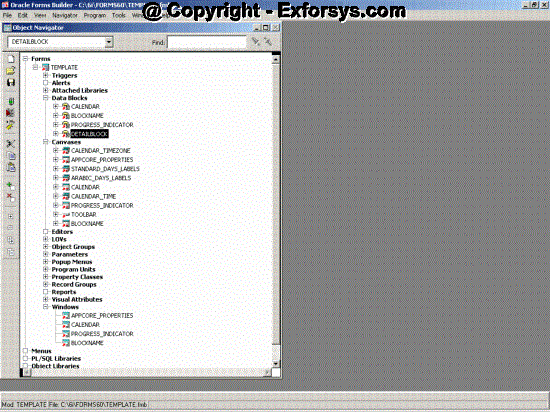
Figure -1 Template.fmb
Overview of the Template Form
The TEMPLATE form is the starting point for all development of new forms. The first step in creating a form for use in Oracle Applications is to copy the template form from $AU_TOP/forms/US, to a local directory and renaming it.
The Template form is unique because it contains some special libraries and triggers that render the application using the template form some standard characteristics. The components of the template form are:
- References to object groups: The template form contains platform–independent references to predefined standard object groups in the APPSTAND form (STANDARD_PC_AND_VA,STANDARD_TOOLBAR, and STANDARD_CALENDAR).
- Libraries: The template form contains platform–independent attachments of several libraries (including FNDSQF, APPCORE, and APPDAYPK).
- Special triggers: The template form contains several form–level triggers with required code. These are responsible for standard the behavior of the form.
- Predefined Program Units: The template form contains predefined program units that include a spec and a body for the package APP_CUSTOM, which contains default behavior for window opening and closing events.
- Applications Color Palette: The template form contains the application color palette. This gives the forms developed using the template form the look and feel of Oracle applications.
- Many referenced objects (from the object groups) that support the Calendar, the toolbar, alternative regions, and the menu. These objects include LOVs, blocks, parameters, and property classes, and so on.
- The TEMPLATE form contains sample objects that can be seen as examples for the expected layout cosmetics. These samples can be completely removed from the form later as they are only examples and are not required. The following objects are the samples and can be removed:
- Blocks: BLOCKNAME, DETAILBLOCK
- Window: BLOCKNAME
- Canvas–view: BLOCKNAME
Hence, the template form comes along with many attachments, predefined program units, and defined visual attributes as well as examples that not only give the forms that are developed using the template.fmb a standard look and feel, but also make t easier to develop forms with consistent and standard functionality.
Libraries in the Template form
As stated above, the template form contains platform–independent attachments of several libraries. These libraries are used while running the form as a part of Oracle Applications. Hence, these libraries should not be changed or modified. There are three main libraries that are attached to the template form:
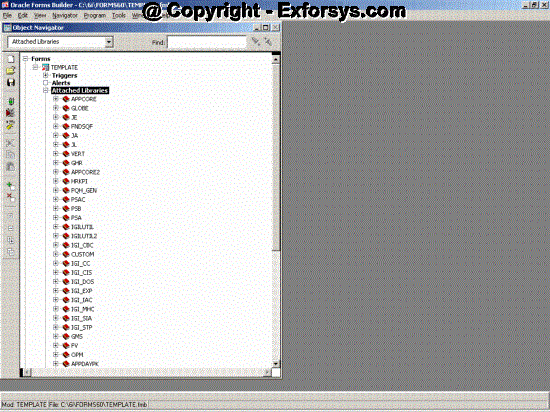
Figure -2 Template Form attached libraries
APPCORE
APPDAYPK
FNDSQF
Each of these libraries is explained in detail below.
APPCORE
APPCORE contains the packages and procedures that are responsible for the standard ‘Oracle Applications’ behavior of the forms. The forms have to support the menu, toolbar, and other required standard behaviors in compliance with oracle applications.
The Oracle Applications forms also have to display specific runtime behaviors in accordance with the Oracle Applications User Interface Standards, such as the way in which fields are enabled, behaviors of specific types of windows etc. APPCORE contains the procedures to support this standard runtime behavior.
APPCORE also contains various other utilities for exception handling, message levels, and so on.
{mospagebreak}
.
.
APPDAYPK
The APPDAYPK library contains the packages that control the Oracle Applications Calendar feature. The calendar (or the date picker) is a utility that oracle apps provide to pick the dates for a date type field.
FNDSQF
FNDSQF contains packages and procedures for Message Dictionary, flexfields, profiles, and concurrent processing. It also has various other utilities for navigation, multicurrency, WHO, etc. 23–4 Oracle Applications Developer’s Guide Procedures and functions in FNDSQF typically have names beginning with ”FND”.
Other Libraries
The template form also contains a few other libraries that are not linked directly to the template form, but are linked to the three libraries listed above. Although, while using the form it makes no difference whether the library is linked directly to template or to another library that is linked to template. These are discussed below.
CUSTOM library:
The CUSTOM library (CUSTOM.pll) is probably the most widely used and customized in the libraries attached to the template form. This library allows extension of Oracle Applications forms without modification of Oracle Applications code.
Any form goes to the CUSTOM.pll whenever any event fires on the form. Code can be written in the CUSTOM.pll with the logic branching based on the form, block and trigger on which you want it to run.
You can use the CUSTOM library for customizations such as Zoom (such as moving to another form and querying up specific records), enforcing business rules (for example, vendor name must be in uppercase letters), and disabling fields that do not apply for your site.
GLOBE:
The GLOBE library allows Oracle Applications developers to incorporate global or regional features into Oracle Applications forms
without modification of the base Oracle Applications form. Oracle Applications sends events to the GLOBE library. Regional code can
take effect based on these events. The GLOBE library calls routines in
the JA, JE, and JL libraries.
VERT:
The VERT library allows Oracle Applications developers to incorporate vertical industry features (for automotive, consumer packaged goods, energy, and other industries) into Oracle Applications forms without modification of the base Oracle Applications form. Oracle Applications sends events to the VERT library. Vertical industry code can take effect based on these events. The VERT library calls routines in various other libraries.
JA
The JA library contains code specific to the Asia/Pacific region and is called by the GLOBE library.
JE
The JE library contains code specific to the EMEA (Europe/MiddleEast/Africa) region and is called by the GLOBE library.
JL
The JL library contains code specific to the Latin America region and is called by the GLOBE library.
[catlist id=183].