
This document provides an overview of the Special Triggers in the Template Form. The template form contains many form level triggers. These triggers are required for the proper operation of other routines. They are also aid in making the form respond to and behave properly in case of standard events. These triggers must not be deleted or to ensure the proper functioning of the form. Also, code can be added to these triggers but, the existing text must not be deleted.
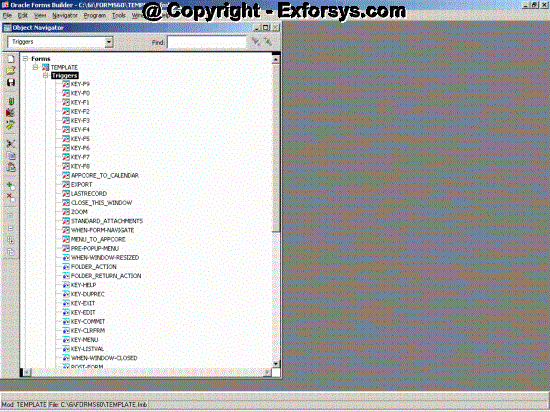
Figure: 3 Template Form triggers
These triggers are listed below:
- KEY–CLRFRM
- KEY–COMMIT
- KEY–DUPREC
- KEY–EDIT
- KEY–EXIT
- KEY–HELP
- KEY–LISTVAL
- KEY–MENU
- ON–ERROR
- POST–FORM
- PRE–FORM
- WHEN–FORM–NAVIGATE (reference)
- WHEN–NEW–BLOCK–INSTANCE
- WHEN–NEW–FORM–INSTANCE
- WHEN–NEW–ITEM–INSTANCE
- WHEN–NEW–RECORD–INSTANCE
- WHEN–WINDOW–CLOSED
- WHEN–WINDOW–RESIZED
User–Named Triggers:
- ACCEPT
- CLOSE_THIS_WINDOW (reference)
- CLOSE_WINDOW
- EXPORT (referenced)
- FOLDER_ACTION
- FOLDER_RETURN_ACTION
- LASTRECORD (reference)
- MENU_TO_APPCORE (reference)
- QUERY_FIND
- STANDARD_ATTACHMENTS (reference)
- ZOOM (reference)
You cannot change triggers that are referenced into the form.
Triggers That Often Require Some Modification
ACCEPT: This trigger is executed when ‘Action, Save and Proceed’ menu choice is invoked. It saves and moves to the next record of the block specified as the First Navigation Block.
KEY–DUPREC: This trigger disables the default duplicate record functionality of Oracle Forms.
KEY–CLRFRM: This trigger validates the record before attempting to clear the form.
KEY–LISTVAL: This trigger is invoked when the LOV is invoked / in case of flexfield operations.
ON–ERROR: This trigger is executed when an error occurs and it processes all errors, server or client side, using Message Dictionary calls.
WHEN–NEW–FORM–INSTANCE: This trigger as executed when a new form is opened.
WHEN–NEW–RECORD–INSTANCE: This trigger is executed when the cursor navigates to a new record.
WHEN–NEW–BLOCK–INSTANCE: This trigger is executed when the cursor navigates to a new block.
WHEN–NEW–ITEM–INSTANCE: This trigger is executed when the cursor navigates to a new field.
Triggers That Cannot Be Modified
Oracle Applications does not support the modification of the following form–level triggers in any way.
CLOSE_THIS_WINDOW: This trigger invokes APP_CUSTOM.CLOSE_WINDOW from the menu Action–>Close Window.
CLOSE_WINDOW: This trigger processes all window close events. Code that processes the close window events must reside in the APP_CUSTOM.CLOSE_WINDOW package
EXPORT: This trigger processes invocation of the”Action, Export” menu choice.
FOLDER_ACTION: This trigger processes invocation of entries on the Folder menu.
EXPORT: This trigger processes invocation of the”Action, Export” menu choice.
FOLDER_ACTION: This trigger processes invocation of entries on the Folder menu.
KEY–COMMIT: This trigger processes commits in normal or called forms.
KEY–EDIT: This trigger performs flexfield operations, or Calendar or Editor Invocation.
KEY–EXIT: This trigger processes Close events, and leaves enter–query mode.
KEY–HELP: This trigger invokes the Window Help system.
LASTRECORD: This trigger processes the menu event Go–>Last Record.
MENU_TO_APPCORE: This trigger supports the Special menu.
STANDARD_ATTACHMENTS: This trigger processes invocation of the Attachments menu entry or toolbar button.
WHEN–WINDOW–CLOSED: This trigger centralizes window close events from the Oracle Applications or Window Manager menu.
{mospagebreak}
WHEN-FORM-NAVIGATE: You cannot modify this referenced trigger. It enables certain standard behaviors, such as normalizing a minimized form when it is navigated to. You cannot modify this referenced trigger. It enables certain standard behaviors, such as normalizing a minimized form when it is navigated to.
Frequently Asked Questions
1. What is Template form?
2. Why is the template form used?
3. What are the major components of the template form?
4. What are the libraries attached to the template form?
5. What is the Use of APPCORE library?
6. What is the use of GLOBE library?
7. What is the significance of CUSTOM library?
8. Name a few special triggers in the template form?
9. Which triggers cannot be modified?
10. How can custom code be executed for various events?
[catlist id=183].