
Exforsys

SQL Server 2005 Training

  1. SQL Server 2005 - Configuring Replication
  2. SQL Server 2005 Replication Enhancements
  3. SQL Server 2005 - Mirror Server
  4. SQL Server 2005 - Introduction to Data Availability
  5. SQL Server 2005 - Backing up a Database
  6. SQL Server 2005 - Using Database Snapshots
  7. SQL Server 2005 - Disaster Recovery
  8. SQL Server 2005 - Managing Certificates
  9. SQL Server 2005 - Managing Permissions
  10. Managing SQL Server 2005 Security
  11. SQL Server 2005 - Using the Database Tuning Advisor
  12. SQL Server 2005 - Tuning a Database
  13. Maintain indexes in a SQL Server 2005 database
  14. SQL Server 2005 - Defining Indexes
  15. SQL Server 2005 - Database Backup
  16. SQL Server 2005 - Populating the Database
  17. SQL Server 2005 Configuration Manager
  18. SQL Server 2005 - Using the Sqlcmd Utility
  19. Using the SQL Management Objects
  20. Using SQL Sever Management Studio - Part 2
  21. Using SQL Sever Management Studio - Part 1
  22. SQL Server 2005 - Using Event Notifications
  23. SQL Server 2005 - Using DDL Triggers
  24. SQL Server Monitoring Tools - Server Profiler
  25. SQL Server 2005 - Testing Troubleshooting
  26. SQL Server 2005 - Upgrading from earlier versions of SQL Server
  27. SQL Server 2005 Installation - Maintenance Plan Without Using Wizard
  28. SQL Server 2005 - Unattended Installations
  29. SQL Server 2005 Installation - Maintenance Plan Using Wizard
  30. Installing a Second Copy of SQL Server 2005
  31. Planning to Install SQL Server 2005
  32. SQL Server 2005 Installation
  33. SQL server 2005 Editions
  34. SQL Server 2005 Architecture Overview
  35. SQL Server 2005 - Management studio interface Summary Page
  36. SQL Server 2005 - Server Groups
  37. SQL Server 2005 - Registered Servers
  38. SQL Server 2005 Administrative Tools
  39. Developing Client applications in SQL Server 2005
  40. SQL Server Management Objects
  41. NET CLR in SQL Server 2005
  42. Native HTTP Support in SQL Server 2005
  43. XML Data Types in SQL Server 2005
  44. Using XML in SQL Server 2005
  45. Using Notification Services in SQL Server 2005
  46. SQL Server 2005 - Service Broker
  47. Data Manipulation Language (DML) in SQL Server 2005
  48. T-SQL Enhancements in SQL Server 2005
  49. Security Features in SQL Server 2005 for the Developer
  50. SQL Server Architecture and Components
  51. SQL Server 2005 Management Studio
  52. Overview of SQL Server 2005 for the Database Developer
  53. Getting started with SQL Server 2005

Ads


Home arrow Technical Training arrow SQL Server 2005 Training

SQL Server 2005 - Database Backup

Author : Exforsys Inc.     Published on: 20th Dec 2005    |   Last Updated on: 5th Feb 2009

SQL Server 2005 - Database Backup

In this tutorial you will learn how to take database backup in SQL Server 2005.

Ads

The database created above can be backed up at periodic intervals using the Backup Database dialog box in SQL Server Management Studio. The file gets stored in the .abf format. To display the Backup database dialog box right click a database in the Object Explorer and select Tasks > backup.
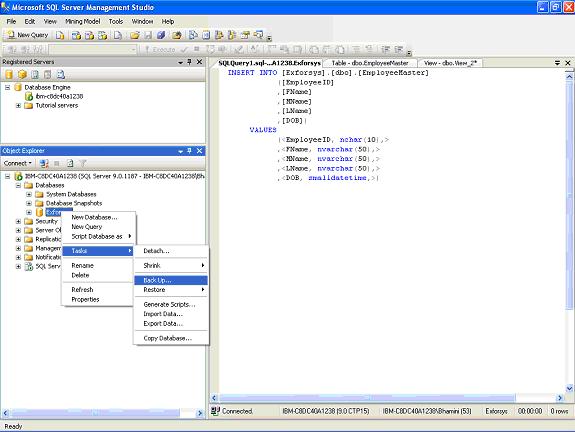
The following dialog box appears
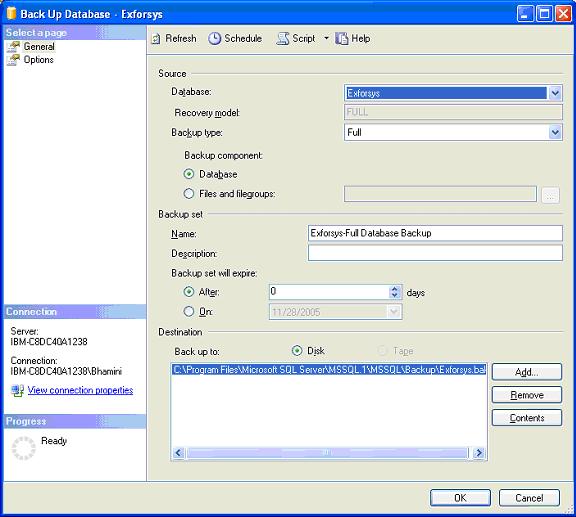
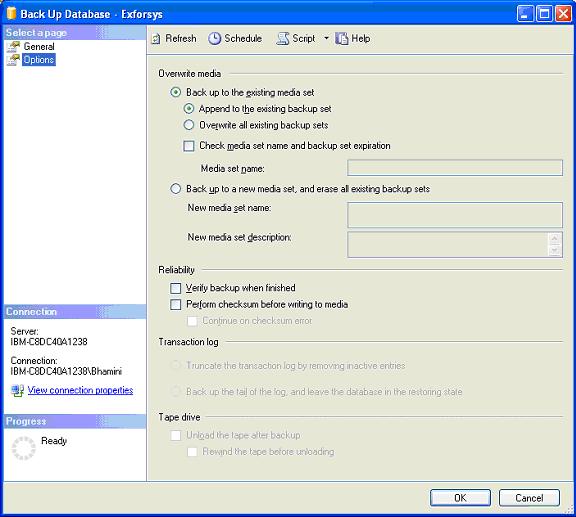
The Database is the name of the currently selected Analysis Services database. They type of recovery will have to be specified. A timestamp for expiry of the database will have to be specified. Finally the destination will have to be specified. Under options the user will have the option to overwrite on a media or append to an existing database file. He will also be able to set an option to check media set name and backup set expiration or backup into a new media set and erase all backup sets. He will set options for verifying the backup when the operation is complete and perform a checksum before writing to the media. He can maintain transaction logs and write to a tape media and unload the tape after writing. Once he has set the options he can create the backup by selecting OK.
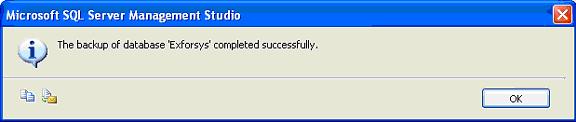
The backup is commenced and on completion, a message box is displayed as under signifying the success of the operation.
Ads

Click OK to exit the message box.

Till now we have examined in detail the SQL Server Management Studio and the various Administrative tasks that can be performed by the DBA using the interface.


This tutorial is part of a SQL Server 2005 Training tutorial series. Read it from the beginning and learn yourself.

SQL Server 2005 Training

  1. SQL Server 2005 - Configuring Replication
  2. SQL Server 2005 Replication Enhancements
  3. SQL Server 2005 - Mirror Server
  4. SQL Server 2005 - Introduction to Data Availability
  5. SQL Server 2005 - Backing up a Database
  6. SQL Server 2005 - Using Database Snapshots
  7. SQL Server 2005 - Disaster Recovery
  8. SQL Server 2005 - Managing Certificates
  9. SQL Server 2005 - Managing Permissions
  10. Managing SQL Server 2005 Security
  11. SQL Server 2005 - Using the Database Tuning Advisor
  12. SQL Server 2005 - Tuning a Database
  13. Maintain indexes in a SQL Server 2005 database
  14. SQL Server 2005 - Defining Indexes
  15. SQL Server 2005 - Database Backup
  16. SQL Server 2005 - Populating the Database
  17. SQL Server 2005 Configuration Manager
  18. SQL Server 2005 - Using the Sqlcmd Utility
  19. Using the SQL Management Objects
  20. Using SQL Sever Management Studio - Part 2
  21. Using SQL Sever Management Studio - Part 1
  22. SQL Server 2005 - Using Event Notifications
  23. SQL Server 2005 - Using DDL Triggers
  24. SQL Server Monitoring Tools - Server Profiler
  25. SQL Server 2005 - Testing Troubleshooting
  26. SQL Server 2005 - Upgrading from earlier versions of SQL Server
  27. SQL Server 2005 Installation - Maintenance Plan Without Using Wizard
  28. SQL Server 2005 - Unattended Installations
  29. SQL Server 2005 Installation - Maintenance Plan Using Wizard
  30. Installing a Second Copy of SQL Server 2005
  31. Planning to Install SQL Server 2005
  32. SQL Server 2005 Installation
  33. SQL server 2005 Editions
  34. SQL Server 2005 Architecture Overview
  35. SQL Server 2005 - Management studio interface Summary Page
  36. SQL Server 2005 - Server Groups
  37. SQL Server 2005 - Registered Servers
  38. SQL Server 2005 Administrative Tools
  39. Developing Client applications in SQL Server 2005
  40. SQL Server Management Objects
  41. NET CLR in SQL Server 2005
  42. Native HTTP Support in SQL Server 2005
  43. XML Data Types in SQL Server 2005
  44. Using XML in SQL Server 2005
  45. Using Notification Services in SQL Server 2005
  46. SQL Server 2005 - Service Broker
  47. Data Manipulation Language (DML) in SQL Server 2005
  48. T-SQL Enhancements in SQL Server 2005
  49. Security Features in SQL Server 2005 for the Developer
  50. SQL Server Architecture and Components
  51. SQL Server 2005 Management Studio
  52. Overview of SQL Server 2005 for the Database Developer
  53. Getting started with SQL Server 2005
 

Comments