
In this tutorial you will learn about Consuming and Manipulating Data Viz. Access and Manipulate SQL Server data – Using Ad Hoc Queries; Running Queries, The SELECT Statement, The INSERT Statement, The UPDATE Statement and The DELETE Statement.
Access and Manipulate SQL Server data – Using Ad Hoc Queries
Consuming and Manipulating Data
Modern day enterprises deal with online transaction processing databases that need to store huge volumes of data as well as carryout database operations such as UPDATE, ADD, and DELETE or retrieve data for viewing and decision making. The emergent need is to device a software that connects to the database and allows the user perform all these operations and more. Visual Basic.Net coupled with SQL server provides for a system that is dynamic and efficient. In this lesson we shall be studying how we can connect to SQL server and manipulate data.
Access and Manipulate SQL Server Data
The data stored in an SQL server becomes accessible if the data source is defined in the system or the user connects to the database using an application with a connection and object and a connect string. VB.NET, as we saw in the earlier lessons allows the user create statements dynamically and execute queries implicitly. In this section we shall use queries explicitly to manipulate data in the SQL Server database using the DataCommand object.
Before actually launching onto manipulation of data, the user must instantiate the SqlCommand.
Dim sqlCommand1 As New SqlCommand()
This object exposes the following method that can be used to query the database.
|
Methods |
Description |
|
BeginExecuteNonQuery |
Initates the asynchronous execution of the T-SQL statement or stored procedure. Usually used for execution commands such as SELECT, DELETE, UPDATE, and SETstatements. |
|
BeginExecuteReader |
Initiates the asynchronous execution of the Transact-SQL statement or stored procedure. This should receive one or more result sets from the Server. |
|
BeginExecuteXmlReader |
Initiates the asynchronous execution of the Transact-SQL statement or stored procedure |
|
ExecuteReader |
executes commands that return rows. |
|
ExecuteNonQuery |
Executes commands such as Transact-SQL INSERT, DELETE, UPDATE, and SET statements. |
|
ExecuteScalar |
Retrieves a single value (for example, an aggregate value) from a database. |
|
ExecuteXmlReader |
Builds an Xml Object. |
The DataReader object can also be used to access data. The dataReader is usually declared in Visual Basic using the following command:
Dim MyReader As New SqlDataReader.
The select statement is the simplest method of accessing data from the database. The user can direct the system to select the columns and display the data in the console.
VB.NET uses the classes contained in System.Data.SqlClient. These classes have to be referenced before they can be used. Let us understand how this is done by working out an example.
(a) Create a new windows application in Visual Basic 2005 Express.
(b) Double click on the Form1(design) to go to the codes page.
(c) Import the Namespace System.Data.SqlClient, using the following statement.
Imports System.Data.SqlClient
(d) Define a ConnectString that the Connection Object will use to establish the connection with the database. The value for the ConnectString will specify the server, initial database and the type of database connection and the UserName and the password.(see code below).
(e) Define a query which is a string variable.
(f) Add some query that will be returning rows from the database.
(g) Define a datacommand, SqlCommand object whose constructor will take two parameters viz., the query and the connection object.
(h) At this stage the connection is established and available.
(i) Use the SqlDataReader to retrieve the data and write to console.
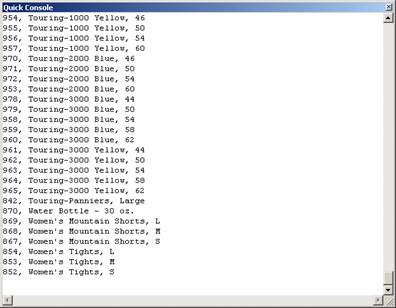
The following code shows the implementation of the data access using the SELECT statement to retrieve and display data on the console
Click here to view sample code
The data output extracted is shown below:
The INSERT Statement
The insert statement is used to add new data rows to the table. Create the SqlAdapter object as above. Now call the ExecuteNonQuery method of the SqlAdapter. This method executes queries in instances where the query statement is either an insert, update or a Delete method.
Let us understand how to insert data by working out an example.
1. Start a new windows application and to the form Form1
2. Add one label and one TextBox and two buttons.
3. Add the codes as in the case of previous demo.
4. The method InsertData will have two arguments, one for the connect string and the other for the ProductCategory name.
5. Add an insert data command.
The final code will look like the screenshot below:
Click here to veiw sample code
{mospagebreak}
.
.
Now press F5 to execute the program. You will see the form like the screenshot below:

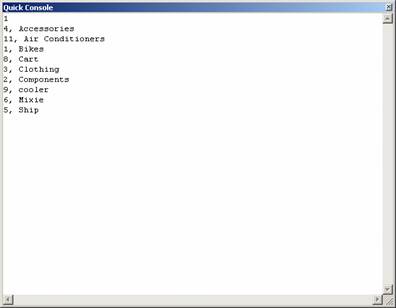
Enter a product category and press Insert. The console window will appear and show all the products including the one just inserted. The display will be like the one in the screenshot below.
The UPDATE Statement
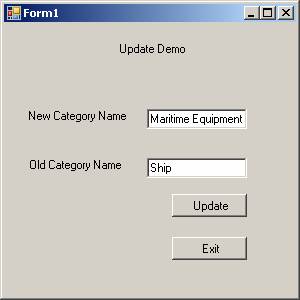
UPDATES may be required whenever an user commits an error or wishes to enter data in a field where data was omitted to be entered or wishes to merely change the value of a field. Let us assume that the value “ship” was wrongly entered in place of “Maritime Equipments”. Now the user wishes to update this field with the correct information. Let us work out this example and learn how we can do this.
1. Create a Windows Application in the Visual Basic Express Beta 2.
2. Add Three labels, two TextBoxes and two Command buttons.
The window will look like the screenshot shown below:
To update the field the user will create a code as below:
Click here to view sample code
Note that this code is similar to the code we wrote for INSERT. The difference being that we use the UPDATE command instead of the INSERT command in the code.
|
Caution: Please note that using a column like name which can contain duplicates will cause more rows than you originally intended to be deleted or updated. |
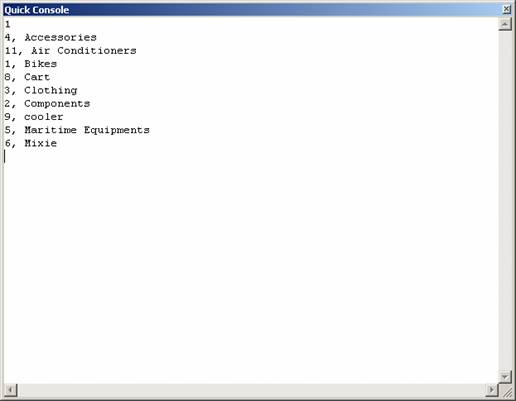
The output for the program in the Quick Console is shown below. Please note that ProductCategory Name for ID No: 5, has been changed to Maritime Equipments.
The DELETE Statement
Sometimes data entry errors can occur due to entry of duplicate values or completely wrong entries. The user will need to delete such entries. The DELETE command is used for this purpose. In the illustration above, we added Maritime Equipments as a product category. Now we find that we do not need this category. We shall use the DELETE statement to delete the category. However, it should be noted that if there are other constraints it may be difficult to delete a particular item, row or column.
-
Create a new Windows Application in Visual Basic Express 2005 Beta2 IDE and
-
Add two labels, a TextBox and two Command Buttons as shown below:

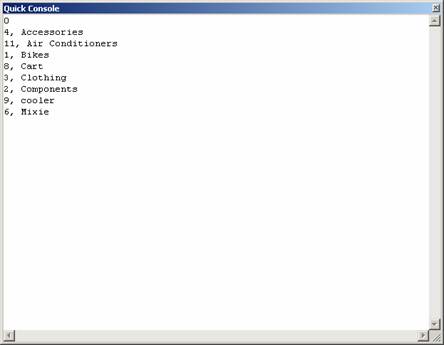
The user will have to replace the UPDATE statement of the previous code with the DELETE statement in the code. Now press F5 to execute the program. In the window that pops up, enter the category name that you want to delete. Please note that using a column like name which can contain duplicates, will cause more rows than you originally intended, to be deleted or updated. The Quick Console will show that the row has been deleted:
|
Tip: Before proceeding any further new users to VB.NET may bear in mind that Namespaces especially SystemData are not referenced by default. The user must add reference to these namespaces in order to avoid errors. The examples in this tutorial are based on ADVENTUREWORKS_DATA.mdf. This can be downloaded from Microsoft.com. If the user wishes to use any other database he can do so by changing the connect string value and also modify the SQL queries in accordance with his needs. |
The SELECT Statement
[catlist id=175].