
Creating Multiple-Document Interface (MDI) Applications
In this tutorial you will learn about Creating Multiple Document Interface (MDI) Applications.
Creating Multiple-Document Interface (MDI) Applications
In most real time applications we often find that multiple windows open within another window. This kind of need is satisfied by implementing Multiple Document Interface (MDI) Applications. You can create a class and designate it as a MDI window by setting its IsMDIContainer Property as true. Set the value for WindowState as maximized. This can be done by editing the property sheet. You will see that the color of the form changes as can be easily seen on the screenshot below:
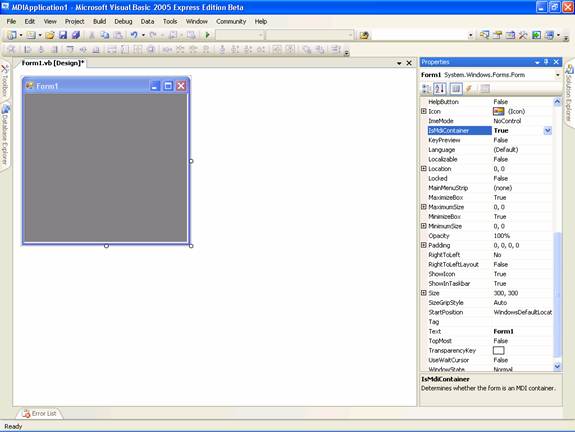
1. You can add two more forms to this project as Child1 and Child2.
2. Now add menu strip from the tool bar and add three main menus namely Form1, Form2 and Exit.
3. In the click event of each of the menus options type the code as given below.
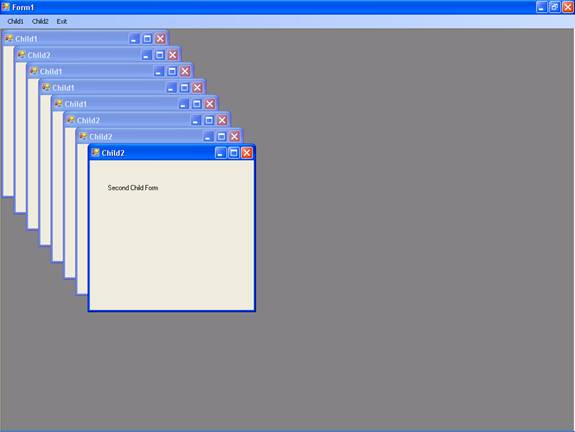
Now press F5 to execute the program. You will be seeing a maximized window. Click on the menu options and check out the application. The following screenshot shows multiple windows opened within the parent window.
In this lesson we have examined the various controls that can be used in a VB.NET application. We have seen how their properties can be set at design time or manipulated at runtime. In the next lesson we shall see how we can handle Exceptions that may occur when mistakes are made by the user or the application seizes up due to the occurrence of an abnormal event.
[catlist id=175].