
Exforsys

VB.NET 2005

  1. VB.NET 2005 Free Training
  2. The .NET Framework Architecture Part 1
  3. The .NET Framework Architecture Part 2
  4. Application Class and Message Class
  5. Implementing Class Library Object
  6. Visual Studio.NET Namespaces
  7. .NET Assemblies
  8. Differences between VB.NET 1.0 and VB.NET 2.0
  9. Introducing VB.NET Windows Forms
  10. Visual Studio Windows Forms Designer
  11. Exploring the Forms Designer generated code
  12. Setting and Adding Properties to Windows Form
  13. Implementing Inheritance
  14. Event Handling In Visual Basic .NET
  15. Building Graphical Interface elements
  16. .NET Common Windows Forms Controls Part 1
  17. .NET Common Windows Forms Controls Part 2
  18. Common Controls and Handling Control Events
  19. DomainUpDown and NumericUpDown Controls
  20. Dialog Boxes in Visual Basic .NET
  21. Visual Studio Adding Controls to Windows Form
  22. VB.NET Validation Controls
  23. Working with Menu Controls
  24. VB.NET MDI Applications
  25. .NET Exceptions
  26. VB.NET Creating and Managing Components Part 1
  27. VB.NET Creating and Managing Components Part 2
  28. Simple Data Binding
  29. .NET Complex Data Binding
  30. .NET Data Form Wizard
  31. Data Manipulation with ADO.NET
  32. SQL Server Stored Procedures
  33. SQL Server Ad Hoc Queries
  34. Finding and Sorting Data in DataSets
  35. ADO.NET Object Model
  36. Working with DataSets
  37. Using XML Data
  38. Working with File System in .NET
  39. Creating Web Service
  40. Instantiating - Invoking Web Services, Creating Proxy Classes with WSDL
  41. Web Reference and Web Services
  42. Web Services - SOAP, WSDL, Disco and UDDI
  43. Web Application Testing in VB.NET 2005
  44. Web Application Tracing and Debugging
  45. Working with Legacy Code and COM Components
  46. ActiveX Controls and Legacy Code
  47. Windows Application Testing
  48. VB.NET Windows Application Testing
  49. Tracing VB.NET Windows Application
  50. Debugging Windows Applications In Visual Studio.NET 2005
  51. Deploying Windows Applications In Visual Studio.NET 2005
  52. Customizing Setup Project in Visual Studio.NET 2005
  53. Shared Assembly
  54. Microsoft .NET Creating Installation Components
  55. The Registry Editor in Visual Studio.NET 2005
  56. The File Types Editor

Ads


Home arrow Technical Training arrow VB.NET 2005

Creating Web Service

Author : Exforsys Inc.     Published on: 16th Jul 2005    |   Last Updated on: 24th Dec 2007

Creating Web Service Project

In this tutorial you will learn about Creating a Web Service Project.

Ads

Creating Web Services

Creating a Web Service Project

Purpose: To create an XML Web service project and thereby separate the functionality of the web service from the web site:

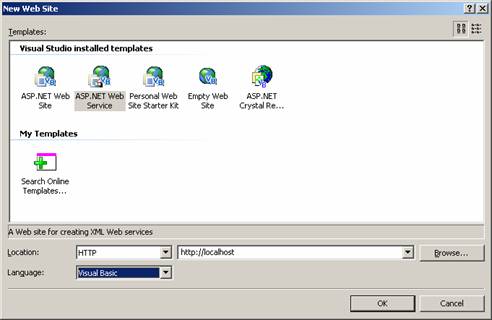
1. On the File menu, point to New, and then click Web Site.

2. In the New Web Site dialog box, select the ASP.NET Web Service icon.

3. Enter the address of the Web server on which you will develop the XML Web service. Use http//localhost to create the new site as shown in the screenshot below:
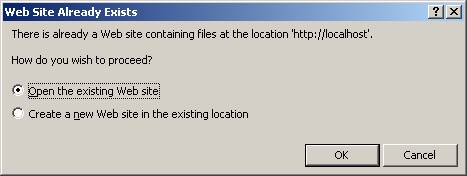
If the web service project is being created within an already existing website then the user will be prompted to confirm whether the files at the location will have to be overwritten. Since our project is new, this dialog will not appear on our example.
If your web site is not configured for asp.net 2.0 then the user will have one more dialog like the one shown below:
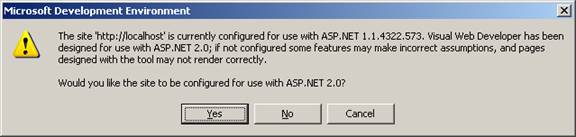
The user may choose yes in both cases or make a decision based on facts. For the current project the user will click YES.

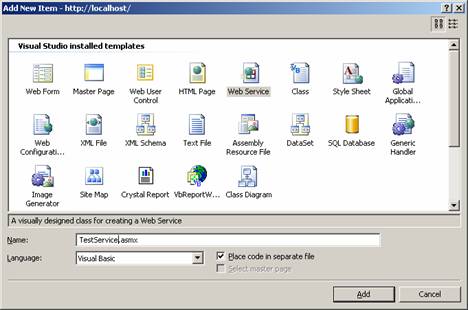
Visual Studio automatically creates the necessary files and references to support an XML Web services. Right click on the solution in the solution explorer and choose new item on the context menu. In the dialog box that appears choose WebService. This shown below:
The Web service is created and the code for this is given below:

WebService Language="VB" CodeBehind="~/Application_Code/TestService.vb" Class="TestService" % >

The CodeBehind file that contains the codes for the Web Service is automatically created by the Visual Studio. The codes generated are given below:


Click here to view sample code

Public methods codes can be added to methods within the Web service class to expose the functionality of some activity to other applications.

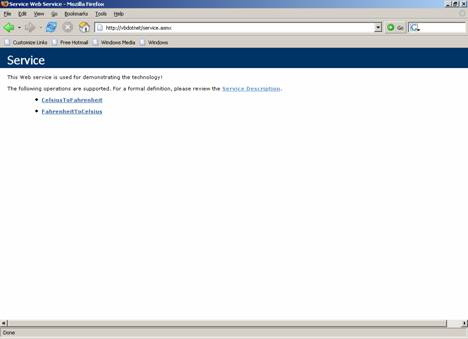
Once this is done the Web service has been successfully created and the user can browse the URL. The screenshot below will appear on the user’s computer monitor.
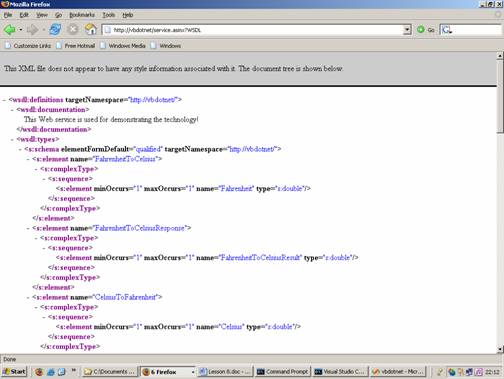
The description of the service will be as under:
Ads

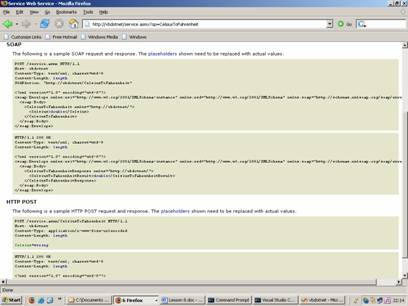
The SOAP request and post information is shown below:


This tutorial is part of a VB.NET 2005 tutorial series. Read it from the beginning and learn yourself.

VB.NET 2005

  1. VB.NET 2005 Free Training
  2. The .NET Framework Architecture Part 1
  3. The .NET Framework Architecture Part 2
  4. Application Class and Message Class
  5. Implementing Class Library Object
  6. Visual Studio.NET Namespaces
  7. .NET Assemblies
  8. Differences between VB.NET 1.0 and VB.NET 2.0
  9. Introducing VB.NET Windows Forms
  10. Visual Studio Windows Forms Designer
  11. Exploring the Forms Designer generated code
  12. Setting and Adding Properties to Windows Form
  13. Implementing Inheritance
  14. Event Handling In Visual Basic .NET
  15. Building Graphical Interface elements
  16. .NET Common Windows Forms Controls Part 1
  17. .NET Common Windows Forms Controls Part 2
  18. Common Controls and Handling Control Events
  19. DomainUpDown and NumericUpDown Controls
  20. Dialog Boxes in Visual Basic .NET
  21. Visual Studio Adding Controls to Windows Form
  22. VB.NET Validation Controls
  23. Working with Menu Controls
  24. VB.NET MDI Applications
  25. .NET Exceptions
  26. VB.NET Creating and Managing Components Part 1
  27. VB.NET Creating and Managing Components Part 2
  28. Simple Data Binding
  29. .NET Complex Data Binding
  30. .NET Data Form Wizard
  31. Data Manipulation with ADO.NET
  32. SQL Server Stored Procedures
  33. SQL Server Ad Hoc Queries
  34. Finding and Sorting Data in DataSets
  35. ADO.NET Object Model
  36. Working with DataSets
  37. Using XML Data
  38. Working with File System in .NET
  39. Creating Web Service
  40. Instantiating - Invoking Web Services, Creating Proxy Classes with WSDL
  41. Web Reference and Web Services
  42. Web Services - SOAP, WSDL, Disco and UDDI
  43. Web Application Testing in VB.NET 2005
  44. Web Application Tracing and Debugging
  45. Working with Legacy Code and COM Components
  46. ActiveX Controls and Legacy Code
  47. Windows Application Testing
  48. VB.NET Windows Application Testing
  49. Tracing VB.NET Windows Application
  50. Debugging Windows Applications In Visual Studio.NET 2005
  51. Deploying Windows Applications In Visual Studio.NET 2005
  52. Customizing Setup Project in Visual Studio.NET 2005
  53. Shared Assembly
  54. Microsoft .NET Creating Installation Components
  55. The Registry Editor in Visual Studio.NET 2005
  56. The File Types Editor
 

Comments