
VB.NET 2005 Tutorials
Deploying Windows Applications
In this tutorial you will learn how to Deploy a Windows-based Application, Create a Setup Project, Configuring Deployment Properties, Customizing a Setup Project, File System Editor, The Registry Editor, The File Types Editor, The User Interface Editor, The Custom Actions Editor and The Launch Conditions Editor
A number of different methodologies for deploying Windows based applications have been available since the first version of Visual Basic. In this lesson we shall briefly discuss the different technologies available and the evolution of this technology leading up to the creation of ClickOnce.
Windows Forms have traditionally been deployed in two ways—using the XCOPY deployment or the Windows installer.
XCOPY deployment describes an ideal deployment scenario that enables the copying of an entire directory structure to a computer on which the program is to be run. However, the current windows applications cannot be deployed in this manner as the installation process is a multi-step one. For instance applications using COM will have to copy the component to the user machine, register it, create dependencies between the component and the registry and then activate it.
Even simple applications would require other dependencies to be defined. The CLR, which tries to overcome the problem of coupling the registry with the component, has not completely eliminated the issue of multi-step deployment. Runtime issues, such as what files are required at runtime, also retard the achievement of the ideal.
The Windows Installer service, introduced as part of the Windows 2000 addressed some of the problems of existing installation programs. It is freely available to all Win9X and NT 4 platforms and is automatically installed with a number of Microsoft applications.
It is an Operating system component that implements all the required rules of setup and creates a file called a Windows installer package file(.msi). It divides the application in terms of the product to be installed, the feature (a unit of the product) to be installed and the component to be installed. This installer can be a single file or multiple files belonging together logically. The Windows Installer package file contains a list of actions and rules that need to be applied to these actions.
The implementation rules are not a part of this package. It also provides a rich API that can be used by developers to include features (eg. On demand installing) into their applications. A drawback of the Windows installer is that installation failure leaves the user system in an unstable condition. To circumvent this problem, the Windows installer provides a rollback option which rollbacks the system to its original state. Hence the Windows installer installation is referred to as transactional.
Visual Studio Installer(VSI) was an add on to the Visual Studio 6. VS.NET provided a set of project templates that helped the user set up the application and deploy it. The setup of the application involved creation of a process that would package up the application and define the mechanics by which the application can be deployed in another machine. Deployment of the application would imply the installation process on another machine.
{mospagebreak}
Creating a Setup Project
Visual Studio .NET comes bundled with five types of project templates that can be set up and used to deploy .NET applications. These project templates can be accessed in the same way that any other project in Visual Studio .NET is accessed, by using the File | New Project dialog box.
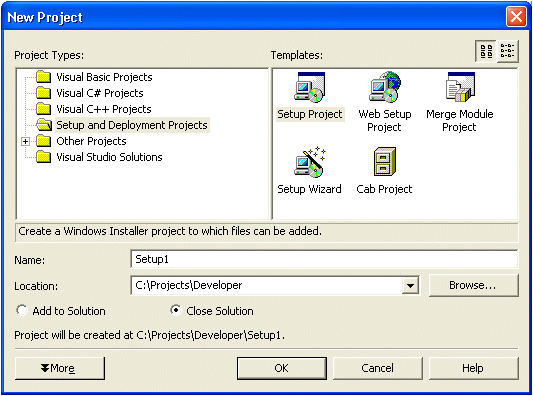
Figure 1 Set up and Deployment of applications in Visual Studio.NET
A standard Windows installer setup for a visual studio.NET application can be invoked with Setup Project template. The Web project template helps in setting up aWeb template while merge module template helps in packaging up an application based on Windows Installer technology. The set up wizard template guides the user through the process of creating any one of the other setup and deployment project templates. The Cab project template is used to create a cabinet file which may contain a number of files but no installation logic. It helps in packaging a number of files into a single file for ease of download.
Configuring Deployment Properties
Once an application is created, its deployment related properties can be configured. To configure, the user has to right click the FormattingApplicationSetup project from the Solution Explorer and select properties and then selecting Build. The configuration manager dialog box, then, helps the user change the Active solution configuration setting from Debug to Release for both projects to create a release build.
By setting the configuration settings to Release, a release build can be created that can be installed onto the end user’s computer. By default the debugging information is included as part of the debug project. This has to be changed to Release to optimize the project output.
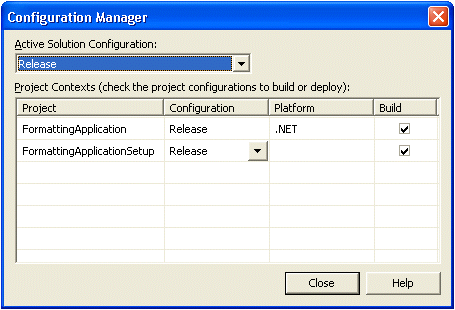
Figure 2: Configuration Manager Dialog Box after Modification
The project files can now be packaged into loose compressed files, setup files or cabinet files. If all the files have to be compressed into a single MSI file the option In Setup file has to be selected. The bootstraper property has to be configured by setting it to BootStrapper. This is a program that will be executed before the application is run. The Bootstrapper program does not get bundled with the MSI and provision needs to be made for download over the Web or any other means. The Widows installer version 1.5 will have to be present on the target computer for Visual Studio.Net installer created application. This installer was bundled into the Windows XP operating system, but with earlier systems it had to be specifically installed and bundled with the installer. This increases the size of the installation program. The Compression property also has to be set to optimize the speed of installation.
Configuring Project Properties
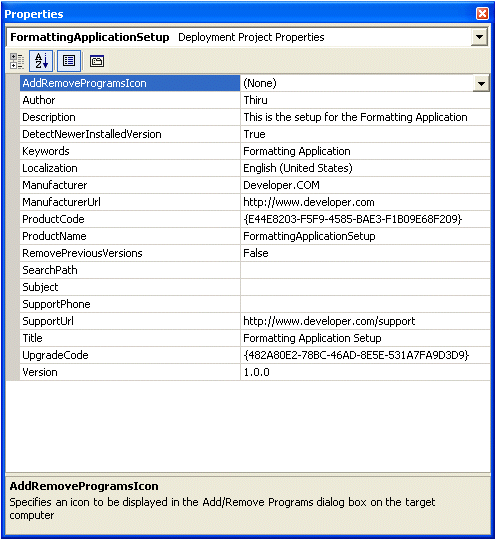
Certain deployment specific properties have to be set at a global level. These properties can be accessed through the properties window. The Add/Remove Programs icon settings, the Author settings, installation description settings, the keyword settings, the Detect newer installed version settings, remove previous versions settings, Manufacturer settings and so on will have to be specified.
(Sample screenshot from older version)
Figure 3. FormattingApplicationSetup Properties Window After Configuration
[catlist id=175].