
Finding and Sorting Data in DataSets
In this tutorial you will learn about Finding and Sorting Data in DataSets – Filtering on Row State and Version, Sorting and Data View Manager.
Finding and Sorting Data in DataSets
Using the table’s Select method or the RowFilter property of a data view, the user can filter records in a data table to make available only the required records. This is useful when the user wants to work with different subsets of the records in a dataset table. To specify filter criteria, the user can use the same expression syntax used to create column expressions. The filter expression is evaluated as a Boolean expression; if the expression returns true, the record is included. A filter expression might look like the following:
Price > 10.00
Filtering on Row State and Version
A dataset can maintain different versions of records in tables. When records are first filled in, the dataset contains the original version of the record. If record is changed, the dataset maintains a different version — the current version — that reflects the changes. A property on the record indicates whether the record is unmodified, updated, new, or deleted
A common use for filters is to specify only the current versions of records in the data table. If records have been changed, there are two versions of a record–the current version reflecting the change and the original version representing the record before any changes were made. Records are also flagged according to their status: new, unchanged, deleted, or modified. A deleted record, for example, still exists in the data table, but its row-state flag has been set to deleted.
Sorting
Sorting is similar to filtering, in that you specify a sort expression. A typical sort expression is simply the name of the column to sort by. For example, to sort by the OrderDate column, the user msut specify the sort expression OrderDate. However, the user can sort by the value of any expression, including calculated values. If table’s Select method is called, the sort expression is passed as a parameter. If DataViews are being used, the sort expression is to be specified as the value of the view’s Sort property.
Data View Manager
Individual DataViews can be defined to sort or filter the data in each DataSet table. If the DataSet contains multiple tables, an alternative is to create a DataView manager (a DataViewManager object). The DataView manager works something like a dataset-wide data view. It provides a single object that manages a collection of DataViews, each of which is associated with a specific table in a dataset. To use a DataView manager, the user must create and configure it in code. There is no design-time object that can be added to a form or component. This means that controls are bound to the DataView manager in code, as there is no design-time component to bind them to.
The following project will illustrate the filtering and sorting of the data.
1. Create a new Windows application project.
2. Add three labels, one DataGridView, one ComboBox and a button to the Form
3. And arrange them as shown in the screenshot below
4. Now go to the codes page and add the following codes.
Click here to veiw sample code
1. Create a SqlConnection object whose constructor will take the connectString as the parameter.
2. Create SqlDataAdapter whose constructor will take the SqlStatement and the connection object as parameters.
3. Instantiating a DataSet and a DataView.
4. Call the fill method of the SqlDataAdapter and fill the DataSet.
5. Create a view.
6. To the ComboBox add the name of the table columns are to be sorted on.
7. Instantiate a DataView object that will be based on the DataSet table
8. Call the sort method of dataview from within the EventHandler of ComboBox selectedIndexChanged.
9. Press F5 to execute the code.
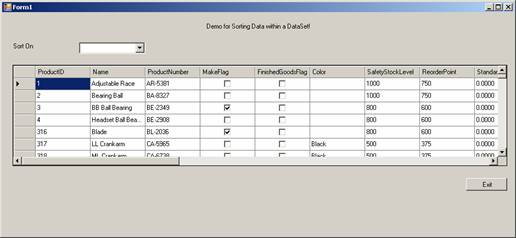
10. The program allows the user change the sort order just by choosing the fields in the combo box. The screenshots of the program is given below.
The DataGridView before Sorting:
The DataGridView after sorting on Name:

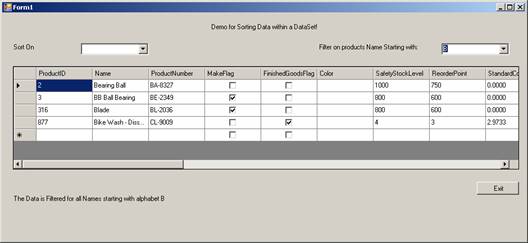
In the same way table data can be filtered. In this case all the instructions given for the above case holds good. The only change is in the EventHandler for the ComboBox. Instead of writing code for sorting, the activity for filtering will be defined. The Additional lines of code for this demo is given below:
Private Sub ComboBox2_SelectedIndexChanged(ByVal sender As System.Object, ByVal e As System.EventArgs) Handles ComboBox2.SelectedIndexChanged
Dim filtStr As String
filtStr = Me.ComboBox2.Text
Label3.Text = "The Data is Filtered for all Names starting with alphabet " & filtStr
dv.RowFilter = "Name like ‘" & filtStr & "*’"
End Sub
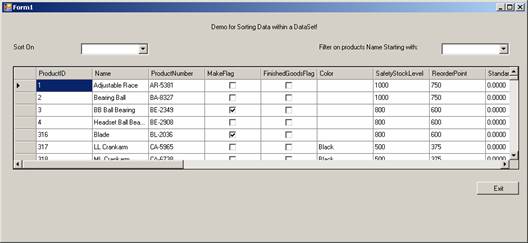
Now press F5 to execute the program. The screenshot given below shows the initial Screen.
The Screenshot Below shows the Screen With filtered data:
[catlist id=175].