
Technical Training
VB.NET 2005Instantiating - Invoking Web Services, Creating Proxy Classes with WSDL
Instantiating - Invoking Web Services, Creating Proxy Classes with WSDL
In this tutorial you will learn about Discovering Web Services, Instantiating and Invoking Web Services, Creating Proxy Classes with the Web Services Description Language Tool (wsdl.exe)
VB.NET 2005 Tutorials: Instantiating - Invoking Web Services, and Creating Proxy Classes with WSDL
Using the Web Services Discovery Tool (disco.exe)
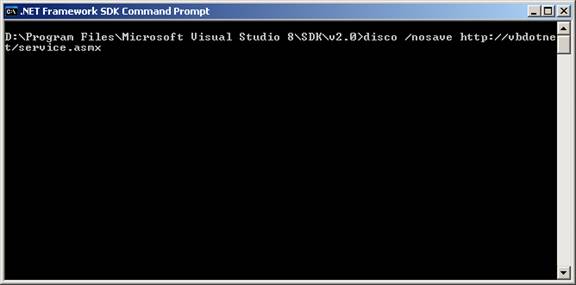
Now that we have created a web service, we will use the disco.exe tool to discover it. To direct the tool to locate the service the syntax to be used is as under. This command has to be entered in the .NET framework command prompt.
disco /nosave http:vbdotnet/service.asmx
The output is also generated on to this screen.
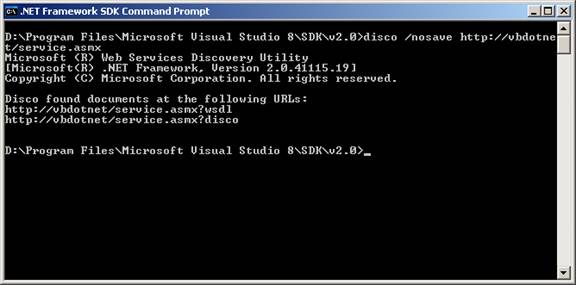
The results can be saved to a directory on the user’s computer. The process of saving is illustrated below.
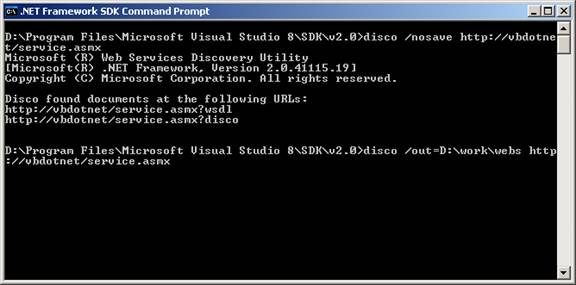
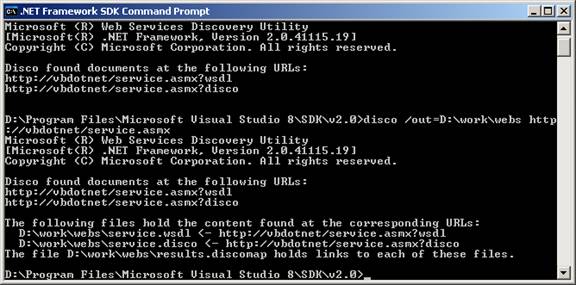
The result produced is shown below:
Instantiating and Invoking Web Services
Creating Proxy Classes with the Web Services Description Language Tool (wsdl.exe)
The .NET Framework provides wsdl.exe tool to parse Web service descriptions and generate proxy classes, which can be used by a consumer to call methods on a Web service. The out put generated can be of any of the forms given below:
.wsdl files
.xsd files
.disco files
.discomap files.
Note that the outputs are generated by disco tool. Both disco.exe and wsdl.exe are located in the same place. Just like the disco tool, wsdl.exe is also a command line application. The format for the command is given below:
Wsdl [options] {URL | Path }
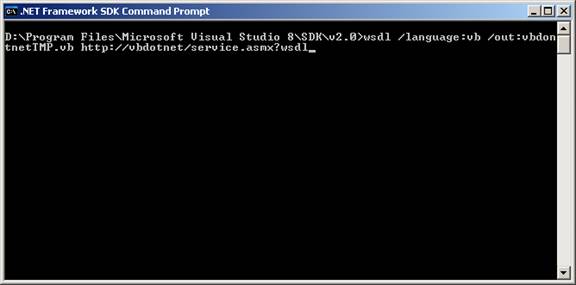
The application responds by writing to the disc file and the result is shown below:
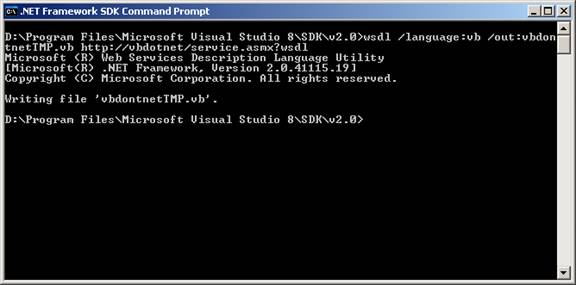
The lines of code generated by the console application wsdl.exe are given below:
VB.NET 2005
- VB.NET 2005 Free Training
- The .NET Framework Architecture Part 1
- The .NET Framework Architecture Part 2
- Application Class and Message Class
- Implementing Class Library Object
- Visual Studio.NET Namespaces
- .NET Assemblies
- Differences between VB.NET 1.0 and VB.NET 2.0
- Introducing VB.NET Windows Forms
- Visual Studio Windows Forms Designer
- Exploring the Forms Designer generated code
- Setting and Adding Properties to Windows Form
- Implementing Inheritance
- Event Handling In Visual Basic .NET
- Building Graphical Interface elements
- .NET Common Windows Forms Controls Part 1
- .NET Common Windows Forms Controls Part 2
- Common Controls and Handling Control Events
- DomainUpDown and NumericUpDown Controls
- Dialog Boxes in Visual Basic .NET
- Visual Studio Adding Controls to Windows Form
- VB.NET Validation Controls
- Working with Menu Controls
- VB.NET MDI Applications
- .NET Exceptions
- VB.NET Creating and Managing Components Part 1
- VB.NET Creating and Managing Components Part 2
- Simple Data Binding
- .NET Complex Data Binding
- .NET Data Form Wizard
- Data Manipulation with ADO.NET
- SQL Server Stored Procedures
- SQL Server Ad Hoc Queries
- Finding and Sorting Data in DataSets
- ADO.NET Object Model
- Working with DataSets
- Using XML Data
- Working with File System in .NET
- Creating Web Service
- Instantiating - Invoking Web Services, Creating Proxy Classes with WSDL
- Web Reference and Web Services
- Web Services - SOAP, WSDL, Disco and UDDI
- Web Application Testing in VB.NET 2005
- Web Application Tracing and Debugging
- Working with Legacy Code and COM Components
- ActiveX Controls and Legacy Code
- Windows Application Testing
- VB.NET Windows Application Testing
- Tracing VB.NET Windows Application
- Debugging Windows Applications In Visual Studio.NET 2005
- Deploying Windows Applications In Visual Studio.NET 2005
- Customizing Setup Project in Visual Studio.NET 2005
- Shared Assembly
- Microsoft .NET Creating Installation Components
- The Registry Editor in Visual Studio.NET 2005
- The File Types Editor


