
In this tutorial you will learn about Complex Data Binding, Binding to a ComboBox or ListBox, Binding to a DataGrid.
Complex Data Binding
Complex data binding is the ability of a control to bind to more than one data element, typically more than one record in a database, or to more than one of any other type of bindable data elements. Examples of controls that support complex binding are the DataGridView, ListBox, and ErrorProvider controls.
Binding to a ComboBox or ListBox
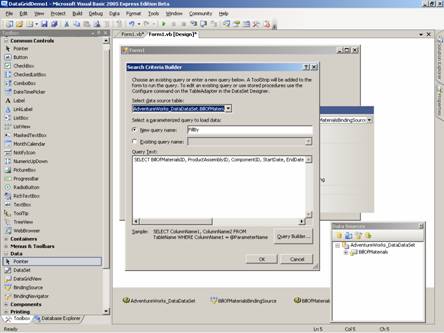
In this section let us create a complex binding by using a ComboBox and a ListBox. As in the preceding section the user must add a database connection to the project and to generate DataSets. Then he must proceed to create a new Windows Application Project by name ComplexDataBindingDemo. After creating the Data Connection to the SQLServer Database, from the ToolBox, he must drag and drop a DataGrid control and a list box on the form Form1. At this point the user’s window should look like the following screenshot:
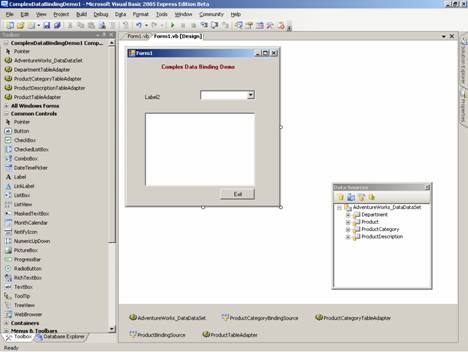
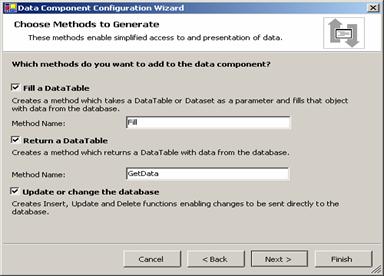
Here also the user will have to go through all the steps involved to set up the data providers and also bind them to the control. After doing this the user will have to set the value to the DataSource property of the controls to the data set. Now in some controls like ListBox and ComboBoxes the user will come across two properties viz, display member and value member. In a typical situation he will be needing the descriptive value of the column to be displayed while the use of the values like ProductId etc need to be passed as values to further queries. The user will have to set these values also.
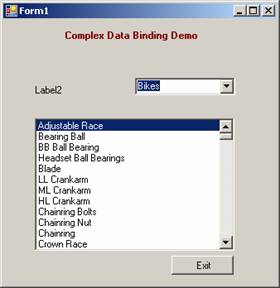
The following screenshots will show the output for ComplexBinding using a combo box, list box and a DataGrid.
Binding to a DataGrid
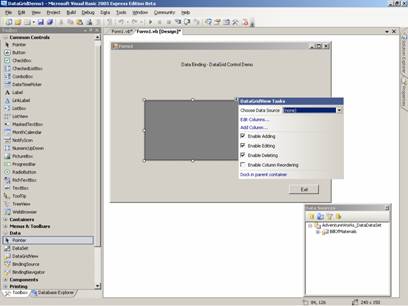
A DataGrid is a very useful Control. A number of improvements have been made to this control in .NET Framework 2005. Binding Data to DataGrid is simple. As a first step, The user has to set the value for the property Advanced Binding and DataSource.
1. Create a new project in Visual Studio and add a label, a button and a grid control.
2. Set the value for text property of the Label and that of the button as Exit.
3. Write code to close the form.
4. Drag and drop one DataGrid on the form from the ToolBox.
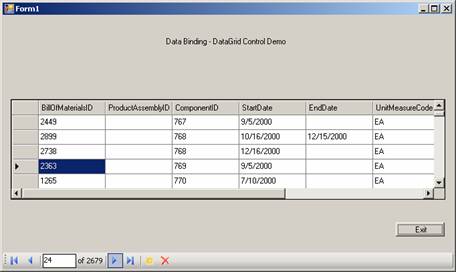
5. Set the value of the propery Datasource as the DataSet.DataTable. The user can do the property editing also using SmartTags.
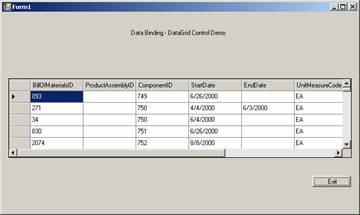
The following screenshot shows the final appearance of the DataGrid
{mospagebreak}
.
.
.
One-Way and Two-Way Data Binding
All that we have done, so far, is to ensure that the data in a database is retrieved and displayed to us using any of the Forms Controls. It is clear that some controls can take user input while others are prevented from taking user input. It is also evident that some controls provide dynamic views while others display only static views based on a snapshot of data.
This brings us to the next concept that needs to be understood. Binding allows data update depending on the type of control used. Bindings that do not allow the user to update the database that provided the user with the data are called One-Way Binding and the type of binding that allows the user to update the underlying database are called Two-Way Binding.
Two way bindings are available in all cases where the data source can be updated and the control has the capacity to display updated data. The user, however, has the option to prevent this by editing the properties of the control.
Closely allied to the concept of two way binding is the concept of System.DataSet. This concept was introduced in Visual Basic.NET to present a XML schema that is aware of the rowstate property. The rowstate property gets or sets the value of the rows so as to track changes to the row.
The System.Data.Common.DataAdapter’s Update method examines the System.Data.DataRow.RowState property, and executes the required INSERT, UPDATE, or DELETE statements iteratively for each row, based on the order of the indexes configured in the System.Data.DataSet. For example, System.Data.Common.DataAdapter.Update might execute a DELETE statement, followed by an INSERT statement, and then another DELETE statement, due to the ordering of the rows in the System.Data.DataTable. Let us see the code fragment for this
It should be noted that these statements are not executed as a batch process; each row is updated individually. This could raise some exceptions which the users will have to handle separately.
The BindingContext and CurrencyManager Classes
Binding controls on a form to the ADO.NET DataSet and providing navigation services that keep all controls in sync is accomplished through the use of two objects known as the CurrencyManager and the BindingContext. For each data-bound form that the user creates in the application, the user will have at least one BindingContext object. This object will be responsible for any CurrencyManager objects. The user will have one CurrencyManager object for each data source on the user’s form. The CurrencyManager object is responsible for keeping track of the user’s position in the DataSet and for the overall supervision of the bindings to the data source. The user will call the necessary methods on the CurrencyManager object to navigate through the records, and the BindingContext ensures that all bound controls are kept in sync. The DataNavigator control used in this application provides that functionality in an easier-to-use form.
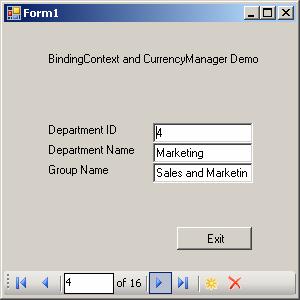
The use of binding context can be illustrated by the following example where three text boxes are bound to three columns of the same table. While navigating, the synchronization of the three columns is made possible by BindingContext.
[catlist id=175].